The best DJ controllers pair hands-on mixing with a layout and software setup that fit the way you play. I rank the Pioneer DJ DDJ-FLX4 as the best overall pick for its approachable, flexible two-channel setup; the Pioneer DJ DDJ-FLX10 stands out for advanced laptop-based performance, while the Denon DJ SC LIVE 4 suits DJs who want standalone four-deck play. The main tradeoffs are portability versus larger controls, simple two-channel layouts versus room to grow, and laptop dependence versus standalone operation. This roundup compares those differences across 13 options, including compact, beginner-focused, and bundle versions. Read on for the full breakdown and help matching a controller to your setup.

Get kitchen gear delivered free with Prime
- Fast, free delivery on millions of items
- Prime Video, Amazon Music and more included
- Member-only deals all year
Complete the kit


Key Takeaways
- The DDJ-FLX4 earns the best-overall position because its two-channel format balances approachable controls and room for varied laptop-based setups without the complexity of a four-channel deck.
- The DDJ-FLX10 and SC LIVE 4 serve different advanced needs: the former is a feature-rich laptop controller, while the latter is a standalone system that reduces dependence on a computer.
- Beginner picks are not interchangeable: the Hercules DJControl Inpulse 200 MK3 emphasizes learning support, while the Numark Party Mix III prioritizes an uncomplicated, light-equipped entry point.
- Compact and portable models trade control space and expansion options for easier transport; the MixTrack Go and DDJ-FLX2 are better fits for mobility than for a fixed, elaborate performance setup.
- Several listings are variations rather than distinct controller platforms: the FLX4 bundle adds a carrying case, and the white FLX4 changes the finish, so buyers should compare included extras and appearance rather than expect a different workflow.
| Pioneer DJ DDJ-FLX4 2-Channel DJ Controller |  | Best Overall for Beginners | Channels: 2 | Performance pads: 16 | Connectivity: USB, Bluetooth | VIEW ON AMAZON | See Our Full Breakdown |
| AlphaTheta Pioneer DJ DDJ-FLX2 2-Channel DJ Controller |  | Best Compact Pick | Channels: 2 | Connectivity: USB-C | Supported software: rekordbox, djay, Serato DJ Lite | VIEW ON AMAZON | See Our Full Breakdown |
| Hercules DJControl Inpulse 200 MK3 2-Deck DJ Controller |  | Best for Guided Learning | Channels: 2 | Decks: 2 | Performance pads: 8 | VIEW ON AMAZON | See Our Full Breakdown |
| Pioneer DJ DDJ-REV1 2-Deck Serato DJ Controller |  | Best for Scratching and Open-Format DJing | Channels: 2 | Connectivity: USB, auxiliary | Compatible devices: PC/Mac | VIEW ON AMAZON | See Our Full Breakdown |
| AlphaTheta DDJ-GRV6 4-Channel DJ Controller | 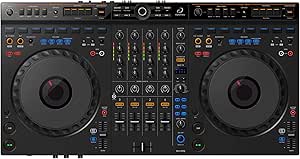 | Best for Four-Deck Mixing | Channels: 4 | Connectivity: Auxiliary, USB | Connectors: TRS, USB | VIEW ON AMAZON | See Our Full Breakdown |
| Pioneer DJ DDJ-FLX10 4-Channel DJ Controller |  | Best for Live Mashups | Brand: Pioneer DJ | Channels: 4 | Compatible software: rekordbox, Serato DJ Pro | VIEW ON AMAZON | See Our Full Breakdown |
| Hercules DJControl T10 DJ Controller |  | Best for Motorized-Platter Scratching | Channels: 4 | Platter size: 10 inches | Crossfader: Contactless InduXfader with adjustable cut and feel | VIEW ON AMAZON | See Our Full Breakdown |
| Numark Party Mix III Bluetooth DJ Controller with Built-In Lights |  | Best for Beginner Party Mixing | Decks: 2 | Connectivity: Bluetooth MIDI, USB-C | Lighting: Beat-synchronized LED light show | VIEW ON AMAZON | See Our Full Breakdown |
| Numark MixTrack Go Compact Bluetooth DJ Controller with Stems Control |  | Best Ultra-Portable Pick | Decks: 2 | Connectivity: Bluetooth MIDI | Power: USB-C | VIEW ON AMAZON | See Our Full Breakdown |
| Denon DJ SC LIVE 4 Standalone 4-Deck DJ Controller |  | Best Standalone Controller | Channels: 4 | Connectivity: 1/4-inch and 1/8-inch headphone jacks, SD card slot, Wi-Fi, Bluetooth, 2 USB inputs | Power source: Corded electric | VIEW ON AMAZON | See Our Full Breakdown |
| Pioneer DJ DDJ-FLX4 2-Channel DJ Controller Bundle with Carrying Case |  | Best Beginner Bundle | Channels: 2 | Weight: 4.63 pounds | Dimensions: 10.74 x 18.98 x 2.33 inches | VIEW ON AMAZON | See Our Full Breakdown |
| Pioneer DJ XDJ-RX3 2-Channel All-in-One DJ System | 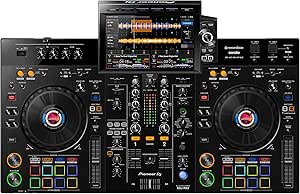 | Best Standalone System | Channels: 2 | Touchscreen: 10.1 inches | Performance pads: 16 | VIEW ON AMAZON | See Our Full Breakdown |
| Pioneer DJ DDJ-FLX4 2-Channel DJ Controller, 16 Pads, White |  | Best for Mobile and Pad-Based Mixing | Channels and decks: 2 channels, 2 decks | Performance pads: 16 | Connectivity: USB, Bluetooth | VIEW ON AMAZON | See Our Full Breakdown |
| dj controller | Weight | Connectivity | Channels | Dimensions |
|---|---|---|---|---|
| Pioneer DJ DDJ-FLX4 2-Channel | 2.8 kg | USB, Bluetooth | 2 | 21.3 × 13.3 × 5.1 in |
| AlphaTheta Pioneer DJ DDJ-FLX2 | 2.7 pounds | USB-C | 2 | 18 × 11.7 × 4.4 in |
| Hercules DJControl Inpulse 200 | 2.2 pounds | — | 2 | — |
| Pioneer DJ DDJ-REV1 2-Deck Ser | 5 lbs | USB, auxiliary | 2 | 10.6 × 20.7 × 2.33 in |
| AlphaTheta DDJ-GRV6 4-Channel | 4.6 kg | Auxiliary, USB | 4 | 14.8 × 28 × 3 in (D × W × H) |
| Pioneer DJ DDJ-FLX10 4-Channel | 14.8 pounds | USB | 4 | — |
| Hercules DJControl T10 DJ Cont | Less than 17.6 lb / 8 kg | Dual USB-C inputs | 4 | — |
| Numark Party Mix III Bluetooth | 2.42 pounds | Bluetooth MIDI, USB-C | — | 8.07 x 13.31 x 1.85 inches |
| Numark MixTrack Go Compact Blu | 1.1 pounds | Bluetooth MIDI | — | 3.67 x 12.76 x 1.57 inches |
| Denon DJ SC LIVE 4 Standalone | 13.6 pounds | 1/4-inch and 1/8-inch headphone jacks, SD card slot, Wi-Fi, Bluetooth, 2 USB inputs | 4 | 15.9 x 28.3 x 3.9 inches |
| Pioneer DJ DDJ-FLX4 2-Channel | 4.63 pounds | — | 2 | 10.74 x 18.98 x 2.33 inches |
| Pioneer DJ XDJ-RX3 2-Channel A | 21 pounds | USB | 2 | 18.48 x 28.67 x 4.66 inches (D x W x H) |
| Pioneer DJ DDJ-FLX4 2-Channel | 2.8 kg | USB, Bluetooth | — | — |
More Details on Our Top Picks
Pioneer DJ DDJ-FLX4 2-Channel DJ Controller
The DDJ-FLX4 is my strongest all-around starting point for learning to mix: its familiar two-channel layout, 16 performance pads, and support for several major DJ apps leave room to explore without making the controller feel specialized. Smart Fader can assist with volume, bass, and BPM during blends, giving new DJs a less demanding way to practice transitions. Compared with the lighter DDJ-FLX2, the FLX4 lists broader software compatibility, including Serato DJ Pro, and its extra pads provide more hands-on options. That flexibility still comes with limits: it remains a two-channel controller, so it is not a fit for mixing four decks, and some app or streaming functions depend on the service and software. I’d choose it over the DDJ-REV1 for general mixing, but not for a scratch-first layout.
Pros:- Smart Fader can help beginners practice track transitions
- 16 pads offer multiple performance-control options
- Supports Android, iOS, Windows, and Mac
- Works with rekordbox, djay, and Serato DJ Pro
Cons:- Two channels limit more complex multi-deck mixes
- Some streaming and software functions depend on compatible apps or services
Best for: New DJs who want one portable controller for learning standard two-channel mixing across phone, tablet, or computer setups.
Not ideal for: DJs building a four-deck set or prioritizing battle-style scratching; its two-channel layout is less suited to those needs than the DDJ-GRV6 or DDJ-REV1.
- Channels:2
- Performance pads:16
- Connectivity:USB, Bluetooth
- Compatible platforms:Android, Windows, iOS, Mac
- Compatible software:djay, rekordbox, Serato DJ Pro
- Dimensions:21.3 × 13.3 × 5.1 in
- Weight:2.8 kg
- Model year:2022
Our verdict“Choose the DDJ-FLX4 for a flexible first controller with broad device and software support, unless you need four channels or a scratch-focused layout.”
AlphaTheta Pioneer DJ DDJ-FLX2 2-Channel DJ Controller
The DDJ-FLX2 makes portability its clearest advantage: at 2.7 pounds, it is easy to carry between a bedroom, a friend’s setup, and a small practice space. USB-C bus power keeps the connection simple, while speaker and headphone outputs support a basic listening setup. Like the DDJ-FLX4, it includes Smart Fader and sticks to two channels, but this model is more compact and lists Serato DJ Lite rather than Serato DJ Pro among its supported software. That makes it a sensible choice for app-based practice, not the more expandable option for someone planning to build advanced routines. Its 3.5 mm audio output and dependence on supported apps and services also make it less versatile for larger or more involved setups than the DDJ-GRV6.
Pros:- Lightweight body is easy to transport
- USB-C bus power avoids a separate power supply
- Smart Fader can assist with basic transitions
- Supports rekordbox, djay, and Serato DJ Lite
Cons:- Two-channel design limits more advanced setups
- 3.5 mm audio output offers fewer connection options than more capable controllers
- Streaming support depends on compatible apps and services
Best for: Traveling beginners and casual DJs who want a lightweight, USB-C-powered controller for supported phone, tablet, or computer apps.
Not ideal for: DJs who want broader audio connections, advanced performance controls, or room to grow into four-channel mixing.
- Channels:2
- Connectivity:USB-C
- Supported software:rekordbox, djay, Serato DJ Lite
- Compatible devices:Android, Windows, iOS, PC/Mac
- Outputs:3.5 mm audio output
- Dimensions:18 × 11.7 × 4.4 in
- Weight:2.7 pounds
- Power:USB-C bus powered
Our verdict“Pick the DDJ-FLX2 when low weight and straightforward USB-C setup matter more than expansion or advanced controls.”
Hercules DJControl Inpulse 200 MK3 2-Deck DJ Controller
The Inpulse 200 MK3 is the most lesson-oriented option here. Its beatmatch light guides, included DJUCED software, and step-by-step tutorials give beginners concrete help with timing and transitions rather than relying mainly on automated blending. Two jog wheels, eight performance pads, and stem controls add room to experiment with mixes and vocal or instrumental combinations. Against the DDJ-FLX4, this Hercules controller puts more emphasis on instruction and guided practice, while the Pioneer offers more pads and a wider listed software mix. Its compact 2.2-pound body is especially easy to carry, though the small footprint and two-channel limit make it less suitable for expanding into complex sets. I’d favor the FLX4 for broader app flexibility and this model for structured learning.
Pros:- Beatmatch light guides support hands-on timing practice
- Includes DJUCED and step-by-step tutorials
- Stem controls enable vocal and instrumental mashups
- Lightweight, compact design is easy to transport
Cons:- Two-channel mixing limits more complex sets
- Eight pads provide fewer performance controls than the DDJ-FLX4’s 16
Best for: First-time DJs who want visual beatmatching guidance, included tutorials, and a lightweight controller for learning at home or on the go.
Not ideal for: DJs who need more than two channels or want the broader listed software compatibility and extra performance pads of the DDJ-FLX4.
- Channels:2
- Decks:2
- Performance pads:8
- Jog wheels:2
- Audio outputs:Master speakers and headphone monitoring
- Hardware interface:3.5 mm audio, USB
- Weight:2.2 pounds
- Software:DJUCED, Serato DJ Lite
Our verdict“Choose the Inpulse 200 MK3 if guided practice matters more than extra pads or a wider software selection.”
Pioneer DJ DDJ-REV1 2-Deck Serato DJ Controller
The DDJ-REV1 is the lineup’s clear choice for beginners drawn to scratching and open-format mixing, rather than a conventional club-style learning layout. Its battle-inspired arrangement, tall pitch faders, quick effect controls, and scratch routine triggers put those techniques within easier reach. The DDJ-FLX4 is the more versatile pick for general mixing and multiple software options; the REV1’s appeal is its Serato DJ Lite-focused workflow. That specialization is also its main tradeoff: it supports only two channels and is listed for PC/Mac, so it is less adaptable to mobile setups than the DDJ-FLX2. At five pounds, it is still compact enough for a home or practice rig, but buyers should choose it for its layout rather than expecting a controller designed to cover every mixing style.
Pros:- Battle-style layout favors scratching and open-format techniques
- Tall pitch faders support pitch control
- Scratch routine triggers simplify access to scratch actions
- Works with Serato DJ Lite
Cons:- Two-channel design restricts more complex mixing
- Listed compatibility is limited to PC/Mac
- Serato DJ Lite focus is less flexible than the DDJ-FLX4’s software options
Best for: New Serato users who want to learn scratch routines, battle-style mixing, and open-format techniques on a two-deck controller.
Not ideal for: Mobile-first DJs or beginners seeking a general-purpose controller with broad device and software support like the DDJ-FLX4.
- Channels:2
- Connectivity:USB, auxiliary
- Compatible devices:PC/Mac
- Dimensions:10.6 × 20.7 × 2.33 in
- Weight:5 lbs
- Material:Stainless steel
- Software:Serato DJ Lite
- Warranty:1 year
Our verdict“Pick the DDJ-REV1 if its battle-style controls match your scratch and open-format goals; choose the DDJ-FLX4 for broader everyday use.”
AlphaTheta DDJ-GRV6 4-Channel DJ Controller
The DDJ-GRV6 earns its place as the option for DJs ready to work beyond a basic two-deck setup. Its four channels, full-size jog wheels, and club-inspired layout provide more room for layering tracks and developing habits that carry over to club-style gear. The DDJ-FLX4 is easier to position as a first controller, but it cannot match the GRV6’s deck capacity; the GRV6 also adds Groove Circuit for live drum-loop swaps and supports Stems FX through Serato DJ Pro. Compatibility with both rekordbox and Serato DJ Pro gives it more software choice than the Serato-focused DDJ-REV1. The tradeoff is scale: at 28 inches wide and 4.6 kg, it is less convenient for small desks or frequent travel, and its hobbyist/intermediate focus may not satisfy buyers seeking a professional flagship setup.
Pros:- Four channels support layered and multi-deck mixes
- Club-inspired layout helps build transferable operating habits
- Groove Circuit enables live drum-loop swaps
- Supports rekordbox and Serato DJ Pro
Cons:- Wide, heavier body is less convenient for small spaces and travel
- Hobbyist and intermediate focus may not meet flagship professional needs
Best for: Intermediate DJs and ambitious hobbyists who want four-channel mixing, full-size jog wheels, and club-inspired controls for home practice.
Not ideal for: Beginners seeking a small, simple travel controller or professionals who require a flagship-focused setup.
- Channels:4
- Connectivity:Auxiliary, USB
- Connectors:TRS, USB
- Supported software:rekordbox, Serato DJ Pro
- Compatibility:PC/Mac, iOS, Android
- Dimensions:14.8 × 28 × 3 in (D × W × H)
- Weight:4.6 kg
- Model:DDJ-GRV6
Our verdict“Choose the DDJ-GRV6 if you need four-channel room to grow and can accommodate a larger controller than the DDJ-FLX4.”
Pioneer DJ DDJ-FLX10 4-Channel DJ Controller
The DDJ-FLX10 is the most flexible computer-based performance pick here for DJs who want to reshape tracks during a set. Its Track Separation lets you manipulate vocals, drums, and instruments without preparing stems in advance, while four channels leave room for layered transitions and external sources. Compared with the Numark Party Mix III, this is built for a more involved setup: it supports both rekordbox and Serato DJ Pro and adds multicolor jog-wheel displays plus DMX lighting control. That range comes with real costs in convenience: at 14.8 pounds, it is less appealing for frequent travel, and it depends on a connected computer rather than offering standalone operation. The limited one-year manufacturer warranty is another point to weigh before choosing it for demanding gig schedules.
Pros:- Track Separation supports live vocal, drum, and instrument manipulation without advance track preparation.
- Four channels provide room for layered mixes and external sources.
- Works with both rekordbox and Serato DJ Pro.
- Multicolor jog displays and built-in DMX output add performance and lighting control.
Cons:- At 14.8 pounds, it is less convenient to carry than compact two-deck options such as the Numark MixTrack Go.
- Requires a computer, unlike the standalone Denon DJ SC LIVE 4.
- Limited manufacturer warranty lasts one year.
Best for: Computer-based DJs who want four channels, live stem manipulation, and direct lighting control for performance sets.
Not ideal for: Traveling DJs seeking a lightweight controller or performers who want to play without a computer.
- Brand:Pioneer DJ
- Channels:4
- Compatible software:rekordbox, Serato DJ Pro
- Connectivity:USB
- Lighting output:DMX
- Weight:14.8 pounds
- Warranty:Limited manufacturer 1-year warranty
Our verdict“Choose the DDJ-FLX10 if live mashups and four-channel computer-based performance matter more than portability or standalone play.”
Hercules DJControl T10 DJ Controller
The DJControl T10 is the specialist choice for DJs who want the feel of moving vinyl rather than standard jog wheels. Its two motorized 10-inch platters, Dr. Suzuki slipmats, and adjustable contactless crossfader are aimed at scratch techniques, giving it a different purpose from the jog-wheel-focused Pioneer DJ DDJ-FLX10. Four channels and included Serato DJ Pro and DJUCED PRO also make it capable of broader mixing, while dual USB-C inputs help two DJs share a setup. That scratch-first hardware has a setup and portability cost: it needs a computer and power supply, and its weight can reach 17.6 pounds. Compared with the compact Numark MixTrack Go, the Hercules is far less suited to spontaneous mobile sessions, but its physical platter response is the reason to accept the bulk.
Pros:- Two motorized 10-inch platters deliver a vinyl-style surface for scratching.
- Contactless InduXfader offers adjustable cut and feel.
- Includes Serato DJ Pro and DJUCED PRO.
- Dual USB-C inputs support back-to-back DJ changes.
Cons:- Requires a computer and corded power to set up.
- Weight can reach 17.6 pounds, limiting portability.
- Its motorized-platter design is less suited to buyers seeking a simple, compact two-deck controller.
Best for: Scratch DJs and turntablists who want motorized vinyl-style platters, an adjustable crossfader, and four-channel mixing.
Not ideal for: Mobile beginners or DJs who need a lightweight, quick-to-pack controller or a setup that works without a computer and power supply.
- Channels:4
- Platter size:10 inches
- Crossfader:Contactless InduXfader with adjustable cut and feel
- Connectivity:Dual USB-C inputs
- Audio input:XLR
- Included software:Serato DJ Pro and DJUCED PRO
- Weight:Less than 17.6 lb / 8 kg
Our verdict“Pick the DJControl T10 for hands-on scratching and platter control, not for lightweight travel or computer-free sets.”
Numark Party Mix III Bluetooth DJ Controller with Built-In Lights
The Party Mix III is the friendliest pick in this group for learning basic two-deck mixing and adding a ready-made party effect. Its beat-alignment indicators can help newcomers match tracks, while the beat-synchronized LED lights add visual energy without separate lighting gear. USB power, a built-in audio interface, and support for computers and mobile devices make it easier to bring into a casual setup than the four-channel Pioneer DJ DDJ-FLX10. The tradeoff is a lower ceiling: its two-deck layout and beginner-focused controls are not a substitute for the Denon DJ SC LIVE 4’s standalone, four-deck workflow or a more advanced performance rig. It also needs compatible DJ software or a mobile app, so the controller alone is not a complete music source.
Pros:- Beat-alignment indicators help beginners practice matching tracks.
- Beat-synchronized LEDs add a built-in party lighting effect.
- USB-powered design and 2.42-pound weight support portable setups.
- Eight performance pads per deck and Stems controls encourage creative mixing.
Cons:- Two-deck controls are limiting for complex or four-channel sets.
- Requires compatible DJ software or a mobile app to perform.
- Its beginner-oriented feature set is less suited to advanced gig workflows.
Best for: New DJs who want a compact, USB-powered two-deck controller with visual beat guidance for casual home or party sessions.
Not ideal for: Experienced performers who need four-channel control, a professional club-style setup, or standalone operation without DJ software.
- Decks:2
- Connectivity:Bluetooth MIDI, USB-C
- Lighting:Beat-synchronized LED light show
- Performance pads:8 per deck
- Audio outputs:Main RCA output, 1/8-inch headphone output
- Mixer controls:3-band EQ, channel Filter knobs, crossfader
- Power source:USB
- Weight:2.42 pounds
- Dimensions:8.07 x 13.31 x 1.85 inches
Our verdict“Choose the Party Mix III for approachable practice and casual parties, but move to a more capable controller for advanced sets.”
Numark MixTrack Go Compact Bluetooth DJ Controller with Stems Control
At just 1.1 pounds, the MixTrack Go is the easiest controller here to pack for a small mobile setup. It offers two decks, capacitive jog wheels, eight pads per deck, and dedicated Stems controls, so its compact size does not rule out live remixing. Bluetooth MIDI can provide wireless control with compatible devices, while separate main and headphone outputs let a DJ cue independently from the audience feed. Compared with the Party Mix III, the MixTrack Go puts less emphasis on built-in lights and more on portability and Stems-focused control. Its wireless use has a specific limitation: Bluetooth MIDI DJing requires a compatible iOS or Android device and the Algoriddim djay app. It also needs USB-C power, so it is not a fully untethered controller.
Pros:- At 1.1 pounds, it is exceptionally easy to carry.
- Dedicated Stems controls and eight pads per deck support live remixing.
- Bluetooth MIDI works with compatible mobile devices.
- Built-in audio interface provides separate main and headphone outputs.
Cons:- Bluetooth MIDI DJing depends on compatible iOS or Android devices and the Algoriddim djay app.
- Requires USB-C power, so it is not fully untethered.
- Two decks and compact controls offer less room for complex sets than four-channel options such as the Denon DJ SC LIVE 4.
Best for: Mobile DJs and casual mixers who prioritize a very light controller, phone or tablet compatibility, and quick Stems-based remixes.
Not ideal for: DJs seeking built-in party lights, four-channel control, or wireless operation without a compatible mobile device, app, and USB-C power.
- Decks:2
- Connectivity:Bluetooth MIDI
- Power:USB-C
- Audio outputs:1/8-inch main output and 1/8-inch headphone output
- Performance pads:8 per deck
- Compatible software:Serato DJ Lite/Pro, Algoriddim djay, VirtualDJ
- Weight:1.1 pounds
- Dimensions:3.67 x 12.76 x 1.57 inches
Our verdict“Choose the MixTrack Go when low weight and mobile Stems control matter more than lighting, extra channels, or independence from a phone or tablet.”
Denon DJ SC LIVE 4 Standalone 4-Deck DJ Controller
The SC LIVE 4 is the clearest choice here for DJs who want a full four-deck setup without making a laptop the center of the performance. Engine DJ OS, a 7-inch touchscreen, Wi-Fi streaming, and built-in speakers let it operate as a standalone system, unlike the computer-dependent Pioneer DJ DDJ-FLX10. Its 17 internal effects, Stems functionality, and broad audio connections add room for performance and external gear; it can also connect with Serato DJ Pro and Virtual DJ. The size and power needs temper that freedom: at 13.6 pounds and nearly 28.3 inches wide, it is not a small travel controller, and it requires corded power. Stems also require a one-time software license purchase, adding a separate cost and setup step to that feature.
Pros:- Standalone Engine DJ OS operation removes the need for a computer during sets.
- 7-inch touchscreen and built-in speakers support an integrated workflow.
- Wi-Fi streaming and Bluetooth audio input expand playback options.
- 17 internal effects and four-part Stems functionality support performance mixing.
Cons:- Requires corded power, limiting use away from an outlet.
- Its 28.3-inch width makes it less convenient to transport than the Numark MixTrack Go.
- Stems require a one-time software license purchase.
Best for: DJs who want four-deck standalone performance with a touchscreen, built-in speakers, streaming access, and connections for external audio gear.
Not ideal for: Laptop-free travelers who need a compact battery-powered rig, or buyers who want Stems without purchasing a separate software license.
- Channels:4
- Connectivity:1/4-inch and 1/8-inch headphone jacks, SD card slot, Wi-Fi, Bluetooth, 2 USB inputs
- Power source:Corded electric
- Output connectors:RCA, 1/4-inch TRS, XLR
- Audio inputs:RCA, 2 XLR + 1/4-inch inputs
- Dimensions:15.9 x 28.3 x 3.9 inches
- Weight:13.6 pounds
- Software compatibility:Serato DJ Pro, Virtual DJ
Our verdict“Choose the SC LIVE 4 for standalone four-deck performance and integrated features, provided its size, corded power, and Stems license fit your setup.”
Pioneer DJ DDJ-FLX4 2-Channel DJ Controller Bundle with Carrying Case
I’d pick this DDJ-FLX4 bundle for a new DJ who wants a compact controller and a case in one package. Its two-channel layout works with rekordbox, Serato DJ Lite, and djay, so beginners can choose a familiar workflow without being locked to one program. Smart Fader and Smart CFX help smooth transitions and add effects without demanding advanced technique, while the microphone input adds room for MCing or streaming. Compared with the XDJ-RX3, this FLX4 depends on a connected computer or mobile device rather than playing USB sets on its own; in return, it is much lighter at 4.63 pounds and includes a carrying case. The tradeoff is a starter-level two-channel setup, and Serato DJ Pro requires a separate license. For larger PA systems, an external DAC or audio interface is recommended.
Pros:- Works with rekordbox, Serato DJ Lite, and djay
- Smart Fader and Smart CFX can help beginners manage transitions and effects
- Microphone input supports MCing and live streaming
- Bundle includes a carrying case and USB Type-C cable
Cons:- Requires a connected computer or mobile device to run DJ software
- Serato DJ Pro requires a separate license
- An external DAC or audio interface is recommended for larger professional PA systems
Best for: New DJs who want a portable, software-flexible two-channel setup with a case for lessons, practice, or small streaming sessions.
Not ideal for: DJs who need standalone USB playback, more than two channels, or direct professional PA integration without extra audio hardware.
- Channels:2
- Weight:4.63 pounds
- Dimensions:10.74 x 18.98 x 2.33 inches
- Compatible software:rekordbox, Serato DJ Lite, Serato DJ Pro, djay
- Supported devices:PC, Mac, iPhone, iPad, Android
- Inputs:1 microphone input
- Outputs:RCA master; 3.5 mm stereo mini jack headphones
- USB ports:2 x USB Type-C
- Included accessories:Carrying case, polishing cloth, USB Type-C cable, quick start guide
Our verdict“Choose this bundle if you want an approachable, portable FLX4 setup with a case, but skip it if you need standalone playback or a more advanced channel count.”
Pioneer DJ XDJ-RX3 2-Channel All-in-One DJ System
The XDJ-RX3 is the strongest fit here for DJs who want to prepare sets in rekordbox and play them from USB without bringing a laptop. Its 10.1-inch touchscreen, CDJ-style layout, 16 pads, Beat FX, and Sound Color FX provide a more club-oriented operating experience than the computer-dependent DDJ-FLX4. It can also serve as a rekordbox Performance mode or Serato DJ Pro control surface when a computer is preferred. That flexibility makes it better suited to rehearsals, mobile gigs, and DJs building familiarity with Pioneer’s standalone workflow. The tradeoff is size: at 21 pounds and nearly 29 inches wide, it is far less convenient to carry than the FLX4 bundle. It also remains a two-channel system, so DJs wanting four-deck control should look at a model such as the Denon DJ SC LIVE 4 instead.
Pros:- Standalone USB playback works without a laptop
- 10.1-inch touchscreen supports on-unit browsing and control
- CDJ-style layout, 16 performance pads, Beat FX, and Sound Color FX
- Can also control rekordbox Performance mode and Serato DJ Pro
Cons:- At 21 pounds, it is considerably less portable than the DDJ-FLX4
- Two-channel design limits control compared with four-deck systems
- Its larger footprint requires more setup and storage space
Best for: Gigging DJs and serious home users who want USB-based standalone playback, a large touchscreen, and a club-style Pioneer workflow.
Not ideal for: Beginning DJs on the move who need a lightweight, easy-to-pack controller, or performers who need four-channel control.
- Channels:2
- Touchscreen:10.1 inches
- Performance pads:16
- Connectivity:USB
- Weight:21 pounds
- Dimensions:18.48 x 28.67 x 4.66 inches (D x W x H)
- Compatible software:rekordbox, Serato DJ Pro
- Warranty:1 year
Our verdict“Choose the XDJ-RX3 if laptop-free USB sets and a club-style Pioneer layout matter more than portability or four-channel flexibility.”
Pioneer DJ DDJ-FLX4 2-Channel DJ Controller, 16 Pads, White
This white DDJ-FLX4 suits beginners and improving DJs who want the familiar two-deck Pioneer layout with more room for pad-led performance. Its 16 pads support multiple performance modes, while Smart Fader and Smart CFX offer guided ways to shape transitions and effects. Computer and mobile-device compatibility, a built-in sound card, and microphone mixing also make it a practical choice for home streaming or compact practice setups. Compared with the bundled FLX4, this version’s listed package includes a USB cable but no carrying case, so it is less ready for transport. Its stated USB and Bluetooth connectivity broadens device options, though buyers should check that their chosen software and setup support the connection method they plan to use. Like the bundle, it has only two-channel, two-deck control, which may become restrictive as sets grow more complex.
Pros:- 16 performance pads support multiple performance modes
- Smart Fader and Smart CFX can simplify transitions and effects
- Supports computers and mobile devices, with rekordbox and Serato compatibility
- Built-in sound card and microphone mixing suit streaming and MCing
Cons:- Two-channel, two-deck control limits more complex sets
- No carrying case is listed, unlike the DDJ-FLX4 bundle
- Bluetooth availability may not suit every software or connection workflow
Best for: Mobile-first beginners and developing DJs who want 16 performance pads, microphone mixing, and a distinctive white finish for home practice or streaming.
Not ideal for: DJs who need four-deck control, standalone USB playback, or a carry-ready package with a protective case included.
- Channels and decks:2 channels, 2 decks
- Performance pads:16
- Connectivity:USB, Bluetooth
- Compatible devices:PC, Mac, iPhone, iPad, Android
- Supported software:rekordbox, Serato
- Weight:2.8 kg
- Material:Stainless steel
- Included components:USB cable
- Warranty:1 year manufacturer limited
Our verdict“Pick this FLX4 if mobile compatibility and pad performance matter more than a bundled case or room to expand beyond two decks.”

How We Picked
I compared these 13 DJ controllers by the job they are meant to do: learning the basics, performing with a laptop, playing on the move, or working without a computer. I weighed channel count and control layout against portability, software dependence, performance options, and how much setup complexity each model asks of its owner. A feature mattered most when it changed what a buyer could do or made a common task easier—not simply because it appeared on a spec list.
The ranking favors useful versatility and a clear audience over raw feature count. That puts the DDJ-FLX4 first as a balanced choice, while specialized picks rank higher for the buyers they serve: the DDJ-FLX10 for advanced laptop performance, the SC LIVE 4 for standalone play, and the Inpulse 200 MK3 for learning. I treated the FLX4 bundle and white edition as variants of the same core controller, so their inclusion does not imply a different performance tier; their value depends on whether the case or finish matters to the buyer.
Factors to Consider When Choosing Dj Controllers
Before choosing among DJ controllers, match the gear to your actual playing environment and learning plans. A larger deck can offer more hands-on control but take up more room, while a compact model may be easier to carry yet feel restrictive as your technique develops. These factors can help you avoid paying for capabilities you will not use—or buying a setup you quickly outgrow.
Choose between laptop-based and standalone play
A laptop controller sends commands to DJ software, so your computer becomes part of the performance setup. This can suit buyers who already organize music and prepare sets on a computer, but it also means managing cables, software compatibility, and a stable laptop position. Standalone systems can play without a laptop, which may simplify the booth and reduce screen dependence. That convenience comes with a larger, more involved piece of equipment and a different music-preparation routine. Before buying, check how you source and organize tracks, not just whether the controller has enough decks. A controller that fits your existing library habits is more useful than one with a headline feature you rarely touch.
Buy the channel count you can put to work
Two channels are enough for many DJs mixing between two tracks, and fewer controls can make the layout easier to learn. Four channels can support extra decks, samples, or more layered sets, but channel count alone does not make a controller a better choice. Extra controls can increase desk space, setup time, and the number of decisions a beginner must manage. A common mistake is buying for a possible future setup while overlooking whether the current workflow needs those channels. If you mainly mix two tracks, prioritize familiar controls and practical portability. Pay for more channels when you have a clear plan to use them.
Match the layout to how you perform
Jog wheels, pads, faders, and effect controls shape how directly you can work without reaching for a mouse or keyboard. The right layout depends on whether your sets focus on straightforward transitions, cue points, scratching, or layered performance. Larger or more specialized controls may help a practiced DJ perform particular techniques, but they can add complexity for someone still learning phrasing and beat matching. Look beyond pad counts and ask which controls you will use repeatedly during a set. Also check where the controls sit relative to one another: an intuitive layout can reduce mistakes under pressure. If possible, compare a product diagram with the actions you expect to perform.
Treat software compatibility as part of the purchase
A controller’s usefulness depends on whether its software works with your computer, operating system, and preferred way of preparing music. Confirm supported platforms and software editions before committing, especially if you share a setup or plan to change computers. Included software or learning tools can lower the setup barrier, but they do not guarantee that every feature is available in every version. Check which functions require a paid upgrade, an internet connection, or a particular device. Buyers sometimes focus on hardware and only later discover that their preferred workflow needs extra setup. Write down your must-have software tasks first, then verify that the controller supports them.
Balance portability against control space
Compact controllers are easier to store and carry, making them practical for small rooms, travel, and occasional practice. The tradeoff is less space between controls and potentially fewer performance options than a larger deck. For home use, a bigger surface may be more comfortable over long sessions, but it can complicate transport and booth placement. Think about the whole setup: a laptop, headphones, cables, and protective case also take space. Do not judge portability by the controller’s size alone; consider how easily the complete rig fits your routine. A carrying case can be useful, but it does not change the underlying controller’s layout or capabilities.
Spend on the limitation you actually want to remove
Paying more makes sense when it solves a specific constraint, such as wanting standalone playback, more channels, or expanded performance controls. It is less useful to buy advanced hardware before you know which techniques or features you need. Beginners may get more value from a clear layout and guided learning than from a large number of controls. Experienced laptop DJs may prioritize hands-on performance options, while mobile DJs may value a self-contained setup. Check whether an accessory bundle adds something you need or simply duplicates gear you already own. I would set a budget around the full setup—including software needs, transport, and headphones—rather than the controller alone.
Frequently Asked Questions
Is the DDJ-FLX4 bundle a better choice than the standard DDJ-FLX4?
The controller itself is the same core FLX4 platform, so the bundle does not change its channel layout or performance workflow. Its main difference is the included carrying case, which can be useful if you travel with the controller and do not already have a suitable way to protect it. If your setup stays at home or you own a case already, the standard version may be the simpler match. Compare the bundle contents carefully, since accessory packages can vary. Choose based on the case and other included items, not an expectation of added controller features.
Should I choose a four-channel controller if I only mix two tracks now?
Not automatically: two-channel controllers can handle the core task of mixing two tracks and often keep the learning process more focused. Four channels make sense if you already use extra decks, want to layer sources, or have a specific plan to expand your sets. They can also take more room and present more controls to manage. If you are unsure, consider whether you can name a regular use for the additional channels. Buying for a real workflow is usually more useful than buying capacity just in case.
Do I need a laptop to use a DJ controller?
Many controllers rely on a computer and compatible DJ software to play and manage music. A standalone system such as the Denon DJ SC LIVE 4 is designed to operate without a laptop during playback, though you still need to prepare and organize music for your setup. Standalone operation can reduce the equipment on the table, while laptop-based control may fit better if your tracks and playlists already live in software. Check the exact model’s supported workflow before buying, since controller labels do not all mean the same thing. Your music library and preparation habits should guide this decision.
Which option makes the most sense for a first-time DJ?
The Hercules DJControl Inpulse 200 MK3 is a strong beginner-focused option in this lineup because its role centers on learning rather than advanced performance. The DDJ-FLX4 is a better fit if you want a more flexible controller that can serve beyond the earliest learning stage. The Numark Party Mix III keeps things approachable and adds built-in lights, but that emphasis may matter less to someone focused on structured practice. Think about whether you value learning guidance, broader flexibility, or a simple setup most. The best first controller is one whose layout encourages you to practice the skills you want to build.
When is a standalone controller worth choosing over a compact model?
A standalone system makes sense when you want to perform without a laptop and value a self-contained setup more than easy storage. Compact models such as the MixTrack Go or DDJ-FLX2 better suit buyers who prioritize portability and a smaller footprint, but they generally keep the computer-based workflow in play. Standalone gear can involve more preparation and occupy more space, so it is not automatically the simpler option. Consider where you play, how often you travel, and whether laptop-free operation solves a real problem for you. If portability is the main concern, compact hardware may be the more practical choice.
Conclusion
For most buyers, I recommend the Pioneer DJ DDJ-FLX4 as the best overall DJ controller in this group: its two-channel format balances accessibility with flexible laptop-based mixing. The Hercules DJControl Inpulse 200 MK3 is my beginner pick for a learning-oriented start, while the Numark Party Mix III suits a simple, light-equipped entry setup. For advanced laptop performance, choose the Pioneer DJ DDJ-FLX10; for standalone four-deck play, the Denon DJ SC LIVE 4 is the premium specialist. Buyers focused on portability can compare the MixTrack Go and DDJ-FLX2, while FLX4 shoppers who need a case should check the bundle and those who want a different finish can consider the white edition. Pick the model that matches your workflow today, rather than the one with the longest feature list.