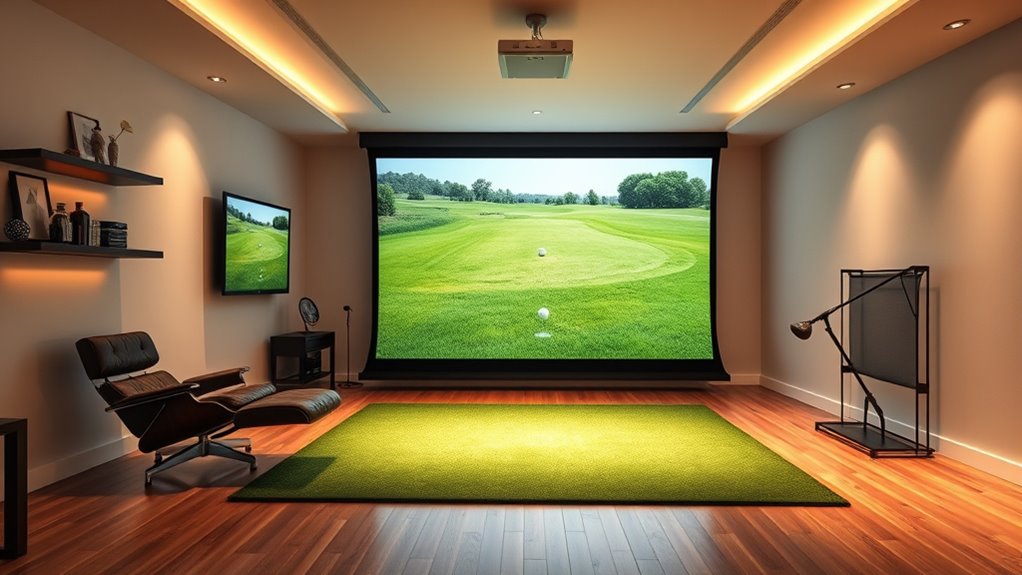

For a home golf simulator setup that balances a defined practice area with room to tailor the rest, I rank the GoSports Golf Simulator Enclosure with Frame and HD Impact Screen as the best overall pick. The SkyTrak ST MAX Golf Simulator Standard Studio Package is a stronger match for buyers seeking a more integrated simulator package, while the PHIGOLF Home Golf Simulator offers a compact, beginner-friendly path that does not require a full hitting bay. The main tradeoff is between a simple enclosure that leaves launch-monitor and projector choices to you, and a more complete package that takes more planning and space. I also compare options with shank nets, dual-use practice features, and different enclosure formats. Read on for the full breakdown and help matching a setup to your room, budget priorities, and golf goals.

Get kitchen gear delivered free with Prime
- Fast, free delivery on millions of items
- Prime Video, Amazon Music and more included
- Member-only deals all year
Complete the kit


Key Takeaways
- Enclosure kits leave key system choices open: Most listed picks focus on the frame and impact screen, so buyers still need to plan for a launch monitor, projector, mat, and compatible software.
- The SkyTrak packages serve a different buying need: The ST MAX studio options are the clearest candidates for shoppers seeking a more integrated simulator package rather than an enclosure alone.
- PHIGOLF prioritizes low space demands: Its motion-sensor and swing-stick approach suits casual indoor play, but it is not a like-for-like replacement for a full impact-screen bay.
- Safety coverage varies across enclosure-style choices: The GoSports enclosure with shank nets is the standout for buyers who want added side protection; room layout and miss-hit direction still matter.
- Several products overlap closely: Duplicate or near-duplicate GoSports and Anything Sports listings make dimensions, included components, and package contents more useful comparison points than the name alone.
| Durbles Golf Simulator Enclosure Kit with HD Impact Screen |  | Best Complete Enclosure Kit | Brand: Durbles | Enclosure size: 10 x 8 ft | Weight: 33.88 kg | VIEW ON AMAZON | See Our Full Breakdown |
| Anything Sports Golf Simulator Enclosure with 4K-Ready Impact Screen |  | Best for a Mid-Size Garage Bay | Brand: Anything Sports | Size: 11 x 8’4 x 5 ft | Weight: 39 kg | VIEW ON AMAZON | See Our Full Breakdown |
| PHIGOLF Home Golf Simulator with Motion Sensor and Swing Stick | 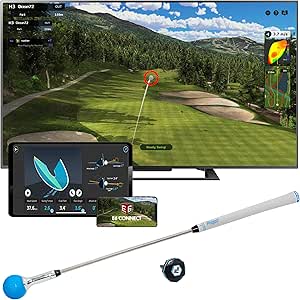 | Best for Beginners and Low-Space Play | Brand: PHIGOLF | Model: PG2 Flex | Sensor: 9-axis motion sensor | VIEW ON AMAZON | See Our Full Breakdown |
| ANYTHING SPORTS Golf Simulator Enclosure Package with Impact Screen and Projector Mount |  | Best for a Wide Practice Bay | Brand: ANYTHING SPORTS | Size: 12 x 9’4 x 5 ft | Item weight: 39 kg | VIEW ON AMAZON | See Our Full Breakdown |
| Anything Sports Golf Simulator Enclosure with 4K-Ready Impact Screen |  | Best Compact Enclosure | Brand: Anything Sports | Size: 8’4 x 8’4 x 5 ft | Weight: 39.92 kg | VIEW ON AMAZON | See Our Full Breakdown |
| GoSports Golf Simulator Enclosure with Frame and HD Impact Screen |  | Best for a Dedicated Simulator Bay | Brand: GoSports | Size: 14 × 8 ft | Weight: 92 lb | VIEW ON AMAZON | See Our Full Breakdown |
| Homevol 2-in-1 Golf Simulator and Practice Net System, 10 x 8 ft |  | Best for Mixed Simulator and Target Practice | Dimensions: 10 × 8 ft | Frame: Steel with foam padding | Practice surfaces: 4K-ready impact screen and multi-hole target cloth | VIEW ON AMAZON | See Our Full Breakdown |
| GoSports Golf Simulator Enclosure Set with Frame and HD Impact Screen |  | Best Size Flexibility | Brand: GoSports | Available sizes: 10 × 8 ft, 12 × 9 ft, or 14 × 8 ft | Listed size: 12 × 9 ft | VIEW ON AMAZON | See Our Full Breakdown |
| ZEALFEEL Golf Simulator Enclosure with HD Impact Screen |  | Best for Ball Containment | Brand and model: ZEALFEEL ZF16-B | Size: 12 × 9 ft | Enclosure dimensions: 11 ft W × 8 ft H × 5 ft D | VIEW ON AMAZON | See Our Full Breakdown |
| 10 × 8 × 6 ft Golf Simulator Enclosure with Impact Screen and Frame Kit |  | Best Compact Enclosure Kit | Dimensions: 10 × 8 × 6 ft | Weight: 72.7 lb | Color: Black | VIEW ON AMAZON | See Our Full Breakdown |
| SkyTrak ST MAX Golf Simulator Standard Studio Package |  | Best Complete Setup for Data-Focused Practice | Brand: SkyTrak | Model: STU-STMAX-STA | Launch monitor: ST MAX with dual Doppler radar and photometric camera | VIEW ON AMAZON | See Our Full Breakdown |
| GoSports Golf Simulator Enclosure with Impact Screen and Shank Nets, 10 x 8 ft |  | Best for Side-Shot Protection | Dimensions: 10 × 8 ft | Included components: Impact screen, enclosure, two shank nets, installation hardware | Screen design: Multi-layer, designed for high-speed golf ball impacts | VIEW ON AMAZON | See Our Full Breakdown |
| SkyTrak ST MAX Golf Simulator Studio Package |  | Best Premium Integrated Studio | Brand and model: SkyTrak ST MAX | Launch monitor technology: Dual Doppler radar and photometric cameras | Projector: GT2000HDR short-throw laser, Full HD, 3,500 lumens | VIEW ON AMAZON | See Our Full Breakdown |
| GoSports Golf Simulator Enclosure with Frame and HD Impact Screen |  | Best Straightforward Screen-and-Frame Kit | Brand: GoSports | Listed size: 10 × 8 ft | Item weight: 79 lb | VIEW ON AMAZON | See Our Full Breakdown |
| home golf simulator setup | Included components | Warranty | Brand | Color |
|---|---|---|---|---|
| Durbles Golf Simulator Enclosu | Enclosure net, impact screen, blackout curtain, safety padding, steel frame | — | Durbles | Black |
| Anything Sports Golf Simulator | Poles, joints, impact screen, hardware | 12 months | Anything Sports | Black |
| PHIGOLF Home Golf Simulator wi | Sensor and premium golf swing stick | 1 year | PHIGOLF | — |
| ANYTHING SPORTS Golf Simulator | Poles, joints, impact screen, hardware | 12 months | ANYTHING SPORTS | Black |
| Anything Sports Golf Simulator | Poles, joints, impact screen, hardware | 12-month no-questions-asked warranty | Anything Sports | Black |
| GoSports Golf Simulator Enclos | Golf simulator enclosure net, frame, and HD impact screen | 6 months | GoSports | Black |
| Homevol 2-in-1 Golf Simulator | — | — | — | — |
| GoSports Golf Simulator Enclos | Frame, HD impact screen, and installation hardware | 6 months | GoSports | Black |
| ZEALFEEL Golf Simulator Enclos | — | 1 year | — | — |
| 10 × 8 × 6 ft Golf Simulator E | Enclosure net, HD impact screen, and frame kit | 1 year | — | Black |
| SkyTrak ST MAX Golf Simulator | Launch monitor, enclosure, impact screen, steel frame, 5×5 ft hitting mat, ZW350ST short-throw projector | — | SkyTrak | — |
| GoSports Golf Simulator Enclos | Impact screen, enclosure, two shank nets, installation hardware | — | — | — |
| SkyTrak ST MAX Golf Simulator | Hitting mat, ball tray, enclosure, screen and frame, projector, launch monitor, protective case | Six months | — | — |
| GoSports Golf Simulator Enclos | Golf simulator enclosure net, frame, HD impact screen, installation hardware | Six months | GoSports | — |
More Details on Our Top Picks
Durbles Golf Simulator Enclosure Kit with HD Impact Screen
For a home simulator buyer who wants the enclosure components bundled together, the Durbles kit stands out with its triple-layer impact screen, blackout curtain, safety padding, and netting. That combination gives it a more safety-focused package than the Anything Sports 4K-Ready enclosure, whose listed components emphasize the screen, frame, mount, and side nets. The 10 x 8 ft footprint is more manageable than the larger 12 x 9’4 x 5 Anything Sports model, though it still claims substantial dedicated indoor space. Tool-free setup may also suit a garage that needs occasional rearranging. The tradeoff is that this is an enclosure, not a complete simulator: the launch monitor and projector are not listed as included, and buyers need to confirm their room can accommodate the frame and swing area.
Pros:- Bundles impact screen, blackout curtain, safety padding, netting, and steel frame
- Triple-layer screen is designed to absorb ball strikes and reduce sound
- Padding is designed to limit ricochets around the enclosure
- Compatible with most launch monitors and projectors
Cons:- Launch monitor and projector are not listed as included
- Needs a dedicated 10 x 8 ft area, with additional clearance needed for swings
- At 33.88 kg, it is not a lightweight setup to relocate frequently
Best for: Home golfers who want a bundled enclosure with added ricochet protection and have a dedicated area at least 10 x 8 ft.
Not ideal for: Buyers seeking a ready-to-play simulator bundle or golfers whose rooms cannot fit a 10 x 8 ft enclosure plus safe swing clearance.
- Brand:Durbles
- Enclosure size:10 x 8 ft
- Weight:33.88 kg
- Frame material:Alloy steel
- Other material:Polyester
- Color:Black
- Included components:Enclosure net, impact screen, blackout curtain, safety padding, steel frame
- Setup:Tool-free
Our verdict“Choose the Durbles kit if bundled enclosure protection matters more than having the projector and launch monitor included.”
Anything Sports Golf Simulator Enclosure with 4K-Ready Impact Screen
This Anything Sports enclosure is a practical fit for buyers prioritizing a projector mount and side shank nets in a rectangular home setup. Its 11 x 8’4 x 5 ft dimensions put it between the smaller 8’4 x 8’4 x 5 Anything Sports package and the wider 12 x 9’4 x 5 version, making it the middle-size option in this group. The 4K-ready impact screen is intended for projected play, while assembly without special tools can simplify a garage installation. A 12-month warranty adds a defined support period. Unlike the Durbles kit, the listed components do not include separate safety padding or a blackout curtain, so buyers wanting those extra enclosure layers may prefer Durbles. The projector and turf are also excluded, meaning this is a strong enclosure base rather than a complete simulator.
Pros:- Includes an impact screen, projector mount, frame poles, joints, and hardware
- Side shank nets add protection beside the screen
- Designed to assemble without special tools
- Includes a 12-month warranty
Cons:- Projector and turf are not included
- No separate safety padding or blackout curtain is listed
- Its 11 x 8’4 x 5 ft footprint still requires a dedicated indoor area
Best for: Golfers setting up a mid-size garage bay who want a projector mount and side protection without moving to the wider 12-foot package.
Not ideal for: Buyers who need turf, a projector, added safety padding, or a compact enclosure for a particularly narrow room.
- Brand:Anything Sports
- Size:11 x 8’4 x 5 ft
- Weight:39 kg
- Shape:Rectangular
- Material:Metal
- Color:Black
- Included components:Poles, joints, impact screen, hardware
- Warranty:12 months
Our verdict“Pick this mid-size Anything Sports enclosure if its projector mount and side nets suit your garage, and source the projector and turf separately.”
PHIGOLF Home Golf Simulator with Motion Sensor and Swing Stick
PHIGOLF takes a different route from the enclosure kits: it delivers virtual play through a 9-axis motion sensor, swing stick, and compatible mobile device, rather than requiring an impact screen and full hitting bay. That makes it the most approachable choice here for apartment golfers, beginners, or families who cannot reserve a room for a frame like the 12 x 9’4 x 5 Anything Sports enclosure. The app offers 38,000+ courses, practice modes, swing feedback, and AI coaching, giving new players ways to practice and play without building a projection setup. It can also attach to a compatible real club for outdoor practice. The compromise is a less screen-and-ball-focused experience: a compatible Android or iOS device is required, and online play is limited to supported modes. It is not a substitute for a launch monitor and impact screen system.
Pros:- Uses a swing stick and mobile device instead of a full enclosure
- App includes more than 38,000 courses, practice modes, and swing feedback
- AI coaching offers guidance for at-home practice
- Sensor can attach to a compatible golf club for outdoor use
Cons:- Requires a compatible Android or iOS device
- Does not provide an impact screen or real-ball enclosure setup
- Online play is available only in compatible modes
Best for: Beginners, apartment golfers, and households wanting casual virtual golf and swing feedback without a dedicated simulator room.
Not ideal for: Players who want to hit real golf balls into a projected impact screen or need a full launch-monitor-based simulator setup.
- Brand:PHIGOLF
- Model:PG2 Flex
- Sensor:9-axis motion sensor
- Compatible devices:Android and iOS
- Course library:38,000+ courses
- Included components:Sensor and premium golf swing stick
- Swing stick length:27.6 inches
- Item weight:0.59 kg
- Warranty:1 year
Our verdict“Choose PHIGOLF for accessible, space-saving virtual golf and swing practice, not for a projected real-ball simulator bay.”
ANYTHING SPORTS Golf Simulator Enclosure Package with Impact Screen and Projector Mount
Among the enclosure options in this group, this ANYTHING SPORTS package is the pick for buyers who can give a simulator a 12 x 9’4 x 5 ft footprint. The wider format offers more enclosure width than the 11 x 8’4 x 5 Anything Sports model, which may better suit a spacious garage or dedicated golf room. It includes a 4K-ready impact screen, projector mount, and side shank nets, while tool-free assembly can keep installation requirements modest. That size is also the central tradeoff: it will not suit every home, and room measurements need to account for swing clearance beyond the frame. Like the smaller Anything Sports enclosure, it excludes the projector and turf, so buyers still need to plan for those parts. Unlike the Durbles kit, separate safety padding is not listed.
Pros:- Wider 12-foot enclosure format than the 11-foot Anything Sports option
- Includes a 4K-ready impact screen and projector mount
- Side shank nets are included for lateral ball protection
- Designed for tool-free assembly and backed by a 12-month warranty
Cons:- Projector and turf are not included
- Large footprint limits placement in smaller rooms and garages
- Separate safety padding is not listed among the included components
Best for: Home golfers with a wide garage or dedicated simulator room who want an impact-screen enclosure with a projector mount and side nets.
Not ideal for: Apartment or spare-room golfers, or anyone who cannot accommodate the 12 x 9’4 x 5 ft enclosure and separate swing clearance.
- Brand:ANYTHING SPORTS
- Size:12 x 9’4 x 5 ft
- Item weight:39 kg
- Material:Metal
- Color:Black
- Shape:Rectangular
- Included components:Poles, joints, impact screen, hardware
- Warranty:12 months
Our verdict“Choose this package over the smaller Anything Sports model if you have the room and want a wider hitting enclosure.”
Anything Sports Golf Simulator Enclosure with 4K-Ready Impact Screen
This is the most compact enclosure among the Anything Sports options listed here, with an 8’4 x 8’4 x 5 ft footprint compared with the 11-foot and 12-foot-wide packages. That makes it a better candidate for a smaller garage or spare room, though buyers still need enough clearance to swing safely. The package includes a near-full-coverage impact screen, blackout cage, projector mount, and side shank nets, so it retains key enclosure pieces rather than shrinking down to a simple net. It assembles without special tools and has a 12-month no-questions-asked warranty. Its compact dimensions are the main advantage over the wider ANYTHING SPORTS 12 x 9’4 x 5 model, but the tradeoff remains: projector and turf are not included, and this enclosure does not replace a launch monitor or the rest of the simulator system.
Pros:- Smallest listed footprint among these Anything Sports enclosures
- Includes a near-full-coverage impact screen, blackout cage, projector mount, and side nets
- Designed to assemble without special tools
- Includes a 12-month no-questions-asked warranty
Cons:- Projector and turf are not included
- The compact width may not suit golfers wanting a wider hitting bay
- Still requires room beyond the stated footprint for safe swinging
Best for: Golfers with a smaller garage or spare room who want a framed impact-screen enclosure and can supply their own projector, turf, and launch monitor.
Not ideal for: Players who need a wide hitting bay, a complete ready-to-play simulator, or a setup that includes turf and projection equipment.
- Brand:Anything Sports
- Size:8’4 x 8’4 x 5 ft
- Weight:39.92 kg
- Material:Metal
- Color:Black
- Included components:Poles, joints, impact screen, hardware
- Warranty:12-month no-questions-asked warranty
Our verdict“Choose this compact Anything Sports enclosure if floor space is tight and you are prepared to supply the remaining simulator equipment.”
GoSports Golf Simulator Enclosure with Frame and HD Impact Screen
For a home setup with room to leave a simulator assembled, this GoSports enclosure pairs a frame and multilayer HD impact screen in one kit. Its blackout panels can help projection look clearer when ambient light is hard to control, while foam padding and a rebound-reducing design address the safety concerns that come with hitting into an indoor screen. At 14 × 8 ft, it offers a broad hitting area, but that footprint makes it less flexible than the Homevol 10 × 8 ft system for tighter rooms. Homevol also adds a target cloth for chipping practice, which this GoSports kit does not list. I’d favor this enclosure when projection and a larger practice bay matter more than multi-target drills. The tradeoffs are its 92-pound weight, dedicated-space demands, and a six-month warranty.
Pros:- Includes both frame and impact screen, avoiding a separate enclosure-frame purchase.
- Multilayer screen is designed for high-speed ball impacts.
- Blackout panels can improve projector visibility in a lit room.
- Foam padding and rebound-reducing design support safer indoor practice.
Cons:- The 14 × 8 ft footprint calls for substantial dedicated space.
- At 92 pounds, moving or reconfiguring the enclosure may be difficult.
- Six-month warranty is shorter than the one-year coverage listed for the ZEALFEEL enclosure.
Best for: Golfers building a permanent indoor simulator bay with enough room for a 14 × 8 ft enclosure and a projector.
Not ideal for: Apartment golfers or anyone who needs to fold away the setup, since the enclosure is large and weighs 92 pounds.
- Brand:GoSports
- Size:14 × 8 ft
- Weight:92 lb
- Color:Black
- Materials:Alloy steel and polyester
- Included components:Golf simulator enclosure net, frame, and HD impact screen
- Warranty:6 months
Our verdict“Choose this GoSports kit if you have space for a large, mostly permanent simulator bay and prioritize a projection-ready impact screen.”
Homevol 2-in-1 Golf Simulator and Practice Net System, 10 x 8 ft
The Homevol makes more sense for golfers who want their home setup to do more than show a projected course. Its 4K-ready impact screen handles simulator use, while the separate multi-hole target cloth adds chipping games without requiring another practice net. Compared with the GoSports 14 × 8 ft enclosure, Homevol is smaller and more drill-oriented, though it gives up some width and does not list a launch monitor. The enclosed cage, top protection net, and side shank nets help contain mis-hits, a useful feature when the setup is used indoors or outdoors. A projector is still needed for simulator visuals, and the product information does not identify a launch monitor or tracking system. I’d pick it for varied practice, not as a complete simulator electronics package.
Pros:- Impact screen and multi-hole target cloth support two distinct kinds of practice.
- Top and side netting help contain high and off-target shots.
- Foam-padded steel frame may reduce rebound and impact noise.
- Indoor and outdoor use gives the setup more placement flexibility than a dedicated indoor enclosure.
Cons:- Projector is required for simulator use and is not listed as included.
- No launch monitor or shot-tracking hardware is specified.
- At 10 × 8 ft, it provides less width than the 14 × 8 ft GoSports enclosure.
Best for: Golfers who want one 10 × 8 ft structure for projected simulator play, chipping games, and outdoor net practice.
Not ideal for: Buyers seeking a ready-to-play simulator with launch monitoring included, since no launch monitor is specified and projection requires a separate projector.
- Dimensions:10 × 8 ft
- Frame:Steel with foam padding
- Practice surfaces:4K-ready impact screen and multi-hole target cloth
- Safety features:Enclosed cage with top protection net and side shank nets
- Use:Indoor and outdoor practice
- Projector:Required for projector-based simulator use; inclusion not specified
- Launch monitor:Not specified
Our verdict“Pick Homevol if target drills and flexible practice matter as much as projected simulator sessions, and source the projector and tracking system separately.”
GoSports Golf Simulator Enclosure Set with Frame and HD Impact Screen
This GoSports set stands out for shoppers who want to match enclosure dimensions to the room rather than commit to one footprint. It is listed in 10 × 8 ft, 12 × 9 ft, and 14 × 8 ft sizes; the listed configuration here is 12 × 9 ft. The frame, HD impact screen, blackout panels, and installation hardware make it a more turnkey projection enclosure than the Homevol 2-in-1 system, which adds a target cloth but does not list installation hardware. Foam padding and screen construction are intended to reduce rebound, while blackout panels can help the projected image stand out. The main compromise is practical: the 86-pound listed weight makes moving it harder, and its six-month warranty is shorter than ZEALFEEL’s one-year coverage. Confirm the chosen size against room clearance before buying.
Pros:- Multiple listed sizes make it easier to fit different home simulator spaces.
- Includes frame, HD impact screen, and installation hardware.
- Blackout panels help limit stray light around the projected image.
- Foam padding and screen design aim to reduce rebound.
Cons:- The listed 12 × 9 ft configuration still needs a substantial indoor footprint.
- At 86 pounds, setup and relocation may take more than one person.
- Six-month warranty is shorter than the one-year term listed for ZEALFEEL and the 10 × 8 × 6 ft enclosure.
Best for: Home golfers comparing several room layouts who want a framed, projection-focused enclosure with multiple size options.
Not ideal for: People who expect to move the enclosure often or need longer listed warranty coverage; the 86-pound weight and six-month term may not suit them.
- Brand:GoSports
- Available sizes:10 × 8 ft, 12 × 9 ft, or 14 × 8 ft
- Listed size:12 × 9 ft
- Item weight:86 lb
- Color:Black
- Materials:Alloy steel and polyester
- Included components:Frame, HD impact screen, and installation hardware
- Warranty:6 months
Our verdict“Choose this GoSports set if you need size options and a complete frame-and-screen enclosure, but check the selected dimensions and warranty terms first.”
ZEALFEEL Golf Simulator Enclosure with HD Impact Screen
ZEALFEEL is the strongest fit here for a home bay where containing mishits matters as much as presenting a projected image. Its side barriers, top coverage, and ground protection add more listed containment pieces than the basic frame-and-screen GoSports sets, and the sloped bottom returns balls toward the hitting area for less interruption between shots. The dual-layer screen measures 118 × 88 inches with a 4:3 aspect ratio, so buyers should check that format against their projector and desired image. The enclosure itself is 11 ft wide, 8 ft high, and 5 ft deep, with a recommended ceiling height of 9 ft and at least 1 ft behind it. Unlike Homevol, it does not include a separate target cloth; projector and mat are also not included. Its one-year warranty is a longer listed term than either GoSports kit’s six months.
Pros:- Side barriers, top netting, and ground protection provide layered ball containment.
- Sloped bottom returns balls toward the hitting area for quicker practice sessions.
- Includes bungee cords, sandbags, and ground stakes for setup.
- One-year warranty is longer than the six-month coverage listed for the GoSports enclosures.
Cons:- Projector and hitting mat are not included.
- Recommended ceiling height is 9 ft, and the setup needs at least 1 ft behind the net.
- The 4:3 screen format may not match every projector or preferred image layout.
Best for: Indoor golfers who want extra side, overhead, and floor protection in a room with at least 9 ft of ceiling height.
Not ideal for: Golfers with low ceilings, limited clearance behind the net, or a need for an included projector and hitting mat.
- Brand and model:ZEALFEEL ZF16-B
- Size:12 × 9 ft
- Enclosure dimensions:11 ft W × 8 ft H × 5 ft D
- Screen size:118 × 88 in
- Aspect ratio:4:3
- Recommended ceiling height:9 ft
- Frame and netting:Powder-coated steel frame; anti-tear netting
- Included accessories:2 side barriers, 4 sandbags, 22 bungee cords, and 4 ground stakes
- Warranty:1 year
Our verdict“Choose ZEALFEEL for a more fully protected hitting bay when your room meets its height and clearance requirements.”
10 × 8 × 6 ft Golf Simulator Enclosure with Impact Screen and Frame Kit
At 10 × 8 × 6 ft, this enclosure is the compact, clearly dimensioned option for buyers who cannot dedicate a 12- or 14-foot-wide bay. The kit includes a frame, heavy-duty net, and HD impact screen, giving it the core structure needed for indoor practice. Compared with the GoSports 12 × 9 ft set, its smaller stated footprint may fit more rooms, and its listed one-year warranty is longer than that GoSports kit’s six-month term. The tradeoff is a less detailed feature set: the supplied information does not specify blackout panels, extra side barriers, or a multi-target practice surface like Homevol’s. At 72.7 pounds, it is also no lightweight, even if it weighs less than the two GoSports enclosures listed here. I’d choose it for a defined compact bay, not for extras or frequent relocation.
Pros:- Defined 10 × 8 × 6 ft dimensions help buyers plan room fit.
- Includes enclosure net, HD impact screen, and frame kit.
- Smaller stated footprint than the 12 × 9 ft GoSports set.
- One-year warranty is longer than the six-month terms listed for both GoSports options.
Cons:- Weighs 72.7 pounds, which may make frequent setup changes inconvenient.
- Product details do not specify blackout panels or added side barriers.
- No launch monitor, projector, or target-practice cloth is listed as included.
Best for: Home golfers fitting a simulator into a smaller dedicated room who want the frame, net, and impact screen in one kit.
Not ideal for: Buyers who need extensive side and floor containment, target-cloth drills, or a lightweight setup that can be moved regularly.
- Dimensions:10 × 8 × 6 ft
- Weight:72.7 lb
- Color:Black
- Materials:Alloy steel and polyester
- Included components:Enclosure net, HD impact screen, and frame kit
- Sport:Golf
- Warranty:1 year
Our verdict“Pick this kit when a defined 10 × 8 × 6 ft footprint and a one-year warranty matter more than extra containment or practice features.”
SkyTrak ST MAX Golf Simulator Standard Studio Package
For a buyer building a home golf simulator around both practice data and projection, this package brings together the ST MAX launch monitor, enclosure, impact screen, 5×5 mat, and short-throw projector. Its dual Doppler radar and photometric camera track ball and club data, giving it a broader practice focus than the GoSports enclosure kits, which supply a hitting area but not a launch monitor or projector. The tradeoff is a more demanding room plan: the selected Studio 12 needs 12 feet of width, 8 feet 6 inches of height, and 5 feet 4 inches of depth, and golfers still need comfortable clearance for a full swing. A 14-day software trial offers a way to sample simulator and training features, but ongoing software access is not specified here. I’d choose this over an enclosure-only kit when integrated tracking is the priority.
Pros:- Bundles launch monitor, enclosure, screen, mat, frame, and projector for a coordinated setup
- Dual Doppler radar and photometric camera provide ball and club data
- Includes speed-training tools and a 14-day simulator and training software trial
- Studio size choices let buyers compare different room footprints
Cons:- The selected Studio 12 requires 12 feet of width and at least 8 feet 6 inches of ceiling height
- The software trial lasts only 14 days, and ongoing access terms are not specified
- A full-swing simulator bay needs more planning and space than an enclosure-only option
Best for: Golfers who want launch and club data in a dedicated indoor bay and have enough room for the selected 12-foot-wide studio
Not ideal for: Buyers with a low ceiling, limited width, or a preference for a simple net-and-screen enclosure without bundled tracking equipment
- Brand:SkyTrak
- Model:STU-STMAX-STA
- Launch monitor:ST MAX with dual Doppler radar and photometric camera
- Included components:Launch monitor, enclosure, impact screen, steel frame, 5×5 ft hitting mat, ZW350ST short-throw projector
- Selected studio size:Studio 12
- Studio 12 dimensions:12 ft W × 8 ft 6 in H × 5 ft 4 in D
- Other available studio dimensions:Studio 10: 10 ft W × 8 ft 6 in H × 5 ft 4 in D; Studio 13 Deep: 13 ft W × 10 ft H × 10 ft D
- Materials:Alloy steel, nylon, and plastic
- Software trial:14 days of simulator and training features
Our verdict“Choose this package if you want tracking, projection, and the physical hitting bay together and can dedicate a full-size room area to them.”
GoSports Golf Simulator Enclosure with Impact Screen and Shank Nets, 10 x 8 ft
This GoSports enclosure is a focused choice for golfers who already have a launch monitor and projector, but want more than a basic screen boundary. Its two shank nets add side protection for shots that stray off line, while foam padding and the multi-layer impact screen are designed to manage rebounds. Compared with the GoSports enclosure with frame and HD impact screen, this version’s clearest distinction is its explicitly included pair of side nets; it is not a complete simulator package and does not list a frame or projector. Blackout panels can help limit stray light around the screen, but the fixed 10 × 8 ft footprint still calls for a dedicated area. I’d put it ahead of a simpler enclosure when errant-shot containment matters more than bundled electronics or flexible sizing.
Pros:- Two shank nets help catch shots that miss the screen laterally
- Multi-layer screen is designed for high-speed ball impacts
- Foam padding is included to help manage rebounds
- Blackout panels and included installation hardware support a defined home practice bay
Cons:- Requires space for a 10 × 8 ft setup
- Does not list a launch monitor, projector, or frame among the included components
- A fixed listed size gives less room-planning flexibility than SkyTrak’s studio-size options
Best for: Home golfers who already own a launch monitor and projector and want extra side protection around a 10 × 8 ft hitting area
Not ideal for: Buyers seeking a complete simulator bundle, a listed frame, or an enclosure that fits a room smaller than the 10 × 8 ft footprint
- Dimensions:10 × 8 ft
- Included components:Impact screen, enclosure, two shank nets, installation hardware
- Screen design:Multi-layer, designed for high-speed golf ball impacts
- Enclosure design:Blackout panels
- Padding:Foam padding
- Side protection:Two shank nets
Our verdict“Pick this enclosure if your electronics are already in place and catching sideways shots is your main setup concern.”
SkyTrak ST MAX Golf Simulator Studio Package
This is the more equipment-rich SkyTrak choice in this group, pairing the ST MAX launch monitor with an enclosure, screen, mat, ball tray, and a Full HD short-throw laser projector rated at 3,500 lumens. That projector specification and the tray’s capacity for up to 100 balls make the package better suited to regular, organized practice than the Standard Studio Package, whose listed projector is the ZW350ST and whose details highlight a 14-day software trial. The added convenience comes with meaningful room and warranty tradeoffs: Studio 10 and 12 need an 8-foot-6-inch ceiling, while Studio 13 Deep calls for 10 feet, and the listed warranty is six months. Compared with the GoSports enclosures, this is the choice for an integrated, data-enabled bay—not a compact screen-only solution.
Pros:- Combines dual Doppler radar and photometric cameras for launch monitoring
- Includes enclosure, impact screen, frame, 5×5 ft mat, projector, and launch monitor
- Full HD short-throw laser projector is rated at 3,500 lumens
- Ball tray holds up to 100 balls and includes a phone holder
Cons:- Requires substantial room and ceiling clearance, including 10 feet of height for Studio 13 Deep
- Listed manufacturer warranty is six months
- The integrated package takes more space and planning than GoSports’ enclosure-only options
Best for: Frequent home practitioners who want a bundled launch monitor, Full HD projector, ball storage, and dedicated studio bay
Not ideal for: Golfers with limited ceiling height or buyers who prefer a standalone enclosure and want a longer listed warranty
- Brand and model:SkyTrak ST MAX
- Launch monitor technology:Dual Doppler radar and photometric cameras
- Projector:GT2000HDR short-throw laser, Full HD, 3,500 lumens
- Hitting mat:5 × 5 ft
- Ball tray capacity:Up to 100 balls; built-in phone holder
- Studio 10 and 12 dimensions:Studio 10: 10 ft W × 8 ft 6 in H × 5 ft 4 in D; Studio 12: 12 ft W × 8 ft 6 in H × 5 ft 4 in D
- Studio 13 Deep dimensions:13 ft W × 10 ft H × 10 ft D
- Included components:Hitting mat, ball tray, enclosure, screen and frame, projector, launch monitor, protective case
- Warranty:Six months
Our verdict“Choose this premium bundle for a regularly used, data-focused simulator bay if its room requirements and six-month warranty fit your plans.”
GoSports Golf Simulator Enclosure with Frame and HD Impact Screen
When the goal is a defined impact-screen bay rather than an all-in-one simulator, this GoSports kit keeps the core build simple: frame, HD impact screen, enclosure, and installation hardware. Blackout panels are intended to improve projection visibility, while the multilayer screen and foam padding aim to reduce rebound. Unlike the GoSports enclosure with shank nets, the listed components do not specify separate side nets, so golfers who often miss laterally may prefer that more protective alternative. It also leaves the launch monitor, projector, and hitting mat to the buyer, making it a less involved purchase than either SkyTrak package but requiring more separate equipment decisions. The listed size is 10 × 8 ft; despite the title’s reference to other sizes, the supplied specifications only confirm that footprint.
Pros:- Includes frame and HD impact screen for a more complete enclosure build than a screen alone
- Blackout panels are designed to improve projector visibility
- Multilayer screen and foam padding are intended to reduce ball rebound
- Installation hardware and instructions are included
Cons:- Does not list a launch monitor, projector, or hitting mat
- Only the 10 × 8 ft size is confirmed in the supplied dimensions
- Warranty claims must be directed through the original retail dealer, and the listed warranty is six months
Best for: Golfers who own their simulator electronics and need a frame, impact screen, and enclosure for a 10 × 8 ft home bay
Not ideal for: Buyers who need launch-monitor equipment, specified side nets, a confirmed choice of multiple sizes, or a warranty handled directly by the manufacturer
- Brand:GoSports
- Listed size:10 × 8 ft
- Item weight:79 lb
- Materials:Alloy steel and polyester
- Included components:Golf simulator enclosure net, frame, HD impact screen, installation hardware
- Screen and enclosure features:Multilayer impact screen, blackout panels, foam padding
- Breaking strength:200 lb
- Warranty:Six months
Our verdict“Choose this kit if you already have the simulator electronics and want a straightforward framed screen enclosure in a 10 × 8 ft space.”

How We Picked
I ranked these options by how well they address the real demands of a home simulator setup: clear product role, practical space use, protection around the hitting area, and how much of the overall system the package appears to provide. I gave more weight to a usable path from purchase to practice than to a screen or enclosure claim by itself. I also separated compact motion-sensor play from full-bay impact-screen setups, since those serve different golfers and should not be judged by the same standard.
That logic places the GoSports enclosure with frame and HD screen first as a broadly adaptable starting point, while the SkyTrak ST MAX studio packages rank higher for buyers who value a more bundled system. The shank-net enclosure gains relevance for homes where side protection matters, and the dual-use Homevol system stands apart for practice flexibility. Similar or duplicated listings are not treated as meaningfully different without distinct package details; before buying, I would verify dimensions and included parts rather than assume two similarly named products have identical contents.
| home golf simulator setup | Brand |
|---|---|
| Durbles Golf Simulator Enclosu | Durbles |
| Anything Sports Golf Simulator | Anything Sports |
| PHIGOLF Home Golf Simulator wi | PHIGOLF |
| ANYTHING SPORTS Golf Simulator | ANYTHING SPORTS |
| Anything Sports Golf Simulator | Anything Sports |
| GoSports Golf Simulator Enclos | GoSports |
| Homevol 2-in-1 Golf Simulator | — |
| GoSports Golf Simulator Enclos | GoSports |
| ZEALFEEL Golf Simulator Enclos | — |
| 10 × 8 × 6 ft Golf Simulator E | — |
| SkyTrak ST MAX Golf Simulator | SkyTrak |
| GoSports Golf Simulator Enclos | — |
| SkyTrak ST MAX Golf Simulator | — |
| GoSports Golf Simulator Enclos | GoSports |
Factors to Consider When Choosing Home Golf Simulator Setup
A simulator purchase is really a room-planning decision followed by an equipment decision. I would work through these factors before choosing between an enclosure, a bundled studio, and a compact sensor-based system.
Measure the Full Swing Zone, Not Just the Enclosure
Product dimensions describe the screen or frame, not the entire space a golfer needs to swing comfortably. Measure ceiling height, hitting position, backswing clearance, and the distance behind and beside the player. Left- and right-handed golfers may need a centered hitting area or room to move the mat, which can change the usable width. A common mistake is buying a bay that fits the wall but leaves a club path too close to a ceiling light or side wall. Mark the intended screen, mat, and stance area on the floor before choosing among fixed enclosures. If the room is shared, also plan how much setup and takedown effort you can tolerate.
Decide What the Package Actually Includes
An enclosure and impact screen are only part of a simulator system. A launch monitor, compatible device or computer, simulator software, hitting mat, projector, and mounting hardware may be separate purchases. Package names can sound similar while including different components, so compare the itemized contents rather than relying on words such as “set” or “studio.” This matters especially when comparing the SkyTrak packages with enclosure-only options. Before choosing a projector, confirm its throw distance, image size, mounting position, and compatibility with the room. A missing component can add complexity even when the central screen and frame appear suitable.
Match the Tracking Method to Your Practice Goals
Decide whether you want a full simulator experience, casual indoor golf play, or a setup mainly for swing practice. The PHIGOLF motion-sensor approach is distinct from an impact-screen bay, while a launch-monitor studio is intended for a more equipment-led practice environment. Do not assume that a screen enclosure supplies ball-flight data; it mainly creates a place to hit into. Check what data the tracking system provides and whether its software supports the games or feedback you expect. If you mostly want entertainment and easy storage, a smaller sensor-based system may be a better fit than a permanent bay. For detailed practice, prioritize the tracking system and its compatibility before selecting the enclosure around it.
Plan for Safety, Noise, and Neighbors
Impact screens, side netting, and room layout each play a role in containing mishits, but no enclosure removes the need for safe clearance. Side protection deserves extra attention if the hitting area is narrow or several people will use the setup. The shank-net GoSports option addresses that concern more directly than a basic screen enclosure, though users still need to follow the manufacturer’s setup guidance. Ball impact and club contact can also create noise that carries through floors and walls. A suitable mat and stable frame can help manage the experience, but a simulator may still be a poor fit for a room directly above a quiet living space. Think through who shares the home and when you plan to practice.
Choose Between Permanent and Flexible Use
A dedicated enclosure can make practice convenient, but it occupies floor area and may involve assembly or storage decisions. A dual-use design such as the Homevol golf simulator and practice net system has appeal when one setup needs to serve more than one training purpose. Compact sensor-based play can take less room, though it offers a different kind of session from hitting real balls into a screen. Consider how often the simulator will be used and whether the room has another job. Buyers often focus on the assembled footprint and overlook the time needed to clear the area before every session. A flexible setup is valuable only if its conversion process is easy enough for your household.
Spend More on the Part That Limits Your Setup
The most useful upgrade depends on what your current plan lacks. If you already own a compatible launch monitor, paying for a complete studio package may duplicate equipment; if you have no tracking system, an enclosure alone will not create a full simulator. A premium bundle can simplify coordination, but it still needs to fit your room and practice style. On the other hand, a lower-cost enclosure may leave you sourcing several components and resolving compatibility yourself. Make a complete equipment list before comparing packages, including the mat, software access, device, projector, and mounting needs. Spend toward the largest gap in your setup rather than toward the longest feature list.
Frequently Asked Questions
Can I turn an enclosure kit into a complete golf simulator later?
Yes, an enclosure can serve as the foundation for a system assembled in stages, provided its dimensions work with the launch monitor and projector you select. Before buying, check the intended hitting distance, screen size, projector placement, and whether the enclosure has a workable mounting arrangement. You will also need to account for the mat, compatible computer or device, and simulator software. Staging purchases can reduce upfront commitment, but mismatched components may cost more time and money to correct later. I would choose the tracking system first if simulator data is the main goal, then select an enclosure around its space requirements.
Is a home golf simulator practical in a room with a low ceiling?
It depends on the golfer’s swing, club choice, and the actual clearance around the hitting position. A frame that fits under the ceiling does not guarantee enough room to swing a driver safely. Measure at the intended stance and check clearance through a full swing, including nearby lights, beams, and ceiling fans. If the space is tight, a compact motion-sensor option such as PHIGOLF may be more practical than a full enclosure, though it offers a different experience. Do not rely on the listed product height alone to judge swing suitability.
Should I choose a SkyTrak studio package or an enclosure-only setup?
Choose based on how much of the system you already own and how much assembly and compatibility work you want to handle. The SkyTrak ST MAX studio packages are the more natural direction for shoppers looking at a bundled simulator route, while enclosure-only products leave more room to select components separately. If you already have a launch monitor or projector, a standalone enclosure may avoid buying overlapping equipment. If you are starting from scratch, compare the package contents carefully; a studio label does not answer every question about software, mat, or projection. Room fit should guide either choice.
Do I need shank nets if my simulator is in a garage?
Shank nets can be useful in a garage where walls, vehicles, tools, or storage are close to the hitting area. The GoSports enclosure with shank nets is the clearest option in this lineup for buyers prioritizing side coverage. Still, netting is not a substitute for a safe layout: clear the swing zone, protect nearby property, and follow setup instructions. Consider whether the netting interferes with walking paths or garage-door operation. If the space is wide and the hitting position is well separated from hazards, a basic enclosure may be sufficient.
Which setup makes the most sense if I mainly want casual indoor golf?
For casual play with limited space, the PHIGOLF motion-sensor system is the most distinct fit among these products because it avoids the full enclosure-and-impact-screen format. It is better viewed as a compact indoor golf experience than as a substitute for a launch-monitor studio. If you want to hit real balls into a screen or work on ball-flight feedback, look instead at an enclosure paired with a compatible tracking system, or a SkyTrak studio package. Your available room and appetite for setup work should settle the choice. Match the system to the kind of practice you will actually repeat.
Conclusion
For most buyers planning a dedicated hitting bay, I recommend the GoSports Golf Simulator Enclosure with Frame and HD Impact Screen as the best overall starting point because it offers a clear enclosure-and-screen foundation without forcing every buyer into the same full-system configuration. The best value direction is an enclosure-first setup when you already own compatible components and can verify what the kit includes. For a best premium choice, look to the SkyTrak ST MAX studio packages and compare their exact contents before deciding between the two listings. Beginners who want casual play and less room commitment should start with PHIGOLF. For specific needs, choose the GoSports shank-net version when side coverage matters, or the Homevol 2-in-1 if dual simulator and practice-net use better suits your routine. Measure first, confirm the package contents, and buy the setup that matches your room as well as your golf goals.