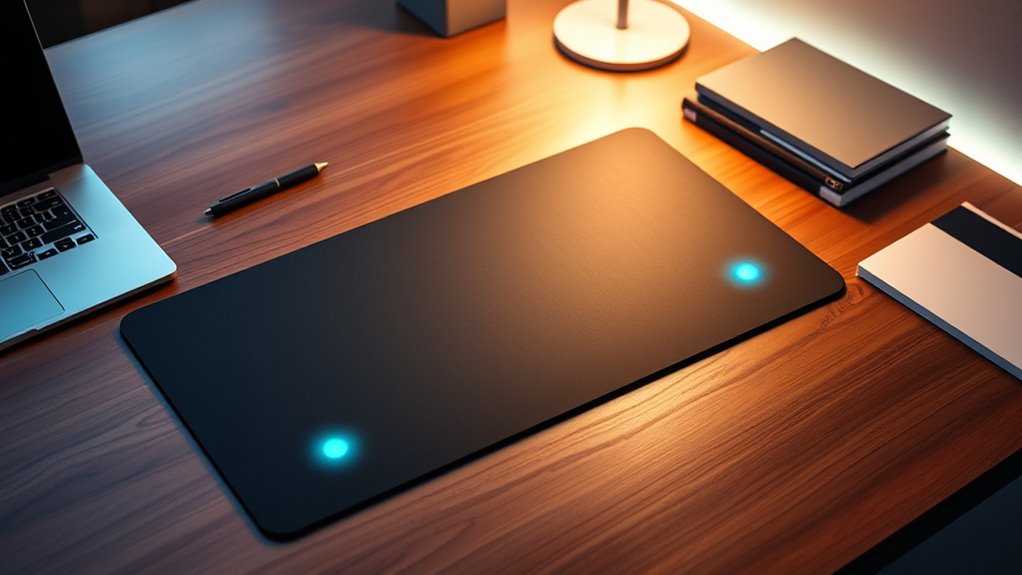
The best smart desk mats with wireless charging combine a roomy work surface with convenient phone charging, but stand designs and extra features vary. I rank the TopMade XXL Desk Mat with 15W Wireless Charging as the best overall for its clear focus on a large mat and dedicated charging. The VOVIPO 3-in-1 stands out for buyers who want several charging positions, while the AWEXEO 2nd Gen suits people who value a foldable phone stand. Your main tradeoff is whether to prioritize a simple, spacious surface or add-ons such as a stand, magnetic alignment, or RGB lighting. Read on for the full breakdown and help matching a mat to your desk and devices.

Get kitchen gear delivered free with Prime
- Fast, free delivery on millions of items
- Prime Video, Amazon Music and more included
- Member-only deals all year
Complete the kit


Key Takeaways
- Large-format coverage is the shared strength: most picks measure roughly 31.5 by 15.75 inches, so the real choice is often layout and charging features rather than basic desk coverage.
- TopMade’s 15W models make charging speed a visible differentiator: check that your phone and power adapter support the needed wireless-charging standard before treating the wattage as a likely result.
- Phone support separates the accessory-focused options: AWEXEO and the foldable- or magnetic-stand mats suit hands-free viewing better than a plain charging surface.
- Extra charging zones add flexibility but take up space: VOVIPO’s 3-in-1 design is aimed at multi-device setups, while simpler mats leave more room for mouse movement and fewer alignment points to manage.
- Surface and style choices matter alongside charging: the blue leather TopMade and RGB model offer a different desk look, but their visual features may matter less than fit, cable routing, and device compatibility.
| TopMade XXL Desk Mat with 15W Wireless Charging, Black |  | Best for a Smooth, Wipe-Clean Surface | Brand and model: TopMade HD114 | Dimensions: 31.5 × 15.7 inches | Material: PU leather | VIEW ON AMAZON | See Our Full Breakdown |
| TopMade XXL Wireless Charging Mouse Pad, 31.5 × 15.75 in, Black |  | Best Value for a Textile Surface | Brand and model: TopMade HD76 | Dimensions: 31.5 × 15.75 inches | Surface: Waterproof textile weave | VIEW ON AMAZON | See Our Full Breakdown |
| Wireless Charging Mouse Pad with Foldable Phone Holder, 31.5 × 15.8 in, Black |  | Best for Hands-Free Phone Viewing | Brand and model: abc.mat HD89 | Dimensions: 31.5 × 15.8 inches | Phone charging: Up to 15W | VIEW ON AMAZON | See Our Full Breakdown |
| TopMade XXL Wireless Charging Mouse Pad, 31.5 × 15.75 in, Black |  | Best for a Simple, Familiar Layout | Brand and model: TopMade HD76 | Dimensions: 31.5 × 15.75 inches | Wireless charging: Qi, up to 15W | VIEW ON AMAZON | See Our Full Breakdown |
| TopMade XXL Leather Desk Mat with 15W Wireless Charging, Blue |  | Best Color Option for a Leather-Look Desk | Brand and model: TopMade HD114 | Dimensions: 31.5 × 15.7 inches | Material: PU leather | VIEW ON AMAZON | See Our Full Breakdown |
| VOVIPO 3-in-1 Wireless Charging Mouse Pad, 90 × 40 cm, Black |  | Best for Three-Device Charging | Dimensions: 90 × 40 cm (34.88 × 15.75 in) | Phone output: 15W | Earbud output: 5W | VIEW ON AMAZON | See Our Full Breakdown |
| AWEXEO 2nd Gen Wireless Charging Desk Mat with Foldable Phone Stand |  | Best Premium Charging Setup | Dimensions: 90 × 40 cm (35.43 × 15.75 in) | Wireless charging: Up to 25W | Charging zones: Phone, earbuds, and smartwatch | VIEW ON AMAZON | See Our Full Breakdown |
| Large Wireless Charging Mouse Pad with Magnetic Phone Stand, 31.5 x 15.8 in |  | Best Ready-to-Use Pick | Dimensions: 31.5 × 15.8 in (800 × 400 mm) | Thickness: 0.12 in | Phone charging: 7.5W for iPhone 8–17; up to 15W for compatible Samsung, Google Pixel, and LG phones | VIEW ON AMAZON | See Our Full Breakdown |
| Large RGB Wireless Charging Mouse Pad with Phone Stand, 31.5 x 15.8 in |  | Best for RGB Desk Setups | Dimensions: 31.5 × 15.8 in (800 × 400 mm) | Thickness: 0.16 in (4 mm) | Phone charging: Up to 15W for compatible phones; 7.5W for iPhone 8–17 | VIEW ON AMAZON | See Our Full Breakdown |
| Extended Mouse Pad with Magnetic Wireless Charging and Foldable Phone Stand |  | Best for Adjustable Phone Viewing | Dimensions: 31.5 × 15.8 in | Weight: 1.7 lb | Surface: Waterproof micro-woven fabric | VIEW ON AMAZON | See Our Full Breakdown |
| smart desk mats with wireless charging | Dimensions | Warranty | Power adapter | Surface |
|---|---|---|---|---|
| TopMade XXL Desk Mat with 15W | 31.5 × 15.7 inches | — | 9V/3A adapter required for 15W; not included | — |
| TopMade XXL Wireless Charging | 31.5 × 15.75 inches | — | 9V/3A adapter required for 15W; not included | Waterproof textile weave |
| Wireless Charging Mouse Pad wi | 31.5 × 15.8 inches | 2 years | 9V/3A adapter required for 15W; not included | Waterproof micro-woven fabric |
| TopMade XXL Wireless Charging | 31.5 × 15.75 inches | — | 9V/3A adapter required for 15W; not included | Waterproof textile weave |
| TopMade XXL Leather Desk Mat w | 31.5 × 15.7 inches | 1 year | 9V/3A adapter required for 15W; not included | — |
| VOVIPO 3-in-1 Wireless Chargin | 90 × 40 cm (34.88 × 15.75 in) | 90 days | Not included; 25W or higher recommended | Water-resistant and scratch-resistant |
| AWEXEO 2nd Gen Wireless Chargi | 90 × 40 cm (35.43 × 15.75 in) | 1 year | — | — |
| Large Wireless Charging Mouse | 31.5 × 15.8 in (800 × 400 mm) | 12 months | — | Waterproof, smooth, with stitched edges |
| Large RGB Wireless Charging Mo | 31.5 × 15.8 in (800 × 400 mm) | 12 months | — | — |
| Extended Mouse Pad with Magnet | 31.5 × 15.8 in | 24 months | — | Waterproof micro-woven fabric |
More Details on Our Top Picks
TopMade XXL Desk Mat with 15W Wireless Charging, Black
I’d pick this version for a desk where a smooth, water-resistant work surface matters as much as charging. Its PU leather top is easy to wipe down, while the 31.5 × 15.7-inch footprint leaves room for a laptop, keyboard, and mouse. Built-in Qi zones add charging for a compatible phone and AirPods case without taking up a separate stand or pad. Compared with the textile-surface TopMade HD76, this HD114 favors a slicker, leather-like feel over a woven texture. The tradeoff is practical: reaching 15W charging requires a separate 9V/3A adapter, and an Apple Watch cannot charge here. Choose it for a tidy, easy-care desk; skip it if you want a textile mouse surface or one pad for every wearable.
Pros:- Large surface fits a laptop, keyboard, and mouse
- PU leather surface is waterproof and easy to wipe clean
- Built-in Qi charging zones serve a compatible phone and AirPods case
- Non-slip base helps keep the mat steady
Cons:- 9V/3A adapter for 15W charging is not included
- Does not support Apple Watch charging
Best for: People who want a large, easy-to-clean PU leather work surface with built-in charging for a Qi phone and compatible AirPods
Not ideal for: Apple Watch owners and buyers who want the required 9V/3A adapter included
- Brand and model:TopMade HD114
- Dimensions:31.5 × 15.7 inches
- Material:PU leather
- Wireless charging:Qi, up to 15W
- Charging compatibility:Qi-enabled devices and compatible AirPods wireless charging cases
- Power adapter:9V/3A adapter required for 15W; not included
- Included cable:6.56-foot USB-C to USB-C woven cable
- Color:Black
- Support:12 months of technical support
Our verdict“Choose this HD114 if a wipe-clean PU leather surface is your priority and you already have, or are willing to supply, the required power adapter.”
TopMade XXL Wireless Charging Mouse Pad, 31.5 × 15.75 in, Black
This TopMade HD76 is the straightforward pick for buyers who want a large textile mouse surface and charging zones without adding a phone stand. The waterproof weave gives it a different feel from the PU leather TopMade HD114, while its non-slip rubber base helps the mat stay put during everyday mouse movement. Its Qi zones charge compatible phones and AirPods cases, and the included USB-C cable saves a separate cable purchase. Compared with the foldable-stand abc.mat HD89, the HD76 keeps the desk surface simpler but gives up angled phone viewing. The key compromise is shared across several mats here: the 9V/3A adapter is not included, despite the up-to-15W charging claim. It also cannot charge an Apple Watch.
Pros:- 31.5 × 15.75-inch surface accommodates a keyboard, mouse, and desk items
- Waterproof textile weave is easy to wipe clean
- Qi charging areas support compatible phones and AirPods cases
- Non-slip rubber base and stitched edges support stable everyday use
Cons:- 9V/3A adapter needed for 15W charging is not included
- No phone stand for hands-free viewing
- Not compatible with Apple Watch
Best for: Desk users who prefer a woven mouse surface and want phone and compatible AirPods charging across a broad workspace
Not ideal for: People who want a built-in angled phone stand, Apple Watch charging, or a complete charging setup with adapter included
- Brand and model:TopMade HD76
- Dimensions:31.5 × 15.75 inches
- Surface:Waterproof textile weave
- Base:Non-slip rubber
- Wireless charging:Up to 15W
- Charging compatibility:Qi-enabled devices and compatible AirPods wireless charging cases
- Power adapter:9V/3A adapter required for 15W; not included
- Included cable:6.56-foot USB-C to USB-C cable
- Support:1 year of technical support
Our verdict“Choose the HD76 if you want a broad textile mouse pad with simple charging zones, and do not need a phone stand or included wall adapter.”
Wireless Charging Mouse Pad with Foldable Phone Holder, 31.5 × 15.8 in, Black
The abc.mat HD89 is the one to choose when charging and viewing a phone belong in the same desk setup. Its foldable phone stand holds the phone at an angle, and the mat also has a charging area for compatible AirPods cases. That gives it a clearer use case than the stand-free TopMade HD76, though it adds a positioning constraint: the phone must sit vertically in stand mode for proper charging alignment. The waterproof micro-woven surface and rubber base cover the basics for a large mouse mat, while the two-year warranty is longer than the one-year support listed for the TopMade HD76. A 9V/3A adapter is still needed for the phone’s maximum 15W output and is not included. Skip it if your phone use is mostly flat on the desk.
Pros:- Foldable holder supports angled phone viewing
- Phone and compatible AirPods cases can charge simultaneously
- Waterproof micro-woven surface is easy to clean
- Two-year warranty
Cons:- Phone needs vertical placement in stand mode for correct charging alignment
- 9V/3A adapter required for 15W phone charging is not included
- Charging stand takes a more specific phone position than a flat charging zone
Best for: People who keep a compatible phone visible for calls, messages, or video while working and want charging built into the stand
Not ideal for: Buyers who prefer to lay their phone flat while charging or do not need an angled phone holder
- Brand and model:abc.mat HD89
- Dimensions:31.5 × 15.8 inches
- Phone charging:Up to 15W
- AirPods charging:5W
- Surface:Waterproof micro-woven fabric
- Base:Non-slip rubber
- Included cable:6.56-foot braided USB-C cable
- Power adapter:9V/3A adapter required for 15W; not included
- Warranty:2 years
Our verdict“Pick the HD89 over the stand-free TopMade HD76 if you want your phone propped up and charging within reach while you work.”
TopMade XXL Wireless Charging Mouse Pad, 31.5 × 15.75 in, Black
This TopMade HD76 is a sensible choice for buyers who want the familiar layout of an extended textile mouse pad: a broad surface, charging zones for a phone and compatible AirPods, and no stand to position or fold away. Its waterproof woven top and grippy rubber base suit a keyboard-and-mouse setup where the mat should stay steady and clean up easily. Compared with the abc.mat HD89, it gives up hands-free phone viewing in favor of a flatter, less specialized workspace. It is also closely matched to the other HD76 listing in this roundup, so the deciding factors are the exact listing and its support terms rather than a different feature set. The main catch remains the separately supplied 9V/3A adapter; Apple Watch charging is unsupported.
Pros:- Large footprint fits a keyboard, mouse, and other desk items
- Waterproof textile surface is easy to clean
- Charging zones support compatible phones and AirPods cases
- Non-slip rubber base helps limit movement
Cons:- 9V/3A adapter for 15W charging is not included
- No foldable phone stand
- Not compatible with Apple Watch
Best for: People who want a large, stand-free textile mat for a keyboard and mouse, with Qi charging built into the surface
Not ideal for: Phone users who want an angled viewing stand, Apple Watch owners, and buyers who need an adapter in the box
- Brand and model:TopMade HD76
- Dimensions:31.5 × 15.75 inches
- Wireless charging:Qi, up to 15W
- Charging areas:Phone and compatible AirPods cases
- Surface:Waterproof textile weave
- Base:Non-slip rubber
- Included cable:6.56-foot USB-C to USB-C cable
- Power adapter:9V/3A adapter required for 15W; not included
- Support:1 year of technical support
Our verdict“Choose this HD76 if you want a no-frills textile charging mat and would rather avoid the stand mechanism on the abc.mat HD89.”
TopMade XXL Leather Desk Mat with 15W Wireless Charging, Blue
This blue TopMade HD114 is for buyers who want the wipe-clean feel of PU leather without defaulting to a black desk mat. It shares the black HD114’s 31.5 × 15.7-inch footprint and Qi charging for a compatible phone and AirPods case, so the color and finish—not a different charging layout—set it apart. Compared with the textile TopMade HD76, its PU leather surface is smoother and easier to wipe down, but buyers who prefer a fabric-like mouse feel may favor that model. The included woven USB-C cable is useful, though it does not replace the separately required 9V/3A adapter for up to 15W charging. Like the other TopMade options here, it does not charge an Apple Watch.
Pros:- Blue PU leather finish offers an alternative to the black mats
- Large surface fits a laptop, keyboard, and mouse
- Waterproof top is easy to wipe clean
- Includes a 6.56-foot woven USB-C cable
Cons:- 9V/3A adapter required for 15W charging is not included
- Does not support Apple Watch charging
- PU leather surface may not suit buyers who prefer woven fabric
Best for: People who want a large, wipe-clean PU leather charging mat in blue to coordinate with a colorful desk setup
Not ideal for: Buyers who want a textile surface, Apple Watch charging, or a 15W-ready adapter included
- Brand and model:TopMade HD114
- Dimensions:31.5 × 15.7 inches
- Material:PU leather
- Wireless charging output:Up to 15W
- Compatibility:Qi-enabled devices and compatible AirPods wireless charging cases
- Power adapter:9V/3A adapter required for 15W; not included
- Included cable:6.56-foot USB-C to USB-C woven cable
- Color:Blue
- Warranty:1 year
Our verdict“Choose the blue HD114 if you want the same leather-surface charging setup as the black HD114 with a more colorful desk finish.”
VOVIPO 3-in-1 Wireless Charging Mouse Pad, 90 × 40 cm, Black
The VOVIPO makes the most sense if you want one broad mat to charge a Qi-enabled phone, earbuds, and smartwatch without adding a separate multi-device dock. Its 90 × 40 cm surface gives a keyboard and mouse plenty of room, while the water-resistant, scratch-resistant finish is suited to daily desk use. Compared with the abc.mat HD117, VOVIPO adds a smartwatch charging zone, but it does not include a power adapter, so the charging setup costs extra effort and requires a 25W-or-higher adapter for fast charging. The HD117 is a simpler choice for phone-and-earbud charging because its adapter and cable are included. VOVIPO’s stated outputs are modest for earbuds and watches, and the 90-day warranty is shorter than the one-year coverage offered by several alternatives here.
Pros:- Charges compatible phones, earbuds, and smartwatches
- 90 × 40 cm surface fits a keyboard, mouse, and laptop
- Non-slip rubber base helps limit movement
- Water-resistant, scratch-resistant surface
Cons:- Power adapter is not included; 25W or higher is recommended for fast charging
- Charging depends on Qi compatibility
- 90-day warranty is shorter than several competing options
Best for: Desk users with Qi-compatible phone, earbuds, and smartwatch who want all three charging zones across a full-size work surface.
Not ideal for: Buyers who want a ready-to-use kit, need confirmed fast-charging performance, or prefer a longer warranty.
- Dimensions:90 × 40 cm (34.88 × 15.75 in)
- Phone output:15W
- Earbud output:5W
- Smartwatch output:2.5W
- Compatibility:Qi-enabled devices
- Materials:Micro-braid polyester surface with rubber base
- Surface:Water-resistant and scratch-resistant
- Power adapter:Not included; 25W or higher recommended
- Warranty:90 days
Our verdict“Choose VOVIPO if three-device charging matters more than an included adapter or extended warranty.”
AWEXEO 2nd Gen Wireless Charging Desk Mat with Foldable Phone Stand
AWEXEO is the most feature-complete pick here for someone who wants a charging mat to double as a phone-viewing station. It combines three charging zones with an adjustable magnetic stand, and the included 35W adapter means you do not have to source a separate power brick. A detachable charging panel also gives the setup more flexibility than the fixed charging surfaces on the VOVIPO 3-in-1 and abc.mat HD117. The protection features and one-year warranty add reassurance, while the microfiber leather surface is waterproof and scratch-resistant. The tradeoff is a crowded feature set that depends on device compatibility: the listing does not specify cable details or precise compatibility, so buyers should check their devices before relying on every charging zone. Its 90 × 40 cm footprint also needs a generously sized desk.
Pros:- Three zones support simultaneous phone, earbud, and smartwatch charging
- 35W adapter is included
- Adjustable magnetic phone stand supports multiple viewing orientations
- Detachable charging panel and overload, temperature, and foreign-object protection
Cons:- Wireless charging requires compatible devices, but compatibility details are not specified
- No charging cable details are provided
- Large 90 × 40 cm footprint may crowd smaller desks
Best for: Desk-based multitaskers who charge a phone, earbuds, and smartwatch while keeping a phone upright for calls or reference.
Not ideal for: Minimalist setups, compact desks, or buyers who need clearly documented device and cable compatibility before purchase.
- Dimensions:90 × 40 cm (35.43 × 15.75 in)
- Wireless charging:Up to 25W
- Charging zones:Phone, earbuds, and smartwatch
- Included adapter:35W
- Material:Microfiber leather
- Stand:Adjustable magnetic phone stand
- Charging panel:Detachable magnetic panel
- Protection:Overload, temperature, and foreign-object protection
- Warranty:1 year
Our verdict“Pick AWEXEO for the broadest charging-and-phone-stand setup, provided its unspecified compatibility works with your devices.”
Large Wireless Charging Mouse Pad with Magnetic Phone Stand, 31.5 x 15.8 in
This abc.mat model is a practical choice for buyers who want phone and earbud charging without shopping separately for a power adapter. It includes a 20W USB-C adapter and cable, plus a magnetic phone-charging area and a dedicated AirPods zone. The HD117 is less expansive in device coverage than the VOVIPO 3-in-1, which also lists smartwatch charging, but its included power accessories make the basic setup more straightforward. Its smooth, waterproof surface, stitched edges, and non-slip natural-rubber base cover the everyday desk-mat essentials. Phone charging varies by device—7.5W for the listed iPhone range and up to 15W for compatible Android phones—and magnetic charging requires a compatible phone or case. Buyers seeking a stand for adjustable viewing should compare it with the stand-equipped abc.mat HD101.
Pros:- Includes a 20W USB-C adapter and 6.6-foot cable
- Magnetic phone charging plus a dedicated compatible AirPods area
- Waterproof surface with stitched edges
- Non-slip natural-rubber base
Cons:- Magnetic phone charging requires a compatible phone or case
- No smartwatch charging zone is listed
- Phone charging output varies by device
Best for: People with a compatible magnetic-charge phone and wireless-charging AirPods who want the adapter and cable included.
Not ideal for: Users who need a smartwatch charging zone, an adjustable phone stand, or charging for phones without compatible magnetic alignment.
- Dimensions:31.5 × 15.8 in (800 × 400 mm)
- Thickness:0.12 in
- Phone charging:7.5W for iPhone 8–17; up to 15W for compatible Samsung, Google Pixel, and LG phones
- Earbud charging:5W for compatible AirPods
- Included accessories:6.6-foot USB-C cable, 20W USB-C adapter, and user manual
- Surface:Waterproof, smooth, with stitched edges
- Base:Non-slip natural rubber
- Warranty:12 months
Our verdict“Choose the HD117 for a straightforward phone-and-AirPods charging mat with its power accessories in the box.”
Large RGB Wireless Charging Mouse Pad with Phone Stand, 31.5 x 15.8 in
The abc.mat HD101 earns its place for buyers who want RGB lighting and wireless charging on the same extended mat. Its 24 lighting modes give it a more gaming-oriented look than the understated abc.mat HD117, while a phone stand, phone charging, and an AirPods zone make it more than a decorative pad. The 20W adapter and USB-C cable are included, so the core charging setup is ready without another accessory purchase. The large 31.5 × 15.8-inch footprint can fit a full-size keyboard and mouse, but it needs a desk at least 32 inches wide and is not suited to portable use. Compared with the foldable-stand B0G645HQC1, this model adds lighting but does not list a fold-flat stand or a 360-degree adjustment feature.
Pros:- 24 RGB lighting modes
- Combines phone stand, phone charging, and compatible AirPods charging
- 20W USB-C adapter and cable are included
- Non-slip rubber base and stitched edges
Cons:- Requires a desk at least 32 inches wide
- Not recommended for portable use
- RGB lighting adds a feature that may be unwanted in a restrained workspace
Best for: Gamers and RGB-focused desk builders with a spacious permanent setup who want charging and lighting in one mat.
Not ideal for: Small-desk owners, frequent travelers, or users who prefer a plain surface without lighting effects.
- Dimensions:31.5 × 15.8 in (800 × 400 mm)
- Thickness:0.16 in (4 mm)
- Phone charging:Up to 15W for compatible phones; 7.5W for iPhone 8–17
- Earbud charging:5W for compatible AirPods
- RGB lighting:24 modes
- Included accessories:20W USB-C adapter, 6.6-foot USB-C cable, and user manual
- Base:Non-slip rubber
- Warranty:12 months
Our verdict“Choose the HD101 if RGB is part of your desk setup; skip it if you want a compact or unlit charging mat.”
Extended Mouse Pad with Magnetic Wireless Charging and Foldable Phone Stand
This extended mat is the strongest fit for buyers who regularly keep a phone visible while it charges. Its foldable magnetic stand rotates 360 degrees and folds flat, giving it more viewing flexibility than the fixed phone-charging area on the abc.mat HD117. The 31.5 × 15.8-inch waterproof micro-woven surface, reinforced stitching, and non-slip rubber base cover the core desk-mat needs, while the included 20W adapter and braided USB-C cable make setup simpler. It charges a phone and compatible earbuds at once, though listed iPhone output is limited to 7.5W; compatible Android devices can reach up to 15W. Unlike the VOVIPO 3-in-1, it does not list a smartwatch zone, so it is better for a two-device routine than an all-device charging station.
Pros:- Foldable magnetic phone stand rotates 360 degrees
- Can charge a phone and compatible earbuds simultaneously
- 20W adapter and braided USB-C cable are included
- Waterproof surface, non-slip base, and reinforced stitching
Cons:- Listed iPhone charging is limited to 7.5W
- Earbud charging requires a compatible wireless charging case
- Large 31.5 × 15.8-inch footprint may not suit smaller desks
Best for: Remote workers and video-call users who want to charge a compatible phone while adjusting its angle or rotating it between tasks.
Not ideal for: People who need smartwatch charging, faster-than-7.5W listed iPhone charging, or a smaller mat for a compact desk.
- Dimensions:31.5 × 15.8 in
- Weight:1.7 lb
- Surface:Waterproof micro-woven fabric
- Base:Non-slip rubber
- Phone charging:7.5W for iPhone; up to 15W for compatible Samsung, Google Pixel, and other Qi devices
- Earbud charging:5W for compatible AirPods with wireless charging case
- Included accessories:20W adapter, 6.56-foot braided USB-C cable, and user manual
- Phone stand:Foldable magnetic stand with 360-degree rotation
- Warranty:24 months
Our verdict“Choose this mat if adjustable phone positioning matters more than smartwatch charging or a compact footprint.”

How We Picked
I compared these mats around the job implied by the search: giving a desk a broad, usable surface while adding practical wireless charging. I weighed the stated charging setup and wattage, whether a phone stand or magnetic alignment is included, overall mat dimensions, and how much the extra hardware might affect mouse space or everyday placement. I also considered material and appearance, since a desk mat stays in view and needs to suit the workspace.
The ranking favors options that balance a large work surface with clearly described charging features and useful everyday additions, rather than rewarding feature count alone. A multi-device layout can be a better fit for some desks, but it does not automatically outrank a simpler mat if the extra zones are unnecessary. Similar TopMade listings are differentiated by stated wattage, finish, and product presentation; buyers should verify the exact model and included accessories before ordering. I also treat charging claims as dependent on a compatible phone, adapter, and placement, not as guaranteed performance for every setup.
| smart desk mats with wireless charging | Brand and model | Surface | Base |
|---|---|---|---|
| TopMade XXL Desk Mat with 15W | TopMade HD114 | — | — |
| TopMade XXL Wireless Charging | TopMade HD76 | Waterproof textile weave | Non-slip rubber |
| Wireless Charging Mouse Pad wi | abc.mat HD89 | Waterproof micro-woven fabric | Non-slip rubber |
| TopMade XXL Wireless Charging | TopMade HD76 | Waterproof textile weave | Non-slip rubber |
| TopMade XXL Leather Desk Mat w | TopMade HD114 | — | — |
| VOVIPO 3-in-1 Wireless Chargin | — | Water-resistant and scratch-resistant | — |
| AWEXEO 2nd Gen Wireless Chargi | — | — | — |
| Large Wireless Charging Mouse | — | Waterproof, smooth, with stitched edges | Non-slip natural rubber |
| Large RGB Wireless Charging Mo | — | — | Non-slip rubber |
| Extended Mouse Pad with Magnet | — | Waterproof micro-woven fabric | Non-slip rubber |
Factors to Consider When Choosing Smart Desk Mats With Wireless Charging
Before choosing, map out how the mat will fit your desk and how you plan to charge. A wireless charging feature only helps when the device, power source, and placement all work together; stand and lighting features can also change how much usable surface remains.
Measure the usable desk area, not just the mat
A stated size describes the mat’s footprint, not the room left for a keyboard, monitor base, or desk accessories. Measure the width and depth available, then mark the charging zone and mouse area to see whether they would overlap your normal work positions. A large mat can make a desk feel organized, but it can also cover cable ports or crowd a shallow desktop. Check whether the listed dimensions include raised edges, a phone stand, or other attachments. Buyers with compact desks may be better served by a simpler layout than by choosing the widest option available.
Treat wattage as one part of charging compatibility
A listed 15W output does not mean every phone will charge at that rate. The phone’s wireless charging support, the pad’s supported standard, and the power adapter and cable all affect the result. Before buying, check whether the product includes a power adapter or expects you to supply one, and confirm its input requirements. A mismatched adapter may limit charging or leave a feature unusable. If you mainly want overnight or occasional top-ups, a dependable, compatible setup may matter more than the highest advertised output.
Choose a phone stand for how you use your screen
A stand is useful when you read notifications, follow calls, or keep a screen visible while working, but it changes where the phone sits on the mat. Foldable designs can be tucked away when not needed, while magnetic stands may make attachment and alignment easier for compatible devices. Check whether the stand suits your phone size and case, and whether it can hold the phone at a useful viewing angle. A stand can also compete with mouse or keyboard space if the charging area sits in the wrong place. Skip the extra hardware if your phone usually stays in a pocket or elsewhere on the desk.
Think through multi-device charging before paying for extra zones
A 3-in-1 layout can reduce charger clutter when you regularly charge several compatible devices in one place. It may be less useful if your other devices do not support the mat’s charging method or if their positions conflict with your normal desk layout. Check which devices can charge at once and whether the product specifies shared power limits. A multi-zone surface can also require more careful placement than a single charging area. Match the number of charging positions to devices you actually use at your desk, rather than treating more zones as automatically better.
Balance surface feel and appearance with daily maintenance
The mat is also a work surface for your hands, keyboard, and mouse, so material and finish affect daily comfort and upkeep. A leather-style finish or colored surface may suit a styled workspace, while an RGB edge can add lighting but also introduces another cable and visual element. Look for care instructions before assuming a surface can be wiped with any cleaner. Consider how dust, spills, and frequent mouse movement will show on the color and texture you choose. A striking finish is a weaker fit if it makes the mat harder to clean or distracts from your screen.
Check cable routing and desk placement before committing
Wireless charging removes the cable from the phone, not from the mat. The charging surface still needs power, and its cable can cross a desk edge or interfere with a keyboard tray. Check where the cable exits and whether your outlet or USB power source can reach without tension. If you use a standing desk, leave enough slack for the desk’s full range of motion. A mat that fits on paper may still be awkward if its charging area ends up beneath a monitor stand or too far from your usual reach.
Frequently Asked Questions
Will a 15W wireless charging mat charge my phone at 15W?
Not necessarily: the phone must support the relevant wireless charging rate, and the mat’s power source must meet its input requirements. A phone case, magnetic alignment, and how the phone sits on the charging area can also affect charging. Check the phone and mat specifications together rather than relying on the number in the product name. Confirm whether an adapter is included or sold separately. If your phone supports a lower rate, the mat may still charge it, but at the phone’s supported limit.
Can I use a magnetic phone stand with any phone or case?
No. Magnetic attachment depends on the phone, case, and stand design, and some cases may weaken the hold or prevent proper alignment. Check the product’s compatibility details for your exact phone model and case setup. A foldable, non-magnetic stand may be a more flexible choice if you switch phones or use a bulky case. Also check whether the stand supports charging while holding the phone, rather than assuming the mounting feature and charging zone work together. If compatibility is unclear, treat the magnetic feature as a bonus rather than the main reason to buy.
Is a 3-in-1 charging mat worth choosing over a single charging zone?
It makes sense if you regularly charge multiple compatible devices at your desk and want to reduce separate charging pads. If you only charge a phone, extra zones can take up useful space without changing your routine. Check whether the mat supports simultaneous charging and whether power is shared across devices. Make sure the charging locations will not sit under your keyboard or mouse hand. The VOVIPO’s multi-device focus is most relevant to a desk setup that can make use of those zones.
Will these large mats fit a smaller desk?
Many options in this lineup are around 31.5 inches wide and 15.75 inches deep, which can occupy much of a compact desk. Measure the clear desktop area, including space needed for monitor stands, desk edges, and cable access. Leave room for your mouse to move freely and for the charging area to remain reachable. A phone stand or RGB edge can add practical or visual bulk even when the base dimensions seem suitable. If the mat crowds your controls, a simpler or smaller desk surface may be a better fit than squeezing in every feature.
What should I check before ordering a wireless charging desk mat?
Verify the exact model name, dimensions, charging wattage, supported devices, and whether a power adapter is included. Similar TopMade listings appear with different wording and finishes, so compare the details rather than assuming they describe identical bundles. Check whether the stand is foldable or magnetic and whether any accessories shown are included. Review the power cable’s location against your desk layout. These checks help avoid buying a mat whose charging zone, accessories, or footprint do not match your setup.
Conclusion
For most buyers, I would start with the TopMade XXL Desk Mat with 15W Wireless Charging as the best overall choice: it puts a spacious work surface and a clearly stated charging feature at the center. For best value, compare the plain TopMade XXL wireless charging listings and choose the one whose exact dimensions, finish, and included parts match your needs; the names overlap, so verify the listing carefully. The VOVIPO 3-in-1 is my best premium-style pick for a multi-device desk, while the AWEXEO 2nd Gen is the best fit for beginners who want a foldable phone stand without making a multi-zone layout the main attraction. Choose the blue leather TopMade for a more distinctive surface, or the RGB and magnetic-stand options when lighting or hands-free phone viewing is a specific priority. If you want the simplest setup, skip extra stand and lighting features and focus on fit, power compatibility, and clear desk space.