
If your KitchenAid Artisan Series 5 Quart Tilt Head Stand Mixer refuses to tilt back, it can hinder your baking routine. This common issue often results from a stuck or malfunctioning tilt mechanism, but with some careful troubleshooting, you can resolve it yourself.
In this guide, we’ll walk you through practical steps to identify the cause, fix the problem safely, and get your mixer working smoothly again. Always prioritize safety and proper handling to avoid damage or injury.
Key Takeaways
| Identify the cause | Determine if the tilt mechanism is stuck or if a part is damaged. |
| Safety first | Unplug the mixer before attempting repairs to prevent electrical hazards. |
| Check for obstructions | Look for debris or buildup blocking the tilt head movement. |
| Inspect the tilt release lever | Ensure the lever is functioning correctly and not broken. |
| Lubricate or replace parts | Lubricate moving parts or replace damaged components for smooth operation. |

KitchenAid Artisan Series 5 Quart Tilt Head Stand Mixer with Pouring Shield KSM150PS, Milkshake
Built to take it all on with the durable and built-to-last metal construction, and 59 touchpoints around the...
As an affiliate, we earn on qualifying purchases.
Gather Necessary Tools and Safety Precautions
- Unplug your KitchenAid mixer from the power outlet to ensure safety during repairs.
- Gather basic tools: a Phillips screwdriver, flat-head screwdriver, and possibly a replacement part if needed.
- Wear protective gloves if you plan to handle internal components.
- Work in a well-lit, flat surface area to prevent accidents.
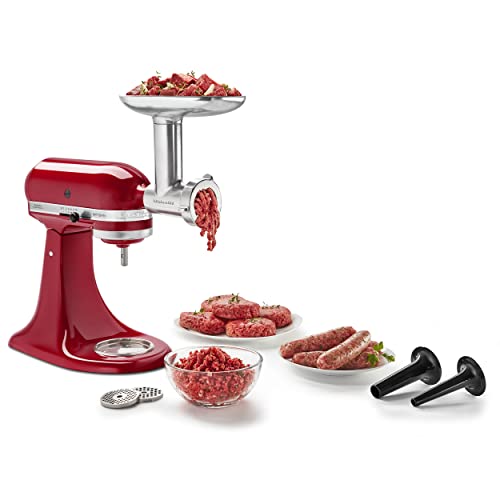
KitchenAid Stand Mixer Attachment, Food Grinder KSMMGA, Metal Food Grinder
Connect to any household KitchenAid Stand Mixer power hub and use the power of the motor to run...
As an affiliate, we earn on qualifying purchases.
Remove the Mixer’s Top Cover and Access Internal Components
- Using a Phillips screwdriver, remove the screws securing the top cover of the mixer. These are typically located at the back or sides of the mixer head.
- Carefully lift off the cover to expose the internal tilt mechanism.
- Inspect for any obvious signs of damage, such as broken or bent parts, or accumulated debris.
Identify and Clear Obstructions or Damage
- Check the tilt release lever and its linkage for any signs of wear or damage. Ensure it moves freely and is not stuck.
- Look for accumulated dough, dust, or debris that may be obstructing the tilt movement and clean it out gently.
- If the gear or internal linkage appears worn or broken, consider replacing these parts or consulting a repair specialist.
Lubricate Moving Parts or Replace Faulty Components
- If parts appear dry or stiff, apply a small amount of food-grade lubricant to the moving joints and gear areas.
- Test the tilt mechanism by manually moving the head after lubrication. If it moves smoothly, reassemble carefully.
- If lubrication doesn’t resolve the issue or parts are damaged, replace the broken components with genuine KitchenAid replacement parts.
Reassemble and Test Your Mixer
- Replace the top cover and tighten screws securely.
- Plug in your mixer and test the tilt head mechanism. It should tilt back smoothly without resistance.
- If the problem persists, double-check all internal parts or seek professional repair assistance.
The Products in This Guide

KitchenAid Artisan Series 5 Quart Tilt Head Stand Mixer
- ✔ Weight: 26 pounds
- ✔ Dimensions: 14 x 8 x 14 inches
- ✔ Color options: Multiple

KitchenAid Stand Mixer Attachment
- ✔ Weight: 2 pounds
- ✔ Dimensions: 8 x 4 x 4 inches
- ✔ Material: Metal
KitchenAid Artisan Series 5 Quart Tilt Head Stand Mixer
The KitchenAid Artisan Series 5 Quart Tilt Head Stand Mixer is built with durable metal construction and offers 59 touchpoints for thorough mixing. Its tilt-head design provides easy access to the bowl, making it simple to add ingredients. If your mixer won’t tilt back, troubleshooting the tilt mechanism can restore full functionality.
Pros:
- Sturdy metal build
- Easy tilt head access
- Powerful 10-speed motor
- Generous 5-quart bowl
Cons:
- Potential for tilt mechanism issues
- Requires careful handling during repairs
- Slightly heavier than some models
Best for: Home bakers needing a reliable, versatile stand mixer
Not ideal for: Those seeking a lightweight or compact option
Bottom line: A robust mixer that can be easily restored with basic troubleshooting.
KitchenAid Stand Mixer Attachment
This KitchenAid Metal Food Grinder attachment expands your mixer’s capabilities, making it easy to grind meat, vegetables, and more. It connects directly to the power hub, providing a powerful and versatile addition to your kitchen arsenal.
Pros:
- Sturdy metal construction
- Multiple grinding plates
- Easy to attach and clean
- Includes sausage stuffer tubes
Cons:
- Requires separate purchase
- Additional storage needed
- Power dependency on mixer
Best for: Home cooks who want fresh ground ingredients
Not ideal for: Those who prefer pre-ground ingredients or don’t want attachments
Bottom line: A durable attachment that makes fresh grinding easy and efficient.
Frequently Asked Questions
Why won’t my KitchenAid mixer tilt back?
Common reasons include a jammed tilt mechanism, debris blocking movement, or damaged parts like the tilt release lever or gear assembly.
Is it safe to attempt fixing the tilt mechanism myself?
Yes, as long as you unplug the mixer first and follow proper disassembly procedures. If unsure, consult a professional.
How do I prevent the tilt head from getting stuck again?
Regularly clean the tilt area, avoid overloading the mixer, and lubricate moving parts if needed. Promptly address any obstructions.
Can I replace the tilt mechanism or internal parts myself?
Yes, genuine replacement parts are available, and many DIY enthusiasts successfully replace broken components following the manufacturer’s instructions.
When should I seek professional repair?
If the internal gear or linkage is severely damaged, or if you’re uncomfortable with disassembly, professional repair is recommended.
Restore Your Mixer’s Tilt Function for Seamless Baking
Fixing a KitchenAid stand mixer that won’t tilt back is often straightforward with the right approach. By carefully inspecting, cleaning, lubricating, or replacing faulty parts, you can save time and money while extending your mixer’s lifespan. Remember to prioritize safety and consult professional help if needed, ensuring your mixer continues to serve you well for years to come.
Affiliate disclosure: As an Amazon Associate we earn from qualifying purchases. Prices and availability are accurate as of the time of publishing.