For a classroom lab, the right iMac is less about having the most impressive screen and more about giving students a dependable workstation that fits the curriculum, room, and support plan. My leading choice is the 2024 silver iMac with M4: it combines current-generation performance, 16GB unified memory, a sharp 4.5K display, and built-in video-conferencing hardware. The blue M4 model offers a similar modern setup, while the renewed 2021 M1 iMac is a lower-spec alternative for labs with lighter workloads and a tighter equipment plan.

Get kitchen gear delivered free with Prime
- Fast, free delivery on millions of items
- Prime Video, Amazon Music and more included
- Member-only deals all year
The main tradeoff is between current capability and purchase lifecycle versus lower-cost refurbished hardware—I’m not using price as a ranking factor here. The M4 models have 16GB memory and newer connectivity, but their 256GB SSDs may need a file-management plan. The older renewed iMacs offer useful display space, yet carry age, memory, operating-system, and warranty considerations that matter more when a device must serve a whole class for years.
Complete the kit


Key Takeaways
- The silver 2024 M4 iMac ranks first for a general-purpose lab because it pairs 16GB unified memory with a current chip, 4.5K display, and modern classroom communication hardware.
- The blue 2024 M4 model has a closely comparable configuration; choose between the two based on the actual port and model configuration your school needs, not the color alone.
- The renewed 2024 M4 is a way to consider the newer platform in a refurbished condition, but its 90-day limited warranty changes the support risk for a shared lab.
- The 2021 M1 renewed iMac is better matched to basic productivity and media work than demanding creative courses, with 8GB memory and 256GB storage as fixed constraints.
- The 2014 27-inch iMac has the largest screen and listed storage, but its older processor, 8GB memory ceiling, macOS Sierra listing, and renewed status make it the most cautious choice for a new lab.
| Apple 2024 iMac 24-inch All-in-One Desktop with M4 Chip, 16GB Memory, 256GB SSD, Silver | 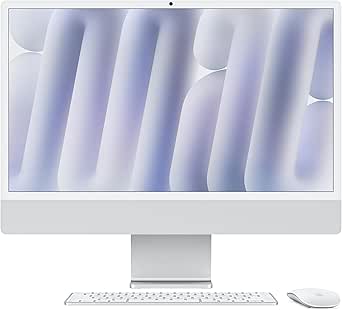 | Best Overall for a Modern Classroom Lab | Model year: 2024 | Processor: Apple M4, 8-core CPU | Graphics: 8-core GPU | VIEW ON AMAZON | See Our Full Breakdown |
| Apple 2024 iMac All-in-One Desktop Computer with M4 Chip, 8-Core CPU and GPU, 24-Inch Retina Display, 16GB Memory, 256GB SSD, Blue |  | Best Alternative M4 Configuration | Model year: 2024 | Processor: Apple M4, 8-core CPU | Graphics: 8-core GPU | VIEW ON AMAZON | See Our Full Breakdown |
| Apple 2024 iMac with M4 Chip, 24-inch Display, 16GB Memory, 256GB SSD, Silver (Renewed) |  | Best Renewed M4 Option | Model year: 2024 | Processor: Apple M4, 8-core, listed at 3.2 GHz | Display: 24-inch 4.5K Retina, 4480 × 2520, 218 ppi | VIEW ON AMAZON | See Our Full Breakdown |
| Apple iMac 24-inch (2021) with M1 Chip, 8GB RAM, 256GB SSD, Silver (Renewed) |  | Best for Basic Tasks on a Refurbished Fleet Plan | Model year: 2021 | Processor: Apple M1, 8-core CPU | Graphics: 7-core integrated GPU | VIEW ON AMAZON | See Our Full Breakdown |
| Apple iMac 27-inch (2014), 8GB RAM, 1TB Storage, Silver (Renewed) |  | Best for a Large Screen on a Legacy-Software Check | Model year: 2014 | Processor: Intel Core i5-4690, 3.5 GHz, 4 cores | Graphics: AMD Radeon R9 M290 X, 2GB dedicated video memory | VIEW ON AMAZON | See Our Full Breakdown |
| imac for classroom lab | Model year | Processor | Display | Memory |
|---|---|---|---|---|
| Apple 2024 iMac 24-inch All-in | 2024 | Apple M4, 8-core CPU | 24-inch 4.5K Retina, 4480 × 2520 | 16GB unified memory |
| Apple 2024 iMac All-in-One Des | 2024 | Apple M4, 8-core CPU | 24-inch 4.5K Retina, 500 nits, up to 1 billion colors | 16GB |
| Apple 2024 iMac with M4 Chip | 2024 | Apple M4, 8-core, listed at 3.2 GHz | 24-inch 4.5K Retina, 4480 × 2520, 218 ppi | 16GB unified memory |
| Apple iMac 24-inch | 2021 | Apple M1, 8-core CPU | 24-inch 4.5K Retina, 4480 × 2520 | 8GB |
| Apple iMac 27-inch | 2014 | Intel Core i5-4690, 3.5 GHz, 4 cores | 27-inch IPS LCD, 5120 × 2880 | 8GB DDR3; listed maximum 8GB |
More Details on Our Top Picks
Apple 2024 iMac 24-inch All-in-One Desktop with M4 Chip, 16GB Memory, 256GB SSD, Silver
I rank the silver 2024 M4 iMac first because it is the clearest all-around fit for a lab buying current-generation all-in-ones. Its M4 chip and 16GB unified memory give students more room for everyday multitasking than the 8GB M1 and Intel options here, while the 24-inch 4.5K Retina display suits documents, coding environments, visual assignments, and shared demonstrations. The compact all-in-one setup also means fewer separate components to place and maintain at each station.
Compared with the blue M4 model, the core classroom proposition is very similar: 16GB memory, a 256GB SSD, Center Stage camera, and current wireless connectivity. This silver listing specifies an 8-core GPU, making it a straightforward choice when a school wants an M4 configuration and a neutral finish. The 12MP camera and built-in audio can simplify hybrid lessons, although schools that use headsets or external cameras may not gain much from those additions.
The main constraint is 256GB of internal storage. Shared labs can accumulate project files, downloaded media, and application data, so I would pair this configuration with cloud storage, network shares, or a clear local-file cleanup policy. It is also a fixed all-in-one design: unlike a modular desktop, the display and computer are purchased and supported as one unit. I’d choose it for a broad mix of school tasks, but not for a lab that needs large local media libraries or easily replaceable components.
Pros:- M4 chip with 8-core CPU and 8-core GPU
- 16GB unified memory suits classroom multitasking better than the 8GB options
- 24-inch 4.5K Retina display with 500-nit brightness
- 12MP Center Stage camera, Spatial Audio speakers, Wi-Fi 6E, and Thunderbolt 4
Cons:- 256GB SSD may fill quickly with locally stored class projects and media
- All-in-one construction makes computer and display a single support unit
Best for: Schools seeking a current, general-purpose iMac for student productivity, creative coursework, and hybrid instruction.
Not ideal for: Labs that require large local storage, component-level upgrades, or a lower-risk refurbished purchase with a longer specified warranty.
- Model year:2024
- Processor:Apple M4, 8-core CPU
- Graphics:8-core GPU
- Display:24-inch 4.5K Retina, 4480 × 2520
- Memory:16GB unified memory
- Storage:256GB SSD
- Camera and audio:12MP Center Stage; three microphones; six speakers with Spatial Audio
- Connectivity:Up to four Thunderbolt 4 ports, Wi-Fi 6E, Bluetooth 5.3
Our verdict“I’d choose this silver M4 configuration as the strongest fit for most labs that want current hardware and can manage files outside the 256GB SSD.”
Apple 2024 iMac All-in-One Desktop Computer with M4 Chip, 8-Core CPU and GPU, 24-Inch Retina Display, 16GB Memory, 256GB SSD, Blue
This blue 2024 iMac earns second place as another strong current-generation lab option. Its M4 chip, 16GB memory, and 4.5K display make it well suited to the typical mix of browser-based coursework, office apps, video lessons, and compatible creative software. The supplied listing specifies an 8-core CPU and 8-core GPU, as well as a 12MP Center Stage camera and six-speaker audio system, so students can join remote sessions without a pile of added accessories.
Its standing just behind the silver M4 is not a claim that blue hardware is less capable. The two listings overlap closely, and both have the same central classroom limitation: 256GB of storage. The silver listing provides more explicit detail about its dimensions and a model identifier, while this blue listing calls out Thunderbolt 4, Wi-Fi 6E, and Bluetooth 5.3. I would compare the exact configuration and procurement documentation available to the school rather than selecting on color or assuming unlisted differences.
For a lab buying many stations, consistent setup matters. A school may prefer this model if the blue finish helps distinguish a particular room or cohort, but a color choice does not improve software support or simplify management by itself. As with the silver iMac, project storage should be planned before deployment. This is a better fit than either renewed older machine for schools prioritizing a current M4 platform, but it is not the answer for workloads that depend on extensive local storage or hardware expansion.
Pros:- M4 chip with 8-core CPU and 8-core GPU
- 16GB unified memory and a 24-inch 4.5K Retina display
- 12MP Center Stage camera, three microphones, and six speakers with Spatial Audio
- Thunderbolt 4, Wi-Fi 6E, and Bluetooth 5.3
Cons:- 256GB SSD leaves limited room for large local student files
- Its practical classroom advantages over the silver M4 are modest in the supplied specifications
Best for: Schools that want an M4 iMac with 16GB memory and prefer this blue configuration for a coordinated classroom or department.
Not ideal for: Buyers who need more than 256GB of built-in storage or require a clearly documented multi-unit procurement configuration before choosing.
- Model year:2024
- Processor:Apple M4, 8-core CPU
- Graphics:8-core GPU
- Display:24-inch 4.5K Retina, 500 nits, up to 1 billion colors
- Memory:16GB
- Storage:256GB SSD
- Camera and audio:12MP Center Stage; studio-quality microphones; six speakers with Spatial Audio
- Connectivity:Thunderbolt 4, Wi-Fi 6E, Bluetooth 5.3
Our verdict“I’d choose the blue M4 when its configuration suits the school’s purchasing plan, while treating it as a close alternative rather than a performance step above the silver model.”
Apple 2024 iMac with M4 Chip, 24-inch Display, 16GB Memory, 256GB SSD, Silver (Renewed)
This renewed 2024 iMac is the option I’d examine when a school wants the M4 generation and 16GB unified memory but is open to refurbished equipment. On the core hardware described, it shares the same useful classroom foundation as the new silver M4: a 24-inch 4.5K display, 256GB SSD, built-in webcam, microphone, and speakers. It should be a more relevant choice for current software and student multitasking than the renewed M1 and 2014 Intel systems.
It ranks below both new M4 configurations because condition and support details matter in a shared lab. This listing identifies the computer as renewed with a 90-day limited warranty, while the new silver model is described as a 2024 M4 system without that renewed-condition caveat. A shorter specified warranty can put more responsibility on school IT if an issue appears after deployment. I would verify the refurbisher’s return terms, included accessories, and the seller’s exact configuration before ordering units for an entire room.
The storage drawback also remains unchanged: 256GB can be restrictive for locally saved video, design files, and student project archives. The supplied renewed listing does not detail ports as fully as the new silver model, so I would not assume identical connectivity without checking the actual item information. This pick makes most sense for a buyer who accepts refurbished condition and values access to M4-era hardware over the more straightforward support profile of a new unit.
Pros:- M4 chip and 16GB unified memory
- 24-inch 4.5K Retina display
- Built-in webcam, microphone, and speakers
- Current-generation platform compared with the renewed M1 and 2014 models
Cons:- Renewed condition with a 90-day limited warranty
- 256GB SSD may need cloud or network storage support
- The supplied listing provides less port detail than the new silver M4 listing
Best for: Schools open to renewed equipment that want an M4 platform and 16GB memory for standard student workloads.
Not ideal for: Institutions that need a longer, clearly specified warranty, complete port documentation, or uniform new hardware across a large deployment.
- Model year:2024
- Processor:Apple M4, 8-core, listed at 3.2 GHz
- Display:24-inch 4.5K Retina, 4480 × 2520, 218 ppi
- Memory:16GB unified memory
- Storage:256GB SSD
- Connectivity:Wi-Fi 6E and Bluetooth 5.3
- Condition:Renewed
- Warranty:90-day limited warranty
Our verdict“I’d consider this renewed M4 for a carefully checked refurbished purchase, but I’d favor the new silver model where predictable support takes priority.”
Apple iMac 24-inch (2021) with M1 Chip, 8GB RAM, 256GB SSD, Silver (Renewed)
The renewed 2021 M1 iMac is a reasonable candidate for a lab centered on web research, document work, presentations, and video calls. Its M1 chip remains the strongest point in this configuration, and the 24-inch 4.5K Retina screen provides ample detail for reading and everyday visual assignments. A 1080p FaceTime HD camera, six-speaker audio, and three-mic array also give it built-in tools for remote instruction without adding a separate camera system.
Against the renewed 2014 iMac, this model has a newer Apple silicon platform and Wi-Fi 6, making it the more sensible of the two for a school considering older refurbished hardware. Compared with the M4 options, though, its 8GB of memory leaves less headroom for students who keep many browser tabs, creative apps, and collaboration software open together. The 256GB SSD is also shared with the newer models, so local storage does not distinguish it as a roomy option.
Renewed condition and the 90-day limited warranty deserve attention when a computer will be used by many students. I would reserve it for a lower-demand room, a small lab with a verified software list, or a supplementary station—not as the default for a new multi-year deployment. Schools should confirm that their required applications support this model and that 8GB memory is enough for the course mix before choosing it over the 16GB M4 systems.
Pros:- M1 chip with an 8-core CPU and 7-core GPU
- 24-inch 4.5K Retina display
- 1080p camera, six-speaker audio, and three-mic array
- Wi-Fi 6 and professionally inspected renewed condition
Cons:- 8GB memory is more limiting than the 16GB M4 configurations
- 256GB SSD offers little room for large local project libraries
- Renewed unit carries a 90-day limited warranty
Best for: A school considering renewed equipment for basic productivity, browsing, presentations, and video-based lessons.
Not ideal for: Creative or technical labs with demanding applications, heavy multitasking, or a need for a newer system with more memory and support certainty.
- Model year:2021
- Processor:Apple M1, 8-core CPU
- Graphics:7-core integrated GPU
- Display:24-inch 4.5K Retina, 4480 × 2520
- Memory:8GB
- Storage:256GB SSD
- Camera:1080p FaceTime HD
- Ports and wireless:Two Thunderbolt/USB 4; up to two USB 3; Wi-Fi 6; Bluetooth 5.0
- Condition and warranty:Renewed; 90-day limited warranty
Our verdict“I’d use this renewed M1 for lighter coursework only, since its screen and chip are appealing but its 8GB memory and refurbisher support limit its fit for a main lab fleet.”
Apple iMac 27-inch (2014), 8GB RAM, 1TB Storage, Silver (Renewed)
The 2014 27-inch iMac has one standout classroom advantage: its large 5120 × 2880 display gives students generous room for timelines, visual references, side-by-side documents, or demonstrations at the front of a room. Its listed 1TB SATA storage is also much larger than the 256GB SSDs in the other products here, and the dedicated Radeon graphics include 2GB of video memory. Those details may appeal to a buyer with a specific display-focused task and a verified older software environment.
That screen does not erase the system’s age. The Intel Core i5-4690, 8GB DDR3 memory, and macOS Sierra listing make it the least suitable choice for a new general-purpose student fleet. It ranks last because compatibility and support longevity are harder to assume than with the M1 and M4 models. Even the renewed 2021 M1 offers a newer platform and a more current wireless specification, though it has less storage and a smaller screen.
I would only shortlist this renewed model after checking that every required application supports the listed operating system and that school network policies allow its software environment. The product includes a wired keyboard and mouse, which can simplify basic setup, but the accessories do not change the old platform’s limits. Its 8GB maximum memory is a major constraint for workloads that grow over the device’s life. For most labs, I’d choose one of the M4 models or the M1 instead.
Pros:- Large 27-inch 5120 × 2880 IPS display
- 1TB SATA storage capacity
- Dedicated Radeon R9 M290 X graphics with 2GB video memory
- Includes a wired keyboard and mouse
Cons:- 2014 Intel platform and macOS Sierra listing create substantial compatibility concerns
- Memory is limited to 8GB
- Renewed condition and older hardware make fleet support less predictable
Best for: A buyer needing a large 27-inch display for a narrow, verified legacy workflow and accepting an older renewed computer.
Not ideal for: New student labs, current creative coursework, or schools that need a broadly supported and longer-lived desktop platform.
- Model year:2014
- Processor:Intel Core i5-4690, 3.5 GHz, 4 cores
- Graphics:AMD Radeon R9 M290 X, 2GB dedicated video memory
- Display:27-inch IPS LCD, 5120 × 2880
- Memory:8GB DDR3; listed maximum 8GB
- Storage:1TB SATA
- Operating system:macOS Sierra listed
- Wireless:802.11ac and Bluetooth 4.0
- Condition and accessories:Renewed; generic wired keyboard and mouse included
Our verdict“I’d choose this only for a legacy-compatible task that specifically benefits from its 27-inch screen, not for a new classroom lab.”

How We Picked
I ranked these systems for shared classroom use, not as general home computers. I gave the most weight to platform age and capability, memory for multitasking, screen utility for instructional work, and connectivity for peripherals and networking. A computer lab may run browsers, collaboration tools, subject-specific software, and video calls at the same time, so an 8GB configuration has a narrower margin than a 16GB one.
I also considered the practical ownership differences: newer versus renewed condition, warranty duration where supplied, storage capacity, and the likely need to standardize support across multiple stations. Built-in cameras, microphones, and speakers can reduce setup clutter for remote lessons, but they do not replace a school’s device-management and software-compatibility checks. Product details supplied for the two 2024 new iMacs describe current M4 hardware; the renewed 2024 listing gives less configuration detail, so I treat it as a distinct support-risk option rather than assuming every specification matches the new units.
Ranking reflects how well each model fits a typical lab with several student stations. I put current M4 configurations ahead of the M1 and Intel models because they provide newer hardware and 16GB memory in the specified listings. The older systems remain on the list for particular needs—such as a refurbished fleet plan or a large display—but their drawbacks are material. Before buying a school-wide quantity, I would confirm software support, device-management compatibility, peripheral needs, warranty coverage, and the exact port configuration with the seller.
| imac for classroom lab | Processor | Connectivity |
|---|---|---|
| Apple 2024 iMac 24-inch All-in | Apple M4, 8-core CPU | Up to four Thunderbolt 4 ports, Wi-Fi 6E, Bluetooth 5.3 |
| Apple 2024 iMac All-in-One Des | Apple M4, 8-core CPU | Thunderbolt 4, Wi-Fi 6E, Bluetooth 5.3 |
| Apple 2024 iMac with M4 Chip | Apple M4, 8-core, listed at 3.2 GHz | Wi-Fi 6E and Bluetooth 5.3 |
| Apple iMac 24-inch | Apple M1, 8-core CPU | — |
| Apple iMac 27-inch | Intel Core i5-4690, 3.5 GHz, 4 cores | — |
Factors to Consider When Choosing Imac For Classroom Labs
Before choosing an iMac for a lab, I’d map the purchase to the software, storage, and support needs of the courses that will use it. A model that handles general browsing well may not suit design, video, or specialist applications.Match the chip and memory to coursework
Start with the applications students will run at the same time, not a broad label such as schoolwork. The 16GB M4 models offer more memory headroom than the 8GB M1 and 2014 Intel iMacs in this lineup. That can matter when students use a browser, video meeting, and subject software together. For a lab limited to documents and browser-based services, an M1 may be adequate if the school verifies compatibility; for creative or technical courses, I would favor an M4 and check software requirements before ordering.
Treat storage as a classroom workflow decision
Four of these configurations list a 256GB SSD. That may suit a managed lab if student work lives in cloud services, network storage, or removable drives, but it can become restrictive when students save video, image libraries, or large project folders locally. The 2014 model lists 1TB storage, yet its age and 8GB memory make it a poor substitute for a newer system just because the capacity is larger. Decide where coursework belongs and how devices will be cleaned between users before choosing any capacity.
Check renewal condition and support coverage
Renewed computers can make sense when a school has a tested refurbishment process, spare units, and a clear acceptance checklist. Here, the renewed M1 and renewed 2024 M4 list 90-day limited warranties; the 2014 model is also renewed. By contrast, the two M4 listings presented as new avoid that specific renewed-condition caveat. For a multi-station lab, I would confirm return terms, warranty coverage, included accessories, battery-free desktop condition, and the seller’s exact hardware configuration before deploying a fleet.
Plan ports, peripherals, and classroom management
All-in-one hardware reduces desk clutter, but school peripherals still need a connection plan. Check the number and type of Thunderbolt or USB ports against keyboards, storage devices, classroom displays, and assistive technology. The silver M4 listing specifies up to four Thunderbolt 4 ports, while the M1 listing details two Thunderbolt/USB 4 ports and up to two USB 3 ports. The blue M4 listing also identifies Thunderbolt 4, but schools should confirm the exact unit configuration and test management tools, network access, and required adapters before purchase.
Choose screen size for the room, not just the desk
The 24-inch M4 and M1 models offer a 4.5K Retina display in a smaller all-in-one footprint. That balance suits individual desks and shared lab tables. The 2014 model’s 27-inch 5K panel provides more physical workspace, but the old platform makes it a specialized screen-first option rather than a sensible default. I would also consider viewing distance, desk depth, accessibility needs, and whether instructors need students to see the same content from across a room.
Frequently Asked Questions
Which iMac in this roundup is the best fit for most classroom labs?
I’d start with the silver 2024 M4 iMac. Its 16GB unified memory, current M4 platform, 24-inch 4.5K display, and built-in camera and audio suit a broad range of student work. The blue M4 model is a close alternative with a similar core configuration. Both list 256GB SSD storage, so a school should plan for cloud or network file storage if students produce large projects.
Is 8GB of memory enough for a student iMac?
It can be enough for a narrow set of tasks, such as browser-based coursework, document editing, and presentations, but I would be cautious about choosing it for a lab that runs several demanding applications at once. In this roundup, the renewed 2021 M1 and 2014 Intel models list 8GB memory, while the three M4 options list 16GB. Schools should test their actual course software and multitasking patterns before standardizing on an 8GB system.
Should a school buy the renewed M4 instead of a new M4?
The renewed 2024 M4 may suit a school that accepts refurbished equipment and confirms the seller’s return, warranty, and configuration details. Its listed hardware includes an M4 chip, 16GB memory, and a 4.5K display, but it carries a 90-day limited warranty. The new silver and blue M4 listings avoid the renewed-condition caveat. For a large deployment, I would weigh support consistency and replacement planning alongside the hardware specification.
Does the 2014 27-inch iMac make sense for a classroom?
Only for a narrow use case where the larger screen or listed 1TB storage matters and the required applications are confirmed to work with its older platform. The listing identifies a 2014 Intel processor, 8GB DDR3 memory, and macOS Sierra, which makes it a risky default for a new student lab. The renewed 2021 M1 or a 2024 M4 is a more relevant choice for schools seeking a newer system, even though those models have smaller displays or less listed storage.
How should a school handle 256GB of storage on these iMacs?
I’d treat 256GB as a local working space rather than a permanent archive for every student. Configure cloud accounts or network storage for coursework, set expectations for exporting completed projects, and decide how shared machines will clear local files between users. That plan is especially useful for the M4 and M1 models in this roundup, which list 256GB SSDs. Large video, design, and audio projects may call for a separate storage solution.
Conclusion
For a school seeking one dependable default across a general-purpose lab, I recommend the new silver 2024 M4 iMac: it has the strongest balance here of current hardware, 16GB memory, display quality, and classroom communication features. Choose the blue M4 if its configuration suits the school’s purchasing plan; its practical classroom strengths are close to the silver model. If refurbished equipment is acceptable, the renewed 2024 M4 is the newer-platform option to investigate, with its 90-day limited warranty and seller details checked first.
For basic tasks on a refurbished plan, the 2021 M1 can fit a lighter-use room, but I would avoid it for demanding coursework that may strain 8GB of memory. The 2014 27-inch iMac is only for a verified legacy workflow that needs its large screen; its age and listed operating system make it a poor foundation for a new lab. Before committing to any model, I’d confirm application support, storage practices, port needs, and school-wide device-management compatibility.