Gaming routers can help manage busy home networks, but newer Wi-Fi alone cannot fix a slow internet plan or a weak connection to your console. My best overall pick is the TP-Link Archer GXE75, whose tri-band Wi-Fi 6E setup offers a useful balance of dedicated capacity and gaming focus. The ASUS ROG Rapture GT-BE98 Pro is the premium choice for demanding, device-heavy homes, while the GL.iNet Flint 2 suits buyers who value network control over flashy gaming features. The main tradeoffs are wireless generation, number of bands, wired connectivity, software complexity, and how much performance your home can actually use. Read on for the full breakdown and guidance on matching a router to your devices, connection, and budget.

Get kitchen gear delivered free with Prime
- Fast, free delivery on millions of items
- Prime Video, Amazon Music and more included
- Member-only deals all year
Complete the kit


Key Takeaways
- The Archer GXE75 leads on balance: its tri-band Wi-Fi 6E design makes it a more targeted gaming pick than basic dual-band routers, without requiring a move to Wi-Fi 7.
- Premium Wi-Fi 7 has a clear audience: the ROG Rapture GT-BE98 Pro and ROG Strix GS-BE12000 suit households with many demanding devices, but their extra capacity can be wasted on a modest internet plan or older clients.
- Wi-Fi generation is not the whole ranking: the GL.iNet Flint 2 remains a distinctive option for buyers who prioritize configuration and network management over gaming-branded software.
- Several Wi-Fi 7 choices serve different needs: tri-band models such as the Archer BE600 and GE650 favor added wireless capacity, while dual-band options such as the ASUS TUF BE6500 and Archer GE400 keep the setup simpler.
- Entry-level routers can be enough: the Archer AX21 is a sensible starting point for basic households, but its older Wi-Fi 6 specification offers less headroom than the newer Wi-Fi 7 picks in this lineup.
| TP-Link Archer GXE75 Tri-Band AXE5400 Wi-Fi 6E Gaming Router | 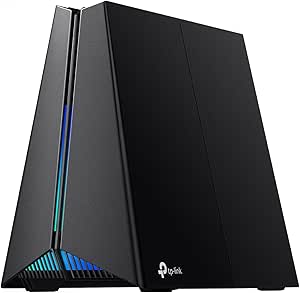 | Best Mid-Range Wi-Fi 6E | Wi-Fi Standard: Wi-Fi 6E (AXE5400) | Max Speed: 5.4 Gbps | Bands: Tri-Band (2.4 GHz, 5 GHz, 6 GHz) | VIEW ON AMAZON | See Our Full Breakdown |
| ASUS TUF Gaming BE6500 Dual-Band WiFi 7 Router |  | Best Wi-Fi 7 Value | Wi-Fi Generation: WiFi 7 (802.11be) | Max Speed: Up to 6.5 Gbps | Bands: Dual-band | VIEW ON AMAZON | See Our Full Breakdown |
| ASUS ROG Rapture GT-BE98 Pro Quad-Band WiFi 7 Gaming Router |  | Best Premium Performance | Wi-Fi Generation: WiFi 7 (802.11be) | Max Speed: 30 Gbps | Bands: Quad-band (dual 6 GHz) | VIEW ON AMAZON | See Our Full Breakdown |
| NETGEAR Nighthawk RS90 Dual-Band WiFi 7 Router |  | Best for Moderate Coverage | Wi-Fi Generation: WiFi 7 | Max Speed: 3.6 Gbps | Coverage: Up to 2,000 sq. ft. | VIEW ON AMAZON | See Our Full Breakdown |
| NETGEAR Nighthawk RS140 Dual-Band WiFi 7 Router |  | Best for Large Homes | Wi-Fi Generation: WiFi 7 | Max Speed: Up to 5 Gbps | Coverage: Up to 2,250 sq. ft. | VIEW ON AMAZON | See Our Full Breakdown |
| TP-Link Archer BE600 Tri-Band Wi-Fi 7 Router |  | Best Overall for High-Bandwidth Households | Wi-Fi Standard: Wi-Fi 7 | Bands: Tri-band (6 GHz, 5 GHz, 2.4 GHz) | Max Speed: 9.7 Gbps | VIEW ON AMAZON | See Our Full Breakdown |
| TP-Link Archer AXE75 AXE5400 Tri-Band WiFi 6E Router |  | Best Value for Wi-Fi 6E Access | Wi-Fi Standard: Wi-Fi 6E | Bands: Tri-band (6 GHz, 5 GHz, 2.4 GHz) | Max Speed: 5400 Mbps | VIEW ON AMAZON | See Our Full Breakdown |
| MSI RadiX AXE6600 Tri-Band WiFi 6E Gaming Router | 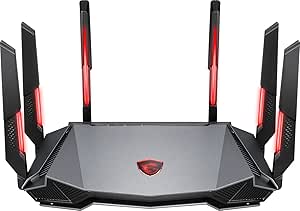 | Best Aesthetic for Gaming Setups | Wi-Fi Standard: Wi-Fi 6E | Bands: Tri-band (6 GHz, 5 GHz, 2.4 GHz) | Max Speed: 6.6 Gbps | VIEW ON AMAZON | See Our Full Breakdown |
| GL.iNet Flint 2 Wi-Fi 6 Gaming Router (GL-MT6000) |  | Best for Tech Enthusiasts and Privacy | Wi-Fi Standard: Wi-Fi 6 | Bands: Dual-band (5 GHz, 2.4 GHz) | Max Speed: 6000 Mbps | VIEW ON AMAZON | See Our Full Breakdown |
| TP-Link Dual-Band BE6500 WiFi 7 Gaming Router 6.5 Gbps (Archer GE400) |  | Best Dedicated Gaming Features on a Budget | Wi-Fi Standard: Wi-Fi 7 | Bands: Dual-band (5 GHz, 2.4 GHz) | Max Speed: 6.5 Gbps | VIEW ON AMAZON | See Our Full Breakdown |
| NETGEAR Nighthawk WiFi 7 Tri-Band Router | 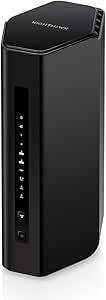 | Best for Large Homes with High Device Density | WiFi Standard: WiFi 7 | Bands: Tri-band (2.4, 5, 6 GHz) | Max Speed: Up to 9.3 Gbps | VIEW ON AMAZON | See Our Full Breakdown |
| TP-Link Archer AX21 AX1800 Dual-Band Wi-Fi 6 Router |  | Best Budget Entry Point for Wi-Fi 6 | Wi-Fi Generation: Wi-Fi 6 (802.11ax) | Bands: Dual-band (2.4, 5 GHz) | Max Bandwidth: 1.8 Gbps combined | VIEW ON AMAZON | See Our Full Breakdown |
| TP-Link Archer BE400 BE6500 Dual-Band Wi-Fi 7 Router |  | Best Value Wi-Fi 7 Upgrade | Wi-Fi Standard: Wi-Fi 7 | Bands: Dual-band (2.4, 5 GHz) | Max Bandwidth: 6.5 Gbps | VIEW ON AMAZON | See Our Full Breakdown |
| ASUS ROG Strix GS-BE12000 Tri-Band WiFi 7 Gaming Router |  | Best Premium Performance for Wired Gamers | WiFi Generation: WiFi 7 | Bands: Tri-band (incl. 6 GHz) | Max Rate: 12,000 Mbps | VIEW ON AMAZON | See Our Full Breakdown |
| TP-Link Archer GE650 Tri-Band Wi-Fi 7 Gaming Router | | Best Balanced Tri-Band Gaming Router | WiFi Standard: Wi-Fi 7 | Bands: Tri-band (2.4, 5, 6 GHz) | Max Speed: Up to 10,658 Mbps | VIEW ON AMAZON | See Our Full Breakdown |
| gaming router | Bands | Max Speed | Processor |
|---|---|---|---|
| TP-Link Archer GXE75 Tri-Band | Tri-Band (2.4 GHz, 5 GHz, 6 GHz) | 5.4 Gbps | Quad-core CPU |
| ASUS TUF Gaming BE6500 Dual-Ba | Dual-band | Up to 6.5 Gbps | — |
| ASUS ROG Rapture GT-BE98 Pro Q | Quad-band (dual 6 GHz) | 30 Gbps | — |
| NETGEAR Nighthawk RS90 Dual-Ba | — | 3.6 Gbps | Quad-core 2.0 GHz |
| NETGEAR Nighthawk RS140 Dual-B | — | Up to 5 Gbps | Quad-core 2.0 GHz |
| TP-Link Archer BE600 Tri-Band | Tri-band (6 GHz, 5 GHz, 2.4 GHz) | 9.7 Gbps | Quad-core CPU |
| TP-Link Archer AXE75 AXE5400 T | Tri-band (6 GHz, 5 GHz, 2.4 GHz) | 5400 Mbps | 1.0 GHz dual-core CPU |
| MSI RadiX AXE6600 Tri-Band WiF | Tri-band (6 GHz, 5 GHz, 2.4 GHz) | 6.6 Gbps | 1.8 GHz quad-core |
| GL.iNet Flint 2 Wi-Fi 6 Gaming | Dual-band (5 GHz, 2.4 GHz) | 6000 Mbps | — |
| TP-Link Dual-Band BE6500 WiFi | Dual-band (5 GHz, 2.4 GHz) | 6.5 Gbps | — |
| NETGEAR Nighthawk WiFi 7 Tri-B | Tri-band (2.4, 5, 6 GHz) | Up to 9.3 Gbps | — |
| TP-Link Archer AX21 AX1800 Dua | Dual-band (2.4, 5 GHz) | — | — |
| TP-Link Archer BE400 BE6500 Du | Dual-band (2.4, 5 GHz) | — | — |
| ASUS ROG Strix GS-BE12000 Tri- | Tri-band (incl. 6 GHz) | — | Quad-core 2.0 GHz |
| TP-Link Archer GE650 Tri-Band | Tri-band (2.4, 5, 6 GHz) | Up to 10,658 Mbps | 1.5 GHz quad-core |
More Details on Our Top Picks
TP-Link Archer GXE75 Tri-Band AXE5400 Wi-Fi 6E Gaming Router
This router occupies a sweet spot for gamers who want 6 GHz congestion relief without the premium price tag of Wi-Fi 7 models. Compared to the ASUS TUF Gaming BE6500, which is newer but dual-band, the GXE75’s tri-band architecture offers more dedicated bandwidth for heavy households. The dedicated gaming acceleration actively prioritizes game packets over streaming or downloads, which is critical for competitive play. However, it relies on Wi-Fi 6E, meaning older devices won’t benefit from the 6 GHz band. It’s a logical step up from Wi-Fi 6 but lacks the raw throughput of the ASUS ROG Rapture GT-BE98 Pro.
Pros:- Dedicated gaming acceleration minimizes lag and jitter
- 2.5G multi-gigabit WAN port supports ultra-fast internet plans
- Wi-Fi 6E 6 GHz band provides congestion-free channels
- Includes TP-Link HomeShield for robust security
Cons:- Requires Wi-Fi 6E compatible devices to utilize the 6 GHz band fully
- High-end features may be overkill for non-gaming households
- LAN ports are limited to 1 Gbps, bottlenecking wired devices
Best for: Gamers with Wi-Fi 6E devices who need stable, low-latency connections and live in multi-device households.
Not ideal for: Users with strictly Wi-Fi 7 devices or those needing multi-gigabit wired speeds beyond 2.5 Gbps.
- Wi-Fi Standard:Wi-Fi 6E (AXE5400)
- Max Speed:5.4 Gbps
- Bands:Tri-Band (2.4 GHz, 5 GHz, 6 GHz)
- WAN Port:1 x 2.5Gbps RJ45
- LAN Ports:3 x 1Gbps LAN
- Processor:Quad-core CPU
- Max Devices:100
- Security:WPA3, HomeShield
Our verdict“A balanced choice for households ready to adopt Wi-Fi 6E for gaming without jumping to Wi-Fi 7.”
ASUS TUF Gaming BE6500 Dual-Band WiFi 7 Router
If you want Wi-Fi 7 benefits like Multi-Link Operation without paying flagship prices, this TUF model is compelling. It offers four 2.5GbE ports, a significant upgrade over the TP-Link Archer GXE75, which only has one multi-gig port. This makes it ideal for connecting multiple high-speed devices like PCs and consoles via Ethernet. However, it is a dual-band router, meaning it lacks the dedicated 6 GHz band found in tri-band options. While faster than Wi-Fi 6, it may struggle in environments with extreme device density compared to the quad-band ASUS ROG Rapture GT-BE98 Pro.
Pros:- Wi-Fi 7 with speeds up to 6.5 Gbps
- Four 2.5GbE ports for wired connections
- Gaming features include traffic prioritization and Open NAT
- Supports WPA3 security
Cons:- Dual-band design rather than tri-band
- Gaming features may require configuration to suit individual setups
- No dedicated 6 GHz band for congestion-free gaming
Best for: Enthusiasts who want Wi-Fi 7 speeds and multiple 2.5G wired ports for consoles and PCs.
Not ideal for: Large homes with heavy 6 GHz device usage, as it lacks a dedicated 6 GHz band.
- Wi-Fi Generation:WiFi 7 (802.11be)
- Max Speed:Up to 6.5 Gbps
- Bands:Dual-band
- Ethernet Ports:4 × 2.5GbE (1 WAN, 3 LAN)
- Antennas:6
- Security Protocol:WPA3
- Key Features:Multi-link operation (MLO), Open NAT
Our verdict“The smart pick for gamers who prioritize wired multi-gig connectivity and Wi-Fi 7 entry-level speeds.”
ASUS ROG Rapture GT-BE98 Pro Quad-Band WiFi 7 Gaming Router
This is the hardware to beat if you demand absolute maximum throughput. With 30 Gbps theoretical speeds and dual 6 GHz bands, it dwarfs the ASUS TUF Gaming BE6500 in raw capacity. The inclusion of two 10 Gbps ports makes it future-proof for multi-gig internet plans and local NAS transfers. It is a monster of a device, but that comes with significant bulk and complexity. For most users, the features here are overkill; it is strictly for enthusiasts who want to squeeze every millisecond out of their connection and have the infrastructure to support 10G wired speeds.
Pros:- Wi-Fi 7 with speeds up to 30 Gbps
- Dual 10 Gbps and four 2.5 Gbps ports
- Gaming traffic acceleration
- Eight antennas and mesh support
Cons:- Actual speed and coverage depend on network and environmental conditions
- Extremely large physical footprint
- Premium price point for niche features
Best for: Hardcore enthusiasts with 10G internet plans, multiple high-end gaming rigs, and large smart homes.
Not ideal for: Average households or those with sub-gigabit internet, as the cost and complexity are unjustified.
- Wi-Fi Generation:WiFi 7 (802.11be)
- Max Speed:30 Gbps
- Bands:Quad-band (dual 6 GHz)
- Ethernet Ports:2 × 10 Gbps, 4 × 2.5 Gbps
- Antennas:8
- RAM:2 GB
- Features:Multi-Link Operation, game acceleration
Our verdict“The ultimate choice for power users who refuse to compromise on speed or port density.”
NETGEAR Nighthawk RS90 Dual-Band WiFi 7 Router
The RS90 stands out for its balance of coverage and speed in a dual-band Wi-Fi 7 format. It covers up to 2,000 sq. ft., making it a solid choice for mid-sized homes where the ASUS TUF Gaming BE6500 might struggle with range. However, it supports only 50 devices, which is half the capacity of the NETGEAR RS140. It also requires a separate modem, unlike some all-in-one gateways. The 2.5 Gig WAN port is standard here, but the four LAN ports are limited to 1 Gig, which could bottleneck wired gaming setups compared to the multi-gig LAN ports on ASUS models.
Pros:- Wi-Fi 7 speeds up to 3.6 Gbps
- Coverage for up to 2,000 sq. ft.
- Includes a 2.5 Gig WAN port
- Built-in security features
Cons:- Requires a separate modem or gateway
- NETGEAR Armor requires a subscription after trial
- Supports only up to 50 devices
Best for: Mid-sized home owners who want reliable Wi-Fi 7 coverage for a moderate number of devices.
Not ideal for: Large households with 50+ connected devices or users needing multi-gig wired LAN speeds.
- Wi-Fi Generation:WiFi 7
- Max Speed:3.6 Gbps
- Coverage:Up to 2,000 sq. ft.
- Device Capacity:Up to 50 devices
- WAN Port:1 x 2.5 Gig
- LAN Ports:4 x 1 Gig Ethernet
- Processor:Quad-core 2.0 GHz
Our verdict“A reliable mid-range option for average-sized homes that don’t need massive device capacity.”
NETGEAR Nighthawk RS140 Dual-Band WiFi 7 Router
If your home is larger or packed with smart devices, the RS140 edges out its sibling, the NETGEAR RS90, by supporting 80 devices and covering 2,250 sq. ft.. It offers slightly higher wireless speeds at 5 Gbps compared to the RS90’s 3.6 Gbps. However, it offers fewer LAN ports (three vs. four) and still requires a separate modem. While it lacks the dedicated 6 GHz band of the TP-Link Archer GXE75, its raw device handling makes it better suited for smart-home-heavy households. It is a robust, straightforward upgrade for those needing more range and capacity than the RS90 provides.
Pros:- Supports Wi-Fi 7 speeds up to 5 Gbps
- Covers up to 2,250 sq. ft.
- Supports up to 80 devices
- Includes a 2.5 Gig WAN port
Cons:- Requires a separate modem or gateway
- NETGEAR Armor requires a subscription after trial
- Only three LAN ports available
Best for: Large home owners with many smart devices who need extended coverage and higher device capacity.
Not ideal for: Gamers needing more than three wired Ethernet ports or those with small apartments.
- Wi-Fi Generation:WiFi 7
- Max Speed:Up to 5 Gbps
- Coverage:Up to 2,250 sq. ft.
- Max Devices:Up to 80
- WAN Port:One 2.5 Gig Ethernet
- LAN Ports:Three 1 Gig Ethernet
- Processor:Quad-core 2.0 GHz
- Security:WPA3, Advanced Router Protection
Our verdict“The go-to for larger households needing Wi-Fi 7 range and support for a high volume of connected devices.”
TP-Link Archer BE600 Tri-Band Wi-Fi 7 Router
This router stands out as the Best Overall choice for households demanding future-proof speed and capacity. Its tri-band Wi-Fi 7 architecture delivers up to 9.7 Gbps combined throughput, significantly outperforming the dual-band Archer GE400 in total bandwidth potential. The inclusion of a 10 Gbps WAN port is a decisive advantage for users with multi-gig fiber plans, a feature largely absent in mid-range competitors like the MSI RadiX AXE6600. While the Archer BE600 excels in raw power, it requires Wi-Fi 7 compatible devices to unlock its full potential, meaning older gadgets will still operate on slower bands. However, for those with modern PCs and consoles, the Multi-Link Operation ensures stable, low-latency connections across congested networks.
Pros:- Includes a 10 Gbps WAN/LAN port for future-proofing
- High combined throughput of 9.7 Gbps across three bands
- Supports up to 120 devices with robust coverage
Cons:- Full performance requires Wi-Fi 7 client devices
- Higher initial cost compared to Wi-Fi 6E alternatives
Best for: Power users with multi-gig internet plans and a mix of Wi-Fi 7 and legacy devices
Not ideal for: Budget-conscious buyers or those with only Wi-Fi 5/6 devices who won’t utilize the 6 GHz band
- Wi-Fi Standard:Wi-Fi 7
- Bands:Tri-band (6 GHz, 5 GHz, 2.4 GHz)
- Max Speed:9.7 Gbps
- Coverage:Up to 2,600 sq. ft.
- Ports:1x 10G, 1x 2.5G WAN/LAN, 3x 2.5G LAN, 1x USB 3.0
- Processor:Quad-core CPU
Our verdict“The Archer BE600 is the definitive choice for homes needing maximum bandwidth and multi-gig wired connectivity.”
TP-Link Archer AXE75 AXE5400 Tri-Band WiFi 6E Router
The Archer AXE75 earns the title of Best Value by offering Wi-Fi 6E capabilities at a price point that undercuts many Wi-Fi 7 models. Unlike the Archer BE600, which pushes for maximum speed, the AXE75 focuses on practical coverage and mesh expansion via EasyMesh. Its 5400 Mbps combined speed is sufficient for most streaming and gaming needs, though the 1 Gbps LAN ports are a clear bottleneck compared to the multi-gig ports on the MSI RadiX AXE6600. This router is ideal for users who want the cleaner 6 GHz band without paying for unneeded Wi-Fi 7 hardware. However, those with internet plans exceeding 1 Gbps will find the wired ports limiting, making it less suitable for heavy NAS users.
Pros:- Affordable entry into Wi-Fi 6E technology
- Supports EasyMesh for easy network expansion
- Dedicated 6 GHz band reduces interference
Cons:- LAN ports are limited to 1 Gbps
- Slower 5 GHz band compared to tri-band Wi-Fi 7 routers
Best for: Users wanting 6 GHz band access for less congestion without committing to Wi-Fi 7
Not ideal for: Those with multi-gig internet plans who require multi-gig wired ports
- Wi-Fi Standard:Wi-Fi 6E
- Bands:Tri-band (6 GHz, 5 GHz, 2.4 GHz)
- Max Speed:5400 Mbps
- Ports:5x Gigabit Ethernet
- Processor:1.0 GHz dual-core CPU
- Security:WPA3
Our verdict“A solid, cost-effective option for upgrading to 6 GHz connectivity without breaking the bank.”
MSI RadiX AXE6600 Tri-Band WiFi 6E Gaming Router
The MSI RadiX AXE6600 is positioned as the Best Aesthetic pick, catering to gamers who prioritize visual integration with their PC rigs. With its customizable RGB lighting and aggressive design, it contrasts sharply with the utilitarian look of the Archer AXE75. Performance-wise, its 6.6 Gbps tri-band speed and AI QoS for game traffic prioritization make it competitive, though it lacks the multi-gig wired ports found on the Archer BE600. The 1.8 GHz quad-core processor handles multiple streams well, but the lack of specific coverage measurements raises questions about its range in larger homes compared to the explicitly rated Archer BE600. It’s a stylish choice for desk setups, but not necessarily the best for whole-home coverage.
Pros:- Customizable RGB lighting for gaming environments
- AI QoS specifically tuned for gaming traffic
- Strong tri-band performance with 6.6 Gbps speed
Cons:- No specific coverage area rating provided
- Lacks multi-gigabit Ethernet ports
Best for: PC gamers who want a router that matches their RGB-heavy battlestation aesthetic
Not ideal for: Users who need transparent coverage metrics or multi-gig wired connectivity
- Wi-Fi Standard:Wi-Fi 6E
- Bands:Tri-band (6 GHz, 5 GHz, 2.4 GHz)
- Max Speed:6.6 Gbps
- Processor:1.8 GHz quad-core
- Features:AI QoS, RGB Lighting
- Antennas:6 fixed antennas
Our verdict“Choose the RadiX if you want your router to look as good as your PC, provided your internet speed fits within 1 Gbps wired.”
GL.iNet Flint 2 Wi-Fi 6 Gaming Router (GL-MT6000)
The GL.iNet Flint 2 is the Best for Tech Enthusiasts pick, distinguishing itself with OpenWrt compatibility and built-in AdGuard Home. Unlike the consumer-friendly Archer BE600, the Flint 2 gives users granular control over their network, including robust WireGuard and OpenVPN support. Its dual-band Wi-Fi 6 design is less future-proof than the Archer GE400, but the two 2.5G Ethernet ports offer better wired flexibility than the MSI RadiX. The tradeoff is complexity; the manufacturer recommends firmware updates during setup, which may intimidate casual users. This router is for those who value privacy and customization over plug-and-play simplicity.
Pros:- Runs OpenWrt for advanced customization
- Built-in AdGuard Home blocks ads and trackers
- Includes two 2.5G Ethernet ports for fast wired connections
Cons:- Requires technical know-how for optimal configuration
- Dual-band design lacks the 6 GHz band found in 6E/7 models
Best for: Network administrators and privacy-focused users who want OpenWrt and AdGuard Home
Not ideal for: Casual users who prefer a simple, app-based setup without technical maintenance
- Wi-Fi Standard:Wi-Fi 6
- Bands:Dual-band (5 GHz, 2.4 GHz)
- Max Speed:6000 Mbps
- Ports:2x 2.5G, 4x 1G Ethernet
- OS:Linux (OpenWrt)
- Features:AdGuard Home, WireGuard, OpenVPN
Our verdict“The Flint 2 is a powerful, privacy-centric router for users who want to tinker with their network settings.”
TP-Link Dual-Band BE6500 WiFi 7 Gaming Router 6.5 Gbps (Archer GE400)
The Archer GE400 takes the Best Dedicated Gaming Features slot by focusing on software-driven gaming optimizations rather than raw bandwidth. It includes Game Server Acceleration via WTFast and a dedicated gaming port, features that set it apart from the generalist Archer BE600. While it offers Wi-Fi 7 speeds of 6.5 Gbps, its dual-band architecture lacks the 6 GHz band, limiting its ability to reduce interference compared to the tri-band MSI RadiX. The 2.5 Gbps WAN/LAN ports are a significant upgrade over the Archer AXE75, making it better suited for multi-gig plans. However, the lack of a 6 GHz band means it may struggle in apartment complexes with heavy 5 GHz congestion.
Pros:- Includes Game Server Acceleration (WTFast) for lower ping
- Features 2.5 Gbps WAN and LAN ports for multi-gig internet
- Dedicated gaming port for priority wired traffic
Cons:- Dual-band design lacks the 6 GHz band
- Lower total bandwidth than tri-band Wi-Fi 7 competitors
Best for: Competitive gamers who want built-in game acceleration and multi-gig ports without paying for tri-band
Not ideal for: Users in dense urban areas who need the extra 6 GHz band to avoid interference
- Wi-Fi Standard:Wi-Fi 7
- Bands:Dual-band (5 GHz, 2.4 GHz)
- Max Speed:6.5 Gbps
- Ports:1x 2.5G WAN/LAN, 1x 2.5G LAN, 3x 1G LAN
- Gaming Features:Game Acceleration, WTFast, Dedicated Gaming Port
- Coverage:Up to 2,600 sq. ft.
Our verdict“The Archer GE400 is the smart choice for gamers prioritizing low-latency tools and wired speed over maximum wireless bandwidth.”
NETGEAR Nighthawk WiFi 7 Tri-Band Router
This tri-band option stands out for its ability to handle up to 100 devices across a massive 2,500 sq. ft. coverage area. Unlike the TP-Link Archer AX21, which struggles with device congestion in busy households, the Nighthawk leverages WiFi 7’s capacity to maintain stability even under heavy load. It includes 2.5 Gig Ethernet ports, making it future-proof for multi-gig internet plans. However, the reliance on a subscription-based security suite after the trial period is a long-term cost consideration that budget-conscious buyers might dislike compared to routers with free lifetime security features.
Pros:- Handles up to 100 devices simultaneously with tri-band WiFi 7
- Includes multiple 2.5 Gig Ethernet ports for high-speed wired connections
- App-based management simplifies network setup and monitoring
Cons:- Requires a separate modem for most internet providers
- NETGEAR Armor security requires a paid subscription after the 30-day trial
- Real-world speeds may drop due to physical obstructions and interference
Best for: Large families or smart home enthusiasts who need to connect dozens of devices without network congestion.
Not ideal for: Small apartment dwellers or those on a tight budget who do not need tri-band complexity or ongoing security subscriptions.
- WiFi Standard:WiFi 7
- Bands:Tri-band (2.4, 5, 6 GHz)
- Max Speed:Up to 9.3 Gbps
- Coverage:Up to 2,500 sq. ft.
- Device Capacity:Up to 100 devices
- WAN Port:1 x 2.5 Gig Ethernet
- LAN Ports:2 x 2.5 Gig, 2 x 1 Gig
Our verdict“This router is the logical choice for large households needing robust capacity and multi-gig wired support.”
TP-Link Archer AX21 AX1800 Dual-Band Wi-Fi 6 Router
The Archer AX21 serves as a practical entry point for users upgrading from older Wi-Fi 5 routers. While it lacks the 6 GHz band found in the NETGEAR Nighthawk WiFi 7, it delivers sufficient 1.8 Gbps combined bandwidth for casual gaming and streaming. Its strength lies in OFDMA technology, which efficiently manages multiple devices without the high cost of newer standards. It is significantly more affordable than premium gaming routers, but those needing ultra-low latency for competitive play or multi-gig internet plans will find its 1 Gbps port limits restrictive.
Pros:- Affordable entry into Wi-Fi 6 technology
- OFDMA improves performance with multiple connected devices
- Supports OpenVPN and PPTP for secure remote access
Cons:- Lacks 6 GHz band support, limiting interference-free capacity
- Ethernet ports are capped at 1 Gbps, restricting wired speeds
- Requires a separate modem for most internet service providers
Best for: Budget-conscious gamers or casual users upgrading from older routers who do not have multi-gig internet plans.
Not ideal for: Competitive gamers requiring the lowest possible latency or homes with multi-gig fiber internet plans.
- Wi-Fi Generation:Wi-Fi 6 (802.11ax)
- Bands:Dual-band (2.4, 5 GHz)
- Max Bandwidth:1.8 Gbps combined
- Antennas:4 fixed high-gain
- LAN Ports:4 x 10/100/1000 Mbps
- Security:WPA3 support
- VPN Support:OpenVPN and PPTP
Our verdict“This model is a sensible, low-risk upgrade for households that do not yet need Wi-Fi 7 features.”
TP-Link Archer BE400 BE6500 Dual-Band Wi-Fi 7 Router
This dual-band router offers a compelling middle ground by bringing Wi-Fi 7 features like Multi-Link Operation to a lower price point than tri-band competitors like the ASUS ROG Strix GS-BE12000. It provides two 2.5 Gbps ports, ensuring that wired devices can benefit from multi-gig speeds without the premium cost of eight-port configurations. While it lacks a dedicated 6 GHz band, its 6.5 Gbps combined throughput is ample for most modern households. The tradeoff is that users heavily reliant on the 6 GHz spectrum for interference-free gaming may find the dual-band design limiting in dense urban environments.
Pros:- Wi-Fi 7 features including Multi-Link Operation at a mid-range price
- Includes two 2.5 Gbps Ethernet ports for fast wired connections
- Coverage up to 2,400 sq. ft. suits most standard homes
Cons:- No 6 GHz band, limiting total spectrum availability
- Not compatible with TP-Link Deco mesh systems
- Requires a separate modem for internet connectivity
Best for: Users wanting Wi-Fi 7 efficiency and multi-gig wired ports without paying for tri-band hardware.
Not ideal for: Households in dense apartment blocks where 5 GHz interference is a significant issue and 6 GHz is required.
- Wi-Fi Standard:Wi-Fi 7
- Bands:Dual-band (2.4, 5 GHz)
- Max Bandwidth:6.5 Gbps
- Coverage:Up to 2,400 sq. ft.
- Device Capacity:Up to 90 devices
- Ports:1 x 2.5G WAN/LAN, 1 x 2.5G LAN, 3 x 1G LAN
- Mesh:EasyMesh compatible
Our verdict“This pick makes the most sense for those ready to adopt Wi-Fi 7 but who want to avoid the premium price of tri-band models.”
ASUS ROG Strix GS-BE12000 Tri-Band WiFi 7 Gaming Router
This router is engineered for enthusiasts who prioritize wired infrastructure alongside wireless speed. With eight 2.5 Gbps ports and a total wired capacity of 20 Gbps, it far exceeds the port count of the TP-Link Archer GE650, allowing for extensive PC and console connections without switches. The 12,000 Mbps wireless rate and gaming acceleration software target competitive latency needs. The downside is its sheer size and potential overkill for smaller homes; furthermore, the conflicting coverage specs in the listing suggest potential variability in real-world range, requiring careful placement for optimal performance.
Pros:- Eight 2.5 Gbps Ethernet ports offer exceptional wired connectivity
- Tri-band WiFi 7 with speeds up to 12,000 Mbps
- Dedicated gaming acceleration and AiProtection Pro security
Cons:- Specs list conflicting coverage figures (3,000 vs 3,300 sq. ft.)
- High performance and port count may be excessive for average users
- Premium price point compared to dual-band alternatives
Best for: Hardcore gamers with multiple wired consoles and PCs who need dedicated gaming traffic prioritization.
Not ideal for: Small apartments or users with few wired devices who do not need eight high-speed ports.
- WiFi Generation:WiFi 7
- Bands:Tri-band (incl. 6 GHz)
- Max Rate:12,000 Mbps
- Wired Capacity:Up to 20 Gbps
- Ports:8 total (1 WAN, 7 LAN) all 2.5 Gbps
- Processor:Quad-core 2.0 GHz
- Coverage:Up to 3,000 sq. ft.
Our verdict“This model is the ultimate choice for gamers building a high-end, wired-heavy battle station.”
TP-Link Archer GE650 Tri-Band Wi-Fi 7 Gaming Router
The Archer GE650 balances high-performance specs with a more accessible form factor than the ASUS ROG Strix. It features a dedicated gaming band and 5 Gbps WAN/LAN ports, offering faster wired potential than the 2.5 Gbps limits of the TP-Link Archer BE400. This tri-band setup provides the interference reduction of 6 GHz WiFi while maintaining manageable coverage for typical homes. The tradeoff is that some advanced security and acceleration features may require additional services or complex setup, which could frustrate users looking for a simple plug-and-play experience.
Pros:- Tri-band WiFi 7 with up to 10,658 Mbps combined speed
- 5 Gbps WAN and LAN ports for ultra-fast wired connections
- Dedicated gaming band and traffic acceleration features
Cons:- Some security and acceleration features may require extra services
- App-based management is required for full feature control
- Requires a separate modem for connectivity
Best for: Gamers who want tri-band WiFi 7 and ultra-fast 5 Gbps wired ports without the bulk of premium models.
Not ideal for: Users who want simple, subscription-free security features and basic setup without app dependencies.
- WiFi Standard:Wi-Fi 7
- Bands:Tri-band (2.4, 5, 6 GHz)
- Max Speed:Up to 10,658 Mbps
- Ports:1 x 5G WAN, 1 x 5G LAN, 3 x 2.5G LAN
- Processor:1.5 GHz quad-core
- Mesh:EasyMesh compatible
- Management:Tether app and web interface
Our verdict“This router strikes an excellent balance between top-tier gaming performance and practical home networking features.”

How We Picked
I ranked these gaming routers by how well their stated wireless design, gaming-oriented features, and wired options fit real home setups. I gave weight to band configuration and Wi-Fi generation, since they affect capacity and compatibility, but I did not treat a newer standard or a larger speed figure as an automatic win. I also considered ease of setup, likely usefulness for gaming traffic, and whether the product appears suited to a single-player household, a crowded network, or a technically hands-on buyer.
The order favors useful balance over headline specifications: a capable router that fits common gaming needs ranks ahead of a costly, high-capacity model that makes sense only for a narrower audience. Tri-band options earn credit when their added band can help separate traffic, while dual-band models can be better matches for simpler homes. The lineup includes distinct roles rather than a single blanket winner; actual results depend on the internet connection, client devices, placement, interference, and wired setup.
Factors to Consider When Choosing Gaming Routers
Before choosing a router, I would start with the limits of the whole connection rather than the gaming label on the box. A router can manage local traffic and improve wireless flexibility, but it cannot remove delays caused by a distant game server, a congested provider network, or poor placement. These decisions help separate a practical upgrade from capacity your current setup may never use.
Match the router to your internet plan and home network
Router speed figures describe theoretical wireless capacity, not the speed a game will receive in every room. If your broadband plan is modest, paying for a router with far more advertised capacity may not change gameplay, though it could still help when many devices share the network. Check the router’s wired port capabilities against your modem and plan, since a slower link in that chain can cap the connection. Also count the devices that actively stream, download, or upload while someone plays. A household with several simultaneous users has a stronger case for added capacity than a solo player. I would buy for the busiest normal evening, not for a theoretical maximum that the home rarely reaches.
Choose bands for your layout, not just the spec sheet
More bands can give compatible devices additional room, but they do not automatically improve coverage or lower latency. A tri-band router may help divide traffic between gaming systems, newer phones, and busy household devices, while a dual-band model can be easier to configure and sufficient in a smaller home. Wi-Fi 6E adds access to the 6 GHz band, but only devices that support it can connect there. Higher-frequency signals can also be less dependable through walls, so a 6 GHz connection may work best in the same room or nearby. Wi-Fi 7 is a forward-looking choice if compatible devices are already part of the household or likely soon. Avoid paying for bands that your clients cannot use and your layout cannot support.
Prioritize Ethernet for fixed gaming systems
A console or gaming PC near the router is usually a strong candidate for Ethernet, which avoids the variable signal conditions that affect wireless links. Before buying, check how many wired devices need connections and whether the router has ports suited to your network equipment. A fast wireless standard will not help a console connected through an inadequate cable, switch, or port. If the router must sit far from the gaming room, a wired access point or a carefully planned mesh arrangement may address coverage more directly than a more powerful single router. Keep the modem, router, and any switches in mind as one chain. This is a common source of disappointment: buyers upgrade the router while leaving the weakest link untouched.
Treat gaming features as management tools, not magic latency fixes
Traffic prioritization and gaming dashboards can make it easier to give game traffic preference when other devices are busy. Their value depends on how well the controls match your household and whether they are easy to configure without disrupting other users. These tools cannot shorten the physical route to a remote server or fix provider-side congestion. A simple network with one player may need little beyond stable settings, while a shared home can benefit from practical controls for prioritizing devices or managing congestion. Look for clear settings and useful visibility rather than assuming a gaming mode guarantees lower ping. If you prefer hands-on control, a configurable router may suit you better than one focused on a guided interface.
Buy for the devices you own, with a realistic upgrade horizon
A router’s newest wireless standard is only useful to clients that can connect using it; older consoles, laptops, and phones will use compatible older modes. That does not make a newer router pointless, since it may support future devices and serve multiple generations at once. Still, replacing every device to exploit one new feature can turn a router upgrade into a much larger project. Check the wireless capabilities of your main gaming device and the rest of the household before choosing between Wi-Fi 6, 6E, and 7. A Wi-Fi 6E model can be a sensible middle ground when compatible clients exist but a full Wi-Fi 7 setup is unnecessary. For an all-older-device household, stable Ethernet and adequate coverage may matter more than the newest label.
Factor in setup, placement, and ongoing management
Even a capable router can perform poorly when tucked behind a television, placed near interference, or installed at the far end of the home. Choose a central, open location where practical, then check whether the router’s size and antenna design suit that spot. A feature-rich interface can help a technically confident buyer, but it may add friction for someone who wants a quick setup and minimal maintenance. Firmware updates and a clear way to manage the network matter after installation, not just on day one. If coverage remains uneven, a compatible access point or mesh node may be a better next step than another router replacement. I would favor a manageable setup that can be placed well over a more elaborate model that must sit in a poor location.
Frequently Asked Questions
Will a gaming router lower my ping in every game?
No router can guarantee a lower ping in every game because latency also depends on your internet provider, the game server, and the route between them. A better router can help when local congestion or unstable Wi-Fi is part of the problem, especially in a home where downloads and streams compete with play. For a fixed console or PC, Ethernet is often the clearest way to remove wireless variability. If ping stays high over a wired connection, changing routers may not address the cause. Check whether the problem affects all games and devices before treating the router as the only suspect.
Should I choose Wi-Fi 7 over Wi-Fi 6E for gaming?
Choose based on compatible devices, household demand, and how long you plan to keep the router rather than the generation name alone. Wi-Fi 7 can make sense for a home already adding newer clients or sharing heavy traffic across many devices. Wi-Fi 6E may offer a useful 6 GHz option at a less complex level when your main devices support it. If your gaming system uses an older wireless standard, it will not gain Wi-Fi 7 capabilities simply because the router has them. For wired gaming, the value of either upgrade may depend more on the rest of the household than on the console itself.
Is a tri-band router worth choosing if my console is wired?
It can be, but the benefit is mainly for the rest of the wireless network rather than the wired console. Extra bands can give compatible phones, laptops, and streaming devices more room when many clients are active. If the console is the only demanding device and the household is small, a capable dual-band router may cover the need. The band must also be supported by the devices that will use it, and signal range can vary by frequency and home layout. Compare the whole household’s traffic before treating tri-band as a gaming requirement.
Can I use a gaming router with my existing modem or mesh system?
Often, but compatibility and setup depend on the modem, provider equipment, and how the mesh system is configured. A separate modem and router can generally work together when the modem provides a compatible connection, while an all-in-one gateway may need bridge or access-point settings to avoid conflicting routing. Adding a gaming router to a mesh network can create extra complexity if both devices manage the same network functions. Check the provider’s requirements and the mesh maker’s supported modes before connecting equipment. If coverage is the main problem, expanding the existing mesh may be simpler than adding another router.
How do I know whether my router, Wi-Fi, or internet provider is causing lag?
Compare gameplay on Ethernet and Wi-Fi, and test at different times of day to see whether the problem changes with local wireless conditions or network load. If Ethernet is stable while Wi-Fi fluctuates, placement, interference, or signal strength may be involved. If both connections lag at the same times, provider congestion or the game server may be a stronger possibility. Run a connection test from more than one device, but remember that a single speed result does not describe every latency problem. This simple diagnosis can prevent replacing a router when the fault sits elsewhere.
Conclusion
For most buyers seeking a focused mix of gaming features and wireless flexibility, I would start with the TP-Link Archer GXE75 as my best overall pick. The Archer AX21 is the best value-style choice for a basic setup that does not need the newest wireless generation, while the ASUS ROG Rapture GT-BE98 Pro is my best premium recommendation for homes with substantial device demand and compatible Wi-Fi 7 clients. Beginners who want a straightforward, current-generation option can look at the ASUS TUF Gaming BE6500; buyers should still compare its dual-band design with tri-band alternatives if the network is crowded. For hands-on network control, the GL.iNet Flint 2 stands apart, and for a high-capacity tri-band Wi-Fi 7 setup, the ASUS ROG Strix GS-BE12000 targets a narrower enthusiast audience. Choose the model that fixes your actual bottleneck—wireless crowding, coverage, or wired capacity—rather than paying for specifications your devices and connection cannot use.