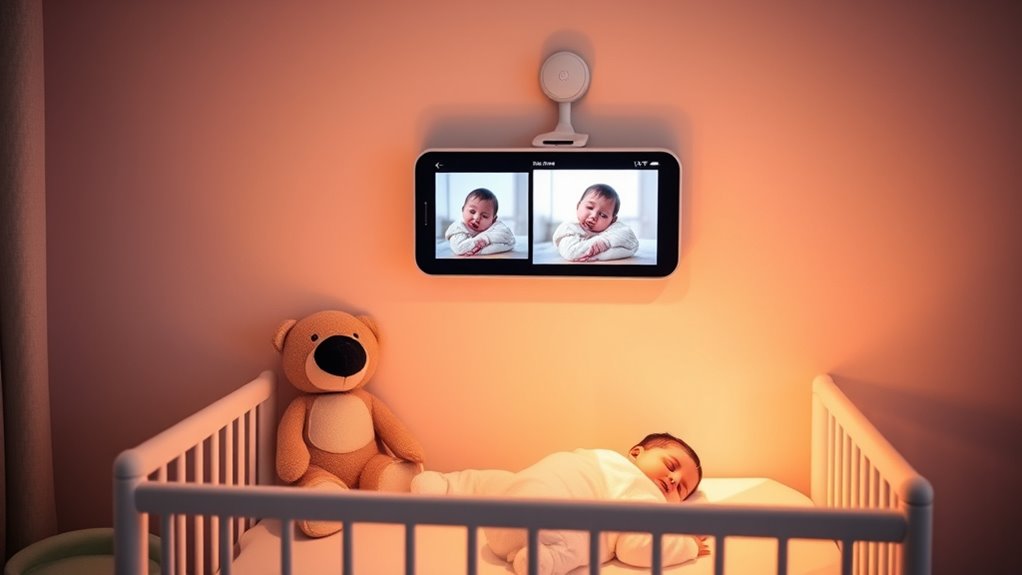

For a dual-camera monitor that balances a roomy display with direct viewing of two camera feeds, I’d start with the Blemil 6-Inch Split-Screen Video Baby Monitor. The HelloBaby HB6560-2 is a strong alternative for families who want a large split screen without Wi-Fi, while the Jeeber 1080p Wi-Fi model suits buyers who want app access as well as a dedicated monitor. The main tradeoff is between straightforward local monitoring and the flexibility of Wi-Fi, along with the screen size and camera controls you need. A larger display can make two rooms easier to check, but it may mean a less compact parent unit. Continue reading for the full breakdown and guidance on choosing between these options.

Get kitchen gear delivered free with Prime
- Fast, free delivery on millions of items
- Prime Video, Amazon Music and more included
- Member-only deals all year
Complete the kit


Key Takeaways
- Six-inch split screens give the Blemil and HelloBaby HB6560-2 a clear role for parents who want to view both camera feeds at once on a larger parent unit.
- No-Wi-Fi models dominate this lineup, giving buyers many direct-monitoring options; the Jeeber stands apart with Wi-Fi and a 1080p video claim.
- Screen size changes how useful split view feels: the Simyke’s 2.8-inch display is more compact, while 5- and 6-inch units give each camera feed more room.
- Camera movement and viewing layout are separate needs. Buyers who want split-screen monitoring should still check whether a model’s camera controls suit the placement and angles in their rooms.
- The best fit depends on the home, not just the camera count. A dedicated monitor can be simpler for routine room checks, while Wi-Fi may help caregivers who want access through a phone.
| Blemil 6-Inch Split-Screen Video Baby Monitor with 2 Cameras |  | Best for Long Standby | Screen: 6-inch IPS | Cameras: 2 | Camera movement: 310° horizontal, 120° vertical | VIEW ON AMAZON | See Our Full Breakdown |
| HelloBaby HB6560-2 No WiFi Baby Monitor with 2 Cameras and 6″ Split Screen Display | 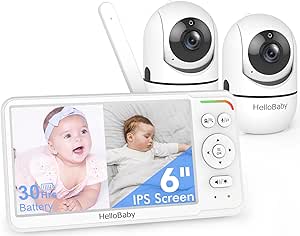 | Best for Flexible Camera Placement | Model: HB6560-2 | Display: 6-inch IPS split screen | Cameras: 2 | VIEW ON AMAZON | See Our Full Breakdown |
| Simyke Video Baby Monitor with 2 Cameras and 2.8-Inch Screen | 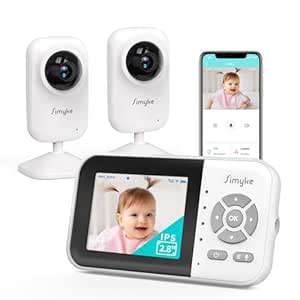 | Best for App Viewing | Screen: 2.8-inch IPS | Cameras: 2 | App connectivity: 2.4 GHz Wi-Fi required | VIEW ON AMAZON | See Our Full Breakdown |
| iFamily 4.3-Inch Split-Screen Baby Monitor with Two Cameras |  | Best for a Smaller Split-Screen Setup | Model: 43E | Display: 4.3-inch split screen | Cameras: 2 | VIEW ON AMAZON | See Our Full Breakdown |
| HelloBaby 6-Inch Split-Screen Video Baby Monitor with Two Cameras | 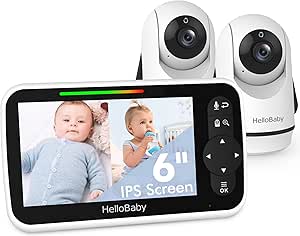 | Best Feature-Rich No-Wi-Fi Pick | Screen: 6 inches | Cameras: 2 | Connectivity: 2.4 GHz wireless; no Wi-Fi required | VIEW ON AMAZON | See Our Full Breakdown |
| Babysense 5-Inch HD Split-Screen Baby Monitor with 2 Cameras |  | Best Overall for Split-Screen Viewing | Display: 5-inch, 720p | Cameras included: 2 | Maximum cameras: 4 | VIEW ON AMAZON | See Our Full Breakdown |
| HelloBaby HB6550 No-WiFi Baby Monitor with 2 Cameras and 5-Inch Screen |  | Best for Long Battery Life | Screen: 5-inch IPS | Cameras included: 2; supports up to 4 | Connection: 2.4 GHz FHSS; no Wi-Fi required | VIEW ON AMAZON | See Our Full Breakdown |
| Jeeber 1080p Wi-Fi Baby Monitor with Two Cameras and 4-Inch IPS Display |  | Best for App-Based Remote Access | Display: 4-inch IPS | Cameras: 2 | Video: 720p video; supports up to 1080p display | VIEW ON AMAZON | See Our Full Breakdown |
| HelloBaby HB6550-2 5″ Dual Camera Baby Monitor – No WiFi, Pan Tilt Zoom |  | Best for a Clear Single-Camera View | Screen: 5-inch IPS | Cameras: 2 included; expandable to 4 | Connection: 2.4 GHz FHSS private link; no Wi-Fi | VIEW ON AMAZON | See Our Full Breakdown |
| GoodBaby 5″ Split-Screen Baby Monitor with 2 Cameras and Audio |  | Best for Long-Running Split-Screen Monitoring | Display: 5-inch HD LCD | Cameras: 2 included; expandable to 4 | Pan and tilt: 355° pan and 120° tilt | VIEW ON AMAZON | See Our Full Breakdown |
| video baby monitors with dual camera | Cameras | Screen | Display | Battery life |
|---|---|---|---|---|
| Blemil 6-Inch Split-Screen Vid | 2 | 6-inch IPS | — | — |
| HelloBaby HB6560-2 No WiFi Bab | 2 | — | 6-inch IPS split screen | Up to 30 hours in VOX/ECO mode |
| Simyke Video Baby Monitor with | 2 | 2.8-inch IPS | — | Up to 6 hours with screen on; up to 10 hours in VOX mode |
| iFamily 4.3-Inch Split-Screen | 2 | — | 4.3-inch split screen | — |
| HelloBaby 6-Inch Split-Screen | 2 | 6 inches | — | — |
| Babysense 5-Inch HD Split-Scre | — | — | 5-inch, 720p | — |
| HelloBaby HB6550 No-WiFi Baby | — | 5-inch IPS | — | Up to 30 hours in ECO mode |
| Jeeber 1080p Wi-Fi Baby Monito | 2 | — | 4-inch IPS | — |
| HelloBaby HB6550-2 5" Dual Cam | 2 included; expandable to 4 | 5-inch IPS | — | Up to 30 hours in ECO mode |
| GoodBaby 5" Split-Screen Baby | 2 included; expandable to 4 | — | 5-inch HD LCD | Up to 30 hours in VOX mode; up to 10 hours with screen on |
More Details on Our Top Picks
Blemil 6-Inch Split-Screen Video Baby Monitor with 2 Cameras
The Blemil pairs a 6-inch split-screen with two remotely steerable cameras, making it a practical choice for checking a nursery and another sleep space without cycling between feeds. Its private FHSS connection needs no Wi-Fi or app, unlike the app-connected Simyke, so viewing stays on the included monitor rather than extending to a phone away from home. The cameras pan and tilt, and automatic night vision helps keep both views useful after lights-out. The standout is its stated up to 30 hours of ECO-mode standby, though that is not continuous-screen runtime. The tradeoff is that the quoted outdoor range can vary with interference, and the large monitor is less pocketable than a compact option such as the Simyke.
Pros:- 6-inch display can show both camera views at once.
- Private 2.4 GHz FHSS connection works without Wi-Fi or an app.
- Remote pan-and-tilt cameras and automatic night vision support room coverage in low light.
- ECO-mode standby is stated at up to approximately 30 hours.
Cons:- No app or Wi-Fi means no remote viewing away from the monitor.
- The stated outdoor range may be reduced by walls or wireless interference.
- The 30-hour figure applies to standby in ECO mode, not continuous viewing.
Best for: Caregivers who want a large split-screen, two remotely adjustable cameras, and long standby between charges without using Wi-Fi.
Not ideal for: Parents who need to check camera feeds from outside the home or want a compact monitor to carry around.
- Screen:6-inch IPS
- Cameras:2
- Camera movement:310° horizontal, 120° vertical
- Connection:2.4 GHz FHSS; no Wi-Fi or app
- Video resolution:720p
- Outdoor range:Up to 1,000 ft
- Battery and ECO standby:4,000 mAh; approximately 30 hours in ECO mode
- Audio and night vision:Two-way audio, cry detection, automatic night vision
Our verdict“Choose the Blemil if a large dual view and extended ECO standby matter more than app access or portability.”
HelloBaby HB6560-2 No WiFi Baby Monitor with 2 Cameras and 6″ Split Screen Display
The HB6560-2 stands out for combining a 6-inch split-screen with unusually flexible camera placement: its cameras can pan 355° and tilt 120°, and the system supports ceiling, wall, crib, desk, or freestanding setups. That range of mounting choices makes it easier to adapt the two views to different room layouts than the Blemil, whose listed mounting options are ceiling or wall. Its no-Wi-Fi FHSS connection and plug-and-play setup suit families who prefer a dedicated monitor, while invisible infrared night vision avoids a visible light in a dark room. Battery life is listed at up to 30 hours in VOX/ECO mode, not with the screen continuously active. As with other non-Wi-Fi picks, including the iFamily 43E, it cannot send feeds to a phone when you are away.
Pros:- 6-inch split-screen shows two camera feeds simultaneously.
- 355° pan and 120° tilt allow broad remote camera adjustment.
- Supports ceiling, wall, crib, desk, and freestanding camera placement.
- Invisible infrared night vision and two-way audio suit quiet nighttime monitoring.
Cons:- No Wi-Fi or app means monitoring is limited to the dedicated unit and its range.
- Up to 30 hours is specified for VOX/ECO mode, not continuous display use.
- The stated outdoor range may not reflect performance through indoor walls.
Best for: Families monitoring two sleep spaces who need multiple mounting options and want a straightforward, app-free setup.
Not ideal for: Caregivers who need to view feeds remotely on a phone or rely on continuous screen use for long stretches.
- Model:HB6560-2
- Display:6-inch IPS split screen
- Cameras:2
- Camera movement:355° pan, 120° tilt
- Connectivity:2.4 GHz FHSS; no Wi-Fi
- Battery life:Up to 30 hours in VOX/ECO mode
- Outdoor range:Up to 1,000 ft
- Other features:Invisible infrared night vision, two-way audio, cry detection, VOX
- Mounting:Ceiling, wall, crib, desk, or freestanding
Our verdict“Pick the HB6560-2 if flexible mounting and app-free dual-room viewing are your priorities.”
Simyke Video Baby Monitor with 2 Cameras and 2.8-Inch Screen
The Simyke takes a different approach from the larger, dedicated-display monitors: it pairs two cameras with a compact 2.8-inch screen and also offers app viewing over 2.4 GHz Wi-Fi. That app option can suit caregivers who want phone access, a capability the Blemil and HelloBaby HB6560-2 do not provide. The smaller screen is easier to carry, but it gives up the roomy simultaneous viewing area offered by those 6-inch split-screen models. Its VOX mode can wake the display when sound is detected, helping conserve battery, while the feeding timer and temperature sensor add useful nursery prompts. The main compromises are a listed screen-on battery life of up to six hours and the need for compatible Wi-Fi for app access.
Pros:- Two cameras cover multiple areas, with a compact 2.8-inch monitor.
- App viewing adds phone access when connected to 2.4 GHz Wi-Fi.
- VOX mode can reduce screen-on time when the room is quiet.
- Includes two-way audio, five lullabies, a feeding timer, and temperature sensing.
Cons:- Continuous screen-on battery life is listed at up to six hours.
- App viewing requires a 2.4 GHz Wi-Fi connection.
- The 2.8-inch display offers less viewing space than the 6-inch Blemil and HB6560-2.
Best for: Caregivers who want a compact dedicated monitor plus phone app viewing and value feeding and temperature prompts.
Not ideal for: Parents who prioritize a large, easy-to-read split-screen or need a full day of continuous screen-on battery life.
- Screen:2.8-inch IPS
- Cameras:2
- App connectivity:2.4 GHz Wi-Fi required
- Wireless range:Up to 1,200 ft
- Battery:2,500 mAh
- Battery life:Up to 6 hours with screen on; up to 10 hours in VOX mode
- Audio and viewing:Two-way audio, night vision, VOX mode
- Additional features:5 lullabies, feeding timer, temperature sensor
Our verdict“Choose the Simyke if app access and a compact monitor matter more than a large dual-view screen or long screen-on runtime.”
iFamily 4.3-Inch Split-Screen Baby Monitor with Two Cameras
The iFamily 43E is the smaller-screen alternative for families who still want to see two camera feeds at once. Its 4.3-inch split-screen takes up less space than the 6-inch displays on the Blemil and HelloBaby HB6560-2, though the tradeoff is a tighter view of each feed. Remote cameras with 355° pan and 120° tilt offer broad adjustment, and the dedicated 2.4 GHz FHSS connection avoids Wi-Fi setup. Two-way audio, temperature monitoring, feeding alerts, and lullabies add functions beyond basic viewing. The stated indoor range of 150 feet is more limiting than the outdoor range figure, so room layout and distance matter. The product data also lists inconsistent screen-size information, making the display specification less clear than on the other options here.
Pros:- Split-screen view shows both cameras at the same time.
- 355° pan and 120° tilt help adjust camera coverage remotely.
- 2.4 GHz FHSS connection works without Wi-Fi or a phone.
- Includes two-way audio, temperature monitoring, feeding alerts, and lullabies.
Cons:- Listed indoor range is 150 ft, which may limit placement in larger homes.
- The product information gives conflicting screen-size details.
- The 4.3-inch display provides less space for each feed than the 6-inch models.
Best for: Families who want simultaneous two-room viewing in a more compact monitor and do not need app-based access.
Not ideal for: Caregivers with a large home who need dependable monitoring across long indoor distances or who require clearly confirmed screen dimensions.
- Model:43E
- Display:4.3-inch split screen
- Cameras:2
- Camera movement:355° pan, 120° tilt
- Connectivity:2.4 GHz FHSS wireless
- Range:Up to 1,000 ft outdoors; 150 ft indoors
- Features:Two-way audio, temperature monitoring, feeding alarm, lullabies, night vision
- Included items:Monitor, 2 cameras, 3 power cords, 2 screws, user guide
Our verdict“The iFamily suits buyers who want a compact dedicated split-screen, provided its indoor range and display-size ambiguity fit their needs.”
HelloBaby 6-Inch Split-Screen Video Baby Monitor with Two Cameras
This HelloBaby combines a 6-inch split-screen with two cameras and a broad set of nursery tools: remote pan-tilt-zoom, cry detection, temperature monitoring, and lullabies. Compared with the HB6560-2, which specifies a 355° pan and 120° tilt, this model lists pan-tilt-zoom but does not give movement angles, so buyers have less detail for planning camera coverage. It also shares the Blemil’s no-Wi-Fi approach, keeping viewing on a dedicated monitor rather than an app. The 4,000 mAh battery and ECO mode support portable use, though the supplied data does not state a runtime, so it is harder to compare endurance with the Blemil or HB6560-2. Its larger screen helps with two feeds, but is less convenient to carry than the Simyke’s compact unit.
Pros:- 6-inch display can show both camera feeds simultaneously.
- Works without Wi-Fi and includes a dedicated wireless monitor.
- Remote pan-tilt-zoom, infrared night vision, and two-way audio support flexible monitoring.
- Cry detection, temperature monitoring, lullabies, and ECO mode add useful functions.
Cons:- No Wi-Fi means no app-based viewing away from the monitor.
- Battery capacity is listed, but no battery runtime is provided.
- The larger display is less portable than the Simyke’s 2.8-inch monitor.
Best for: Families who want a large dual-camera view, remote camera adjustment, and added nursery features without Wi-Fi.
Not ideal for: Buyers who need a stated battery-runtime figure, app access away from home, or a small monitor for frequent carrying.
- Screen:6 inches
- Cameras:2
- Connectivity:2.4 GHz wireless; no Wi-Fi required
- Battery:4,000 mAh
- Camera control:Remote pan-tilt-zoom
- Viewing:Split-screen; infrared night vision
- Audio:Two-way audio, cry detection
- Other features:Lullabies, temperature monitoring, ECO mode
Our verdict“Choose this HelloBaby if you want a large no-Wi-Fi dual-camera monitor with extra nursery features and can accept an unspecified runtime.”
Babysense 5-Inch HD Split-Screen Baby Monitor with 2 Cameras
For parents who want to watch two rooms at once without Wi-Fi, the Babysense 5-Inch HD offers the most balanced mix here: its 5-inch 720p screen shows both included cameras in split-screen, while remote pan and tilt help adjust the view without entering the nursery. It also supports up to four cameras, so the setup can grow as monitoring needs change. Compared with the HelloBaby HB6550, which shows one camera at a time, Babysense makes side-by-side checks easier. The tradeoff is that its audio focuses on only one camera at a time, so the screen can show both rooms while sound does not. Its stated 1,000-foot range is an open-space figure, and walls can reduce it. Two-way talk, soothing sounds, and an adjustable night light add useful nursery controls, though buyers who want remote app access should look at the Wi-Fi-enabled Jeeber instead.
Pros:- Split-screen shows both included cameras at the same time.
- No Wi-Fi or internet connection is needed.
- Supports up to four cameras with remote pan, tilt, and 4× digital zoom.
- Includes two-way audio, lullabies, white noise, and an adjustable night light.
Cons:- Audio focuses on one camera at a time.
- The 1,000-foot range applies to open space and may be shorter indoors.
- No smartphone app or remote viewing over the internet.
Best for: Families who want a private, internet-free monitor with simultaneous views of two children and room to add cameras later.
Not ideal for: Parents who need audio from both rooms at once or want to check the feed through a smartphone while away from home.
- Display:5-inch, 720p
- Cameras included:2
- Maximum cameras:4
- Connection:2.4 GHz FHSS; no Wi-Fi required
- Digital zoom:4×
- Battery:4000 mAh
- Range:Up to 1,000 ft in open space
- Mounting:Tabletop or wall mount
Our verdict“Choose Babysense if you want two-room split-screen monitoring over a private connection and can accept audio from one camera at a time.”
HelloBaby HB6550 No-WiFi Baby Monitor with 2 Cameras and 5-Inch Screen
The HelloBaby HB6550 suits parents who value a monitor that can stay off its charger during extended stretches. Its ECO mode offers up to 30 hours of screen battery life, and sound activation can help conserve power when the room is quiet. The two cameras pan, tilt, and zoom remotely, and the 5-inch IPS screen gives a clear single-camera view. Unlike the Babysense 5-Inch HD and GoodBaby split-screen monitor, this model does not show both camera feeds at once; you must switch views to check another room. That single-view layout can keep one image larger, but it is less convenient for watching two children simultaneously. It uses a private FHSS connection rather than Wi-Fi, with no app-based remote access, and the advertised 1,000-foot range is an outdoor figure that depends on extending the antenna.
Pros:- Up to 30 hours of monitor battery life in ECO mode.
- Two cameras are included, with support for up to four.
- Remote pan, tilt, and zoom help adjust the camera view from the monitor.
- Includes two-way audio, infrared night vision, temperature monitoring, and lullabies.
Cons:- Displays one camera at a time rather than split-screen.
- The stated 1,000-foot range is an outdoor figure and requires antenna extension for best range.
- No Wi-Fi or smartphone app for remote viewing away from home.
Best for: Caregivers who want a no-Wi-Fi monitor with long ECO-mode battery life, remote camera positioning, and a large single-camera view.
Not ideal for: Parents who need both camera feeds visible at once or want to view the nursery remotely through a phone app.
- Screen:5-inch IPS
- Cameras included:2; supports up to 4
- Connection:2.4 GHz FHSS; no Wi-Fi required
- Camera movement:355° pan and 120° tilt
- Battery life:Up to 30 hours in ECO mode
- Range:Up to 1,000 ft outdoors
- Audio and alerts:Two-way audio, sound indicator, and room temperature monitoring
- Mounting:Wall, ceiling, crib, desk, or freestanding
Our verdict“Pick the HB6550 if long ECO-mode runtime and a private connection matter more to you than seeing both camera feeds together.”
Jeeber 1080p Wi-Fi Baby Monitor with Two Cameras and 4-Inch IPS Display
The Jeeber two-camera monitor is the most flexible pick for parents who want both a local screen and the option of app access. It supports simultaneous viewing of two cameras, while Wi-Fi enables remote monitoring; its local FHSS connection also means the monitor can be used without relying on Wi-Fi. That gives it a different role from the no-Wi-Fi HelloBaby HB6550, which keeps monitoring within the home. Jeeber adds cry detection, temperature alerts, night vision, and two-way audio, but its 4-inch screen is smaller than the 5-inch displays on Babysense and HelloBaby. The listing describes 720p video alongside support for a 1080p display, so buyers should not read that as native 1080p camera footage. The base unit also needs power, which limits where it can be placed.
Pros:- Supports simultaneous viewing of both included cameras.
- Offers local monitor viewing over FHSS as well as Wi-Fi app access.
- Includes cry detection, temperature monitoring, night vision, and two-way audio.
- Up to 14 hours of screen use is listed.
Cons:- The 4-inch display is smaller than the 5-inch screens on the Babysense and HelloBaby models.
- Camera video is listed as 720p, despite support for a 1080p display.
- The base unit requires a power connection.
Best for: Parents who want two-camera split-screen monitoring at home plus app access when they are away, and are comfortable setting up a powered base unit.
Not ideal for: Buyers who prefer a larger handheld display, want a fully no-Wi-Fi setup, or need a base unit that can run without a power outlet.
- Display:4-inch IPS
- Cameras:2
- Video:720p video; supports up to 1080p display
- Connectivity:2.4 GHz FHSS and Wi-Fi
- Screen battery life:Up to 14 hours
- Alerts:Cry detection and temperature monitoring
- Security:AES encryption and FHSS
- Mounting:Wall mount
Our verdict“Choose Jeeber if app access away from home is a priority and you can trade a smaller screen for Wi-Fi flexibility.”
HelloBaby HB6550-2 5″ Dual Camera Baby Monitor – No WiFi, Pan Tilt Zoom
This HelloBaby HB6550-2 is aimed at parents who would rather see one larger, uninterrupted camera view than divide a screen between rooms. Its 5-inch IPS display switches between the two pre-paired cameras, while remote pan, tilt, and zoom let you reposition the chosen view from the parent unit. Like the other HelloBaby HB6550 listing, it uses a private 2.4 GHz FHSS link and offers up to 30 hours in ECO mode; unlike the Babysense 5-Inch HD and GoodBaby, it does not provide split-screen. The single-view approach avoids small tiles, but checking both rooms takes a manual change of view. There is no Wi-Fi or companion app, so this is strictly for local monitoring. Its outdoor range claim also depends on antenna extension and may not reflect performance through indoor walls.
Pros:- 5-inch IPS screen presents one camera feed without split-screen tiles.
- Includes two cameras and supports expansion to four.
- Remote 355° pan, 120° tilt, and zoom help adjust camera framing.
- Offers two-way talk, VOX sound detection, temperature monitoring, and eight lullabies.
Cons:- Only one camera is displayed at a time.
- No Wi-Fi or smartphone app for remote viewing away from home.
- Maximum stated range is an outdoor figure and requires antenna extension.
Best for: Families who prefer a full-size view of one room at a time, want a private no-Wi-Fi link, and need long ECO-mode battery life.
Not ideal for: Parents who need to compare two rooms at a glance or want app-based access when outside the home.
- Screen:5-inch IPS
- Cameras:2 included; expandable to 4
- Connection:2.4 GHz FHSS private link; no Wi-Fi
- Pan and tilt:355° pan and 120° tilt
- Battery life:Up to 30 hours in ECO mode
- Range:Up to 1,000 ft outdoors
- Audio:Two-way talk and VOX sound detection
- Additional features:Night vision, temperature monitoring, and 8 lullabies
Our verdict“Pick this HelloBaby if you value a larger single-camera view and long battery life more than simultaneous two-room viewing.”
GoodBaby 5″ Split-Screen Baby Monitor with 2 Cameras and Audio
The GoodBaby 5-inch split-screen monitor pairs side-by-side viewing with a long listed runtime in VOX mode, making it a practical choice for households that want to keep two rooms visible without Wi-Fi. Its 5-inch display shows both cameras together, and the cameras pan up to 355° and tilt up to 120° for remote adjustments. Unlike the HelloBaby HB6550, which displays one feed at a time, GoodBaby keeps both rooms in view; like the Babysense, it is built around local monitoring rather than app access. Audio is the compromise: it focuses on one camera and rotates automatically every 15 seconds, so it may not stay with the room you are listening for. Its 2× zoom is also less powerful than Babysense’s 4×, and the 1,000-foot range can fall short in homes with thick walls.
Pros:- Split-screen shows two camera feeds at once on a 5-inch display.
- VOX battery life is listed at up to 30 hours.
- Remote pan and tilt help reposition the view, with support for up to four cameras.
- Includes two-way talk, night vision, temperature alerts, and lullabies.
Cons:- Audio focuses on one camera and rotates automatically every 15 seconds.
- No Wi-Fi or smartphone app for remote viewing.
- The 2× zoom is less powerful than the 4× zoom on the Babysense monitor, and walls can reduce range.
Best for: Parents who want a no-Wi-Fi split-screen monitor with two-room visibility and long battery life when VOX mode is active.
Not ideal for: Buyers who need app access, stronger digital zoom, or continuous audio focus on a selected camera.
- Display:5-inch HD LCD
- Cameras:2 included; expandable to 4
- Pan and tilt:355° pan and 120° tilt
- Zoom:2×
- Battery:3500 mAh
- Battery life:Up to 30 hours in VOX mode; up to 10 hours with screen on
- Range:Up to 1,000 ft
- Night vision:Up to 15 ft
Our verdict“Choose GoodBaby if simultaneous room views and extended VOX use matter more than app access or stronger zoom.”

How We Picked
I ranked these video baby monitors with dual cameras by how well their stated features address the main reason to buy this category: checking two sleeping areas from one parent setup. I gave weight to split-screen availability and screen size, since two camera feeds are less useful when they are hard to view together. I also compared connection type, camera controls where specified, and the balance between a dedicated parent display and phone access.
The order reflects how clearly each model serves a distinct buyer, not a claim that every family needs the same setup. Options with a larger split-screen display rise for households monitoring two rooms at once; compact-screen picks suit buyers who value portability more. No-Wi-Fi models are ranked for a simpler direct-monitoring setup, while the Wi-Fi option is included for buyers who prioritize app access. I also account for tradeoffs: a bigger screen is less compact, and Wi-Fi introduces a different setup and connectivity choice.
| video baby monitors with dual camera | Battery life | Range |
|---|---|---|
| Blemil 6-Inch Split-Screen Vid | — | — |
| HelloBaby HB6560-2 No WiFi Bab | Up to 30 hours in VOX/ECO mode | — |
| Simyke Video Baby Monitor with | Up to 6 hours with screen on; up to 10 hours in VOX mode | — |
| iFamily 4.3-Inch Split-Screen | — | Up to 1,000 ft outdoors; 150 ft indoors |
| HelloBaby 6-Inch Split-Screen | — | — |
| Babysense 5-Inch HD Split-Scre | — | Up to 1,000 ft in open space |
| HelloBaby HB6550 No-WiFi Baby | Up to 30 hours in ECO mode | Up to 1,000 ft outdoors |
| Jeeber 1080p Wi-Fi Baby Monito | — | — |
| HelloBaby HB6550-2 5" Dual Cam | Up to 30 hours in ECO mode | Up to 1,000 ft outdoors |
| GoodBaby 5" Split-Screen Baby | Up to 30 hours in VOX mode; up to 10 hours with screen on | Up to 1,000 ft |
Factors to Consider When Choosing Video Baby Monitors With Dual Cameras
Two cameras do not automatically make a monitor easier to use. I’d start by deciding how you will view both rooms, where the cameras will sit, and who needs access to the feed. These choices help narrow the options before screen size or feature lists take over.
Decide Whether You Need Split-Screen or Camera Switching
A dual-camera kit can show both feeds at once or let you switch between them, and those are not interchangeable experiences. Split-screen is useful for simultaneous checks, such as watching two children in separate rooms, but each image takes up less of the display. Switching views gives one camera the full screen, though it asks you to move between feeds when checking both spaces. Before buying, confirm how the monitor presents multiple cameras rather than assuming that two included cameras mean two visible feeds at once. If you mostly watch one child and occasionally check another room, a switching layout may be enough. For frequent side-by-side monitoring, give split-screen usability more weight than the camera count alone.
Match Screen Size to Where You Will Use the Parent Unit
A larger display can make two small video feeds easier to interpret, but it may be less convenient to carry from room to room. Choose for viewing distance and routine: a parent unit that stays on a nightstand has different needs from one you plan to keep in a pocket or move around the house. Think about whether you will view one feed at a time or both together, since split-screen reduces the space available to each image. A compact screen can suit quick checks, but it may feel cramped when two rooms are shown at once. Do not assume that a larger screen guarantees clearer video; resolution and the way the display renders each feed matter too. Check the screen specifications alongside the viewing layout.
Choose Between Direct Monitoring and Wi-Fi Access
No-Wi-Fi monitors and Wi-Fi models suit different household routines. A dedicated parent unit avoids relying on phone access for ordinary checks, which can make the setup feel more straightforward. Wi-Fi can be appealing when caregivers want to view a feed through an app, but it adds network setup and makes the experience dependent on connectivity and the app’s access rules. Consider who will use the monitor: a household that shares one parent unit may not need phone access, while caregivers who are often away from the monitor may value it. Check whether app access requires an account or has other limitations before choosing. Treat Wi-Fi as a feature with practical tradeoffs, not an automatic upgrade.
Plan Camera Placement Before Paying for Pan, Tilt, or Zoom
Camera controls help only when the camera is positioned and connected in a way that lets you use them. Room layout should guide the control features: a fixed view may be sufficient when a crib fills the frame, while a wider room or changing camera position can make remote movement more useful. Check whether the model specifies pan, tilt, or zoom and how those controls work from the parent unit or app. Think about mounting height, nearby power access, and whether each camera can cover the area you want to watch. A common mistake is to focus on movement features before confirming that the camera can be placed safely with a useful view. The right controls cannot make up for poor placement.
Check What the Two-Camera Setup Includes and Supports
Buyers often focus on the number of cameras and overlook how the full kit fits the home. Verify that both cameras are included, then check how the monitor handles them, what power each needs, and whether the system can support additional cameras if your needs change. If you expect to add another room later, confirm the stated camera limit instead of assuming every dual-camera model expands. Think about whether the included cables and mounting options work for your planned locations. Also check what features are shared across both cameras; a specification that applies to one camera may not describe the whole setup. Reading these details before purchase can prevent a kit from falling short of your room plan.
Spend for the Feature That Solves Your Actual Problem
Paying more only makes sense when the added feature changes how you use the monitor. Prioritize the bottleneck in your routine: a bigger split display may matter more than app access if you check two rooms side by side, while Wi-Fi may matter more if caregivers need remote phone viewing. If portability is the main concern, a large screen could be an inconvenience rather than a benefit. Compare the complete feature set, not a single headline such as HD video or a particular screen size. Decide which compromises you can live with before choosing between models with similar camera counts. That keeps the purchase tied to your household’s needs instead of feature accumulation.
Frequently Asked Questions
Is a split-screen monitor better than one that switches between cameras?
It depends on how often you need to check both rooms at the same time. Split-screen saves the step of changing feeds, but it makes each image smaller, which can be harder to view on a compact display. Switching cameras gives a larger single view, but you cannot see both rooms simultaneously. If you routinely monitor two children or rooms during the same stretch, split-screen is usually the more convenient layout. If the second camera is for occasional checks, switching may be a reasonable tradeoff.
Should I choose a no-Wi-Fi monitor or a Wi-Fi model?
Choose based on who needs access and where they will be. A no-Wi-Fi parent unit keeps routine viewing centered on a dedicated screen, while a Wi-Fi model can add phone-based access. Phone viewing depends on the network and the app’s setup, so check what remote access requires before relying on it. If you mainly monitor from home and want a simple parent-unit routine, no-Wi-Fi may fit better. If caregivers need to check in from a phone, Wi-Fi may justify the added setup.
Is a 2.8-inch screen large enough for two camera feeds?
A 2.8-inch screen can be a practical choice when portability matters more than viewing two rooms in detail. Split-screen divides the available display area, so each feed appears smaller than it would in a full-screen view. If you expect to watch both rooms closely or keep the parent unit farther away, a larger display may be easier to read. If you mostly check in briefly and value a compact device, the smaller screen may be an acceptable compromise. Compare the layout and resolution as well as the diagonal measurement.
Does 1080p video mean a dual-camera monitor will look clearer?
1080p is a useful specification, but it does not describe the whole viewing experience. Display size, split-screen layout, connection quality, and camera placement all affect how easy a feed is to interpret. A high-resolution camera may still appear small when two feeds share a compact screen. Check whether the resolution claim applies to both cameras and how video is shown on the included parent display or app. Match the specification to the way you plan to view the monitor rather than choosing by resolution alone.
What should I check before mounting two cameras in separate rooms?
Plan the view and power access for each camera before fixing either one in place. Confirm a safe mounting position and a clear view of the sleep area, then check that cables can reach without creating hazards. Consider whether the parent unit can receive a reliable signal from both locations, especially if rooms are separated by floors or thick walls. If you want to adjust the view remotely, verify that the camera’s stated controls support your placement. A quick placement plan can prevent a second camera from being included but rarely useful.
Conclusion
For the strongest all-around fit in this lineup, I’d choose the Blemil 6-Inch Split-Screen Monitor for its large display and simultaneous two-camera viewing. The HelloBaby HB6560-2 is my value-minded pick for buyers who want a similarly large split-screen setup with no Wi-Fi, while the Jeeber 1080p Wi-Fi model is the premium-style choice for shoppers who want both a dedicated display and app access. For beginners who prefer a straightforward parent-unit routine, I’d start with a no-Wi-Fi HelloBaby model and confirm that its screen size suits the room layout. If portability matters most, the compact Simyke 2.8-inch model is the specific-use option to compare, with the tradeoff of smaller split-screen feeds. Choose based on how you need to view two rooms, not simply on the fact that two cameras are included.